Community
    • Login

    print page number in footer

    Scheduled Pinned Locked Moved Help wanted · · · – – – · · ·
    3 Posts 3 Posters 2.7k Views 1 Watching
    Loading More Posts
    • Oldest to Newest
    • Newest to Oldest
    • Most Votes
    Reply
    • Reply as topic
    Log in to reply
    This topic has been deleted. Only users with topic management privileges can see it.
    • Jiri CvrkJ Offline
      Jiri Cvrk
      last edited by

      please, how to set notepad++ to print page number in footer?
      In options, print, footer …?

      Thank you.

      EkopalypseE Alan KilbornA 2 Replies Last reply Reply Quote 0
      • EkopalypseE Offline
        Ekopalypse @Jiri Cvrk
        last edited by

        @jiri-cvrk
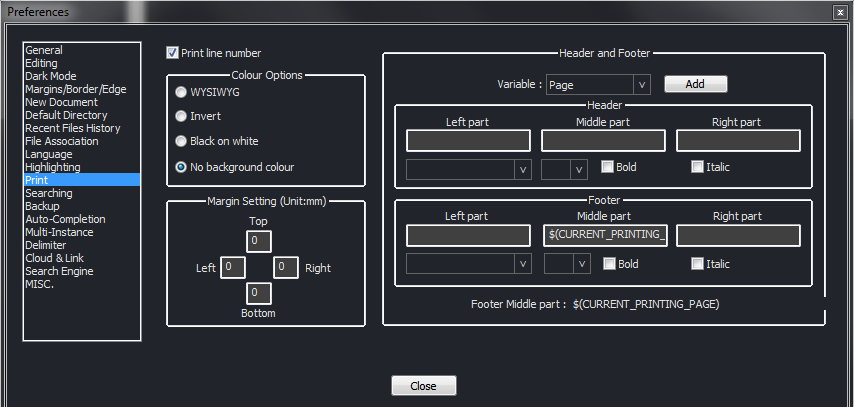
        bf205fa5-b912-48d3-b13b-ab5f3a90bcba-image.png

        Yes, select Page from the variable box, put your cursor into one of the footer fields and press Add.

        See here for more information about that topic.

        1 Reply Last reply Reply Quote 4
        • Alan KilbornA Offline
          Alan Kilborn @Jiri Cvrk
          last edited by

          @jiri-cvrk

          Just an FYI: If you are looking to obtain “Page 3 of 7” I don’t think that is currently possible … the of 7 part.

          1 Reply Last reply Reply Quote 2

          Hello! It looks like you're interested in this conversation, but you don't have an account yet.

          Getting fed up of having to scroll through the same posts each visit? When you register for an account, you'll always come back to exactly where you were before, and choose to be notified of new replies (either via email, or push notification). You'll also be able to save bookmarks and upvote posts to show your appreciation to other community members.

          With your input, this post could be even better 💗

          Register Login
          • First post
            Last post
          The Community of users of the Notepad++ text editor.
          Powered by NodeBB | Contributors