Practical to remove "white" areas between marked data on adjacent lines?
-
Is it practical to remove “white” areas between marked data on adjacent lines?
Example: I’d like the red coloring to “flow together” without a white gap, line-to-line in the following:
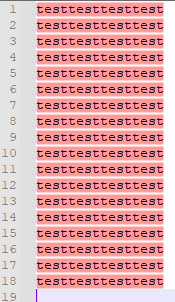
I’ve experimented with Scintilla’s SCI_SETEXTRAASCENT and SCI_SETEXTRADESCENT, but they don’t seem to be the right things for this desire…
-
Are you using markers or indicators?
-
Sorry must be indicators, I just looked again.
-
I’d recommend setting the indicator type to
INDIC_FULLBOXand also adjusting the outline alpha to match the current alpha for the foreground. -
@nick-brown said in Practical to remove "white" areas between marked data on adjacent lines?:
Sorry must be indicators, I just looked again
Yes, I’m not doing anything special to achieve it, just Mark of
testas provided by N++'s Find dialog Mark operation. -
Have you seen SCI_INDICSETSTYLE, and use INDIC_FULLBOX
https://www.scintilla.org/ScintillaDoc.html#SCI_INDICSETSTYLE
-
@dail nailed it, and @Nick-Brown was very close (but slightly incomplete). Thanks, both of you.
If I do this in PythonScript:
editor.indicSetStyle(31, 16)
editor.indicSetOutlineAlpha(31, editor.indicGetAlpha(31))
Then I get the effect I’m after:
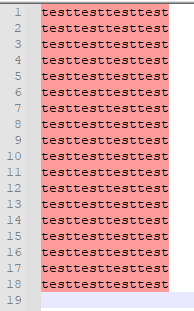
Note that 31 is the indicator number for red-marking, and 16 is the value for INDIC_FULLBOX.



Hello! It looks like you're interested in this conversation, but you don't have an account yet.
Getting fed up of having to scroll through the same posts each visit? When you register for an account, you'll always come back to exactly where you were before, and choose to be notified of new replies (either via email, or push notification). You'll also be able to save bookmarks and upvote posts to show your appreciation to other community members.
With your input, this post could be even better 💗
Register Login