Community
    • Login

    Practical to remove "white" areas between marked data on adjacent lines?

    Scheduled Pinned Locked Moved Help wanted · · · – – – · · ·
    7 Posts 3 Posters 907 Views 2 Watching
    Loading More Posts
    • Oldest to Newest
    • Newest to Oldest
    • Most Votes
    Reply
    • Reply as topic
    Log in to reply
    This topic has been deleted. Only users with topic management privileges can see it.
    • Alan KilbornA Offline
      Alan Kilborn
      last edited by

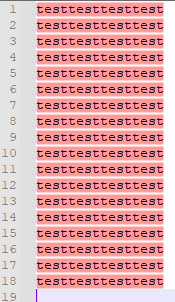
      Is it practical to remove “white” areas between marked data on adjacent lines?

      Example: I’d like the red coloring to “flow together” without a white gap, line-to-line in the following:
      866be070-7954-4261-ae14-5bf81e86da97-image.png

      I’ve experimented with Scintilla’s SCI_SETEXTRAASCENT and SCI_SETEXTRADESCENT, but they don’t seem to be the right things for this desire…

      Nick BrownN dailD 3 Replies Last reply Reply Quote 0
      • Nick BrownN Offline
        Nick Brown @Alan Kilborn
        last edited by

        @alan-kilborn

        Are you using markers or indicators?

        Nick BrownN 1 Reply Last reply Reply Quote 0
        • Nick BrownN Offline
          Nick Brown @Nick Brown
          last edited by

          @nick-brown

          Sorry must be indicators, I just looked again.

          Alan KilbornA 1 Reply Last reply Reply Quote 0
          • dailD Offline
            dail @Alan Kilborn
            last edited by

            @alan-kilborn

            I’d recommend setting the indicator type to INDIC_FULLBOX and also adjusting the outline alpha to match the current alpha for the foreground.

            Alan KilbornA 1 Reply Last reply Reply Quote 0
            • Alan KilbornA Offline
              Alan Kilborn @Nick Brown
              last edited by

              @nick-brown said in Practical to remove "white" areas between marked data on adjacent lines?:

              Sorry must be indicators, I just looked again

              Yes, I’m not doing anything special to achieve it, just Mark of test as provided by N++'s Find dialog Mark operation.

              1 Reply Last reply Reply Quote 0
              • Nick BrownN Offline
                Nick Brown @Alan Kilborn
                last edited by Nick Brown

                @alan-kilborn

                Have you seen SCI_INDICSETSTYLE, and use INDIC_FULLBOX

                https://www.scintilla.org/ScintillaDoc.html#SCI_INDICSETSTYLE

                1 Reply Last reply Reply Quote 1
                • Alan KilbornA Offline
                  Alan Kilborn @dail
                  last edited by

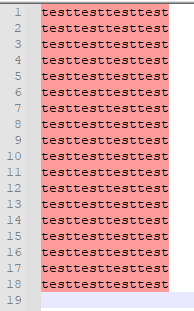
                  @dail nailed it, and @Nick-Brown was very close (but slightly incomplete). Thanks, both of you.

                  If I do this in PythonScript:

                  editor.indicSetStyle(31, 16)
                  editor.indicSetOutlineAlpha(31, editor.indicGetAlpha(31))
                  

                  Then I get the effect I’m after:
                  0504a455-746f-48eb-9a80-00d66b6661ae-image.png

                  Note that 31 is the indicator number for red-marking, and 16 is the value for INDIC_FULLBOX.

                  1 Reply Last reply Reply Quote 3

                  Hello! It looks like you're interested in this conversation, but you don't have an account yet.

                  Getting fed up of having to scroll through the same posts each visit? When you register for an account, you'll always come back to exactly where you were before, and choose to be notified of new replies (either via email, or push notification). You'll also be able to save bookmarks and upvote posts to show your appreciation to other community members.

                  With your input, this post could be even better 💗

                  Register Login
                  • First post
                    Last post
                  The Community of users of the Notepad++ text editor.
                  Powered by NodeBB | Contributors