How to open Notepad++ with a new empty file?
-
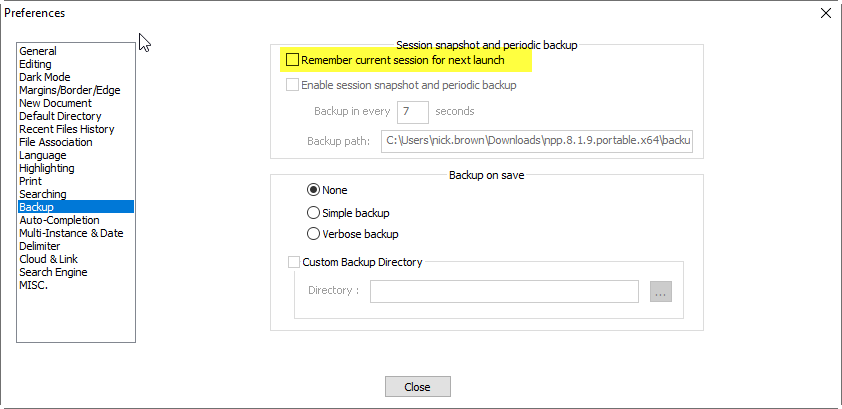
When I double-click on the Notepad++ icon, I would like that it opens a new empty file. I don’t want to see the last file or the what’s new file from the last upgrade. With other words: I want the same behaviour as the classical notepad. Is this possible?
-
-
@nick-brown Thank you, now it works. I would never have expected this function under “backup”.
-
Referring to https://npp-user-manual.org/docs/command-prompt/
another approach is to start Notepad++ with the “command line” parameter of: -nosession
For instance, a Windows 10 desktop icon (shortcut) for Notepad++ can be copied and/or can have its “target of shortcut” changed to:
“C:\Program Files\Notepad++\notepad++.exe” -nosession
This is for the 64-bit version.
This customized icon starts Notepad++ without opening the auto saved session. Only an empty “new 1” tab appears.
It appears also that this Notepad++ instance does not create a saved session for the default Notepad++ configuration to reload later, and does not remove the saved session that the default configuration remembers. (I am only trying it with one file to be remembered open when I close Notepad++.)
Another “command line” or shortcut option to consider is “-multiInst”. This opens a window for Notepad++ even when Notepad++ is running already. Trying it now, the second window will contain the saved session tabs evidently, unless -nosession -multiInst are used together.
Up to now, I’ve just been closing my tabs (Ctrl+w) before closing Notepad++ and especially if I’ve had a very large text data file open: these are other good options.
-
 R Robert Carnegie referenced this topic on


Hello! It looks like you're interested in this conversation, but you don't have an account yet.
Getting fed up of having to scroll through the same posts each visit? When you register for an account, you'll always come back to exactly where you were before, and choose to be notified of new replies (either via email, or push notification). You'll also be able to save bookmarks and upvote posts to show your appreciation to other community members.
With your input, this post could be even better 💗
Register Login