User Dictionary location with DSpellCheck Windows Native Lib
-
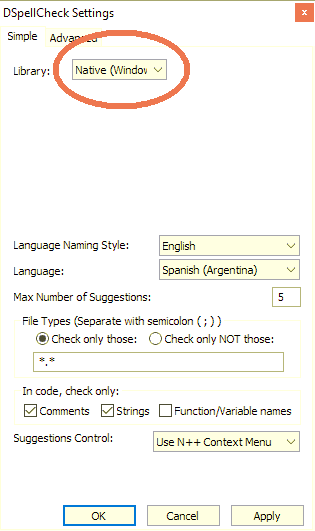
Hi, I would like to know the location of the my personal user dictionary when using DSpellCheck with Windows Native Library. Thank!!!
-
@chelois
C:\Users\...\AppData\Roaming\Notepad++\plugins\ -
C:\Users\...\AppData\Roaming\Notepad++\plugins\Are you sure? Please don’t answer authoritatively if you are just guessing.
I just spun up a fresh Notepad++ with DSpellCheck, set it to use the “Windows Native” library, and added a custom word to the dictionary. DSpellCheck did not create or update any files in the
...\plugins\Configor...\plugins\Config\DSpellCheckfolders.I just did an internet search for “where does the windows native spell checker put custom dictionary”, and the first hit tells me it goes in
%appdata%\Microsoft\Spelling. When I paste that windows path into my Windows Explorer, I see a folder with subfolders named likeen-USand similar. I looked in theen-USand founddefault.dicand other files; looking indefault.dic, I found the word that I added to the custom dictionary.So the correct answer to @ChelOis’s question is: when you are using the DSpellCheck with Windows Native library selected, the words added to the user dictionary go in
%appdata%\Microsoft\Spelling\<language-id>\default.dic -
@wintersilence said in User Dictionary location with DSpellCheck Windows Native Lib:
@chelois
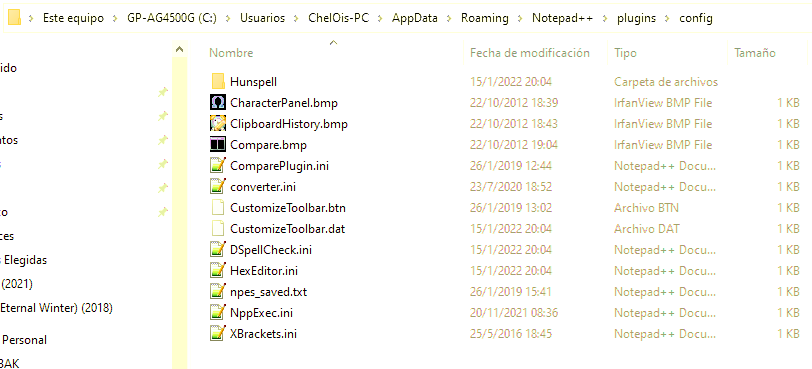
C:\Users\...\AppData\Roaming\Notepad++\plugins\Hi, thanks a lot for your time, but I’m afraid that folder contains no archive, and the only subfolder, named “config”, only contains configuration files but not my dictionary.

-
@peterjones Thanks a lot for your answer!!! I also searched Internet before posting my question here but with no luck, possibly because I searched using Spanish words, my native language. Thanks again!!!
-
@ChelOis I found it in
%appdata%\Notepad++\plugins\config\Hunspell\en_US.usrThe first line of the file appears to be the number of words. But I didn’t edit that, so it may have fixed itself.


Hello! It looks like you're interested in this conversation, but you don't have an account yet.
Getting fed up of having to scroll through the same posts each visit? When you register for an account, you'll always come back to exactly where you were before, and choose to be notified of new replies (either via email, or push notification). You'll also be able to save bookmarks and upvote posts to show your appreciation to other community members.
With your input, this post could be even better 💗
Register Login