Wrong syntax highlightning
-
Notepad++ 8.1.9.3
In lisp file, “;|” and “|;” mark a comment block and should be displayed in comment color.
But only the first line beginning with “;|” is displayed correctly and the color of the other lines looks incorrectly. Is this sa bug?
It seams, that n++ interpreting “;” before “|” as a commentLine, but in union with “|” it should be interpreted as commentStart.
The codeline in the lang.xml is …<Language name="lisp" ext="lsp lisp" commentLine=";" commentStart=";|" commentEnd="|;">All other highlightnings in Lisp,lsp are right.
What I’m doing wrong?
Please help.
Thanks -
-
This setting is only for toggle line/block comments (not highlightning, the lexer is responsible for it). I don’t know how Lisp block comments look like, but the current lexer recognizes
#|comment|#. -
@ekopalypse … thank you for response!
But: negativ
Just the first line after commentStart is right, but all others not.@ ArkadiuszMichalski
I know that the color are made by lexer … strange is, that only “COMMENTLINE” and “COMMENT” is available in lexer. Here “COMMENT” can only mean the commentblock. Or?But I don’t understand why in C the commentblock with …
commentStart= “/" commentEnd="/”
works after all?
And in Lisp …
commentStart= “;|” commentEnd=“|;”
works not.
Strangely laborious. -
Ok, now I understand @Arkadiusz-Michalski’s answer.
For whatever reason, LISP and three other lexers were in the disabled languages box for me and so I didn’t see them when I checked the lexers via the languages menu, which led me to believe it was a UDL issue, which it clearly is not.
Sorry for the confusion.
The LISP lexer only considers |# for comment blocks. -
My current understanding of the lexer is that when it detects a
#, it switches to theSCE_LISP_MACRO_DISPATCHstate, and when the next character is a|, it switches toSCE_LISP_MULTI_COMMENT, which then resolves toSCE_LISP_DEFAULTwhen|#appears.
Does this make sense? -
@peter-szammer said in Wrong syntax highlightning:
But I don’t understand why in C the commentblock with …
works after all?
And in Lisp …
works not.Because, as @ArkadiuszMichalski already said, the
commentLine,commentStart, andcommentEndattributes in thelangs.xmlare only used by the “toggle line/block comments” – which means for the Edit > Comment/Uncomment menu actions:
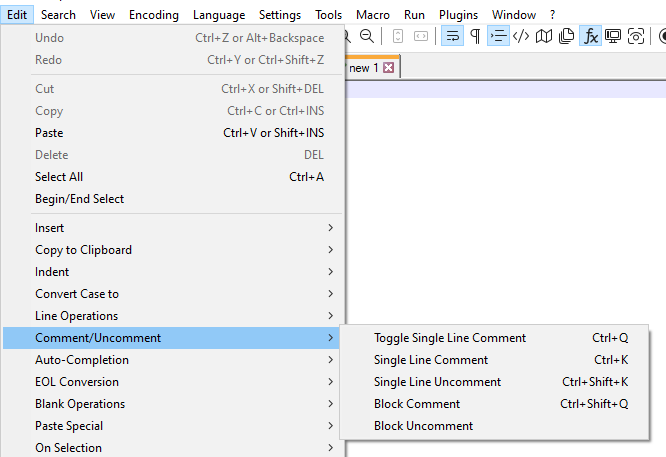
The syntax highlighting is handled by a library of compiled C++ “lexer” code inside Notepad++; the lexer for C/C++ knows that
/* ... */is a block comment and//is a line comment; the lexer for LISP believes that#|comment|#is the block-comment syntax for LISP. The LISP lexer does not look at the XML attributes mentioned above when deciding what is and is not a comment, and you cannot change what the lexer considers a comment by changing those attributes in thelangs.xmlconfig file.If the LISP lexer implementation is wrong, then it would have to be proven wrong in the original Scintilla library implementation, then a bug reported to Scintilla (which is a completely separate project, which the Notepad++ developers have no influence over), then they would have to decide to fix it, and release a new version of the Scintilla library, and then Notepad++ developers would have to incorporate that newer version into the Notepad++ codebase. If it happened at all, it would be a long process. (And you would have to check; Scintilla has gone through quite a few versions since the last time Notepad++ updated, so maybe the Scintilla LISP lexer already has the updates you desire.)
However, if you wanted a workaround until such time as Notepad++ officially considers those extra LISP notations to be comments, you can add extra highlighting to a builtin lexer (like the LISP lexer) using regexes via the PythonScript plugin in conjunction with the script
EnhanceAnyLexer.pythat @Ekopalypse shares in his github repo: install PythonScript plugin using the Plugins Admin, install the script per the instructions embedded in the downloadedEnhanceAnyLexer.pyfile; follow the instructions in that script for customizing it with a regex to match your desired line comments – something liker';\|.*?\|;'as the regex to match (where the backslashes are necessary because regex engine thinks|meansLOGICAL-OR, not the literal|character). -
User manual PR#306 should clarify this in the user manual.
Assuming it is accepted and merged, the new verbiage will be in the next release of the npp-user-manual.org website, which will likely happen soon after the next version of Notepad++ is released.
Until it is merged, there is still time for further clarification if people wanted to comment on the chosen wording/explanation.




Hello! It looks like you're interested in this conversation, but you don't have an account yet.
Getting fed up of having to scroll through the same posts each visit? When you register for an account, you'll always come back to exactly where you were before, and choose to be notified of new replies (either via email, or push notification). You'll also be able to save bookmarks and upvote posts to show your appreciation to other community members.
With your input, this post could be even better 💗
Register Login