Community
    • Login

    After TAB scriptblock error

    Scheduled Pinned Locked Moved Help wanted · · · – – – · · ·
    9 Posts 3 Posters 1.0k Views 1 Watching
    Loading More Posts
    • Oldest to Newest
    • Newest to Oldest
    • Most Votes
    Reply
    • Reply as topic
    Log in to reply
    This topic has been deleted. Only users with topic management privileges can see it.
    • Venus642V Offline
      Venus642
      last edited by

      Hi all.
      I have a simple question:

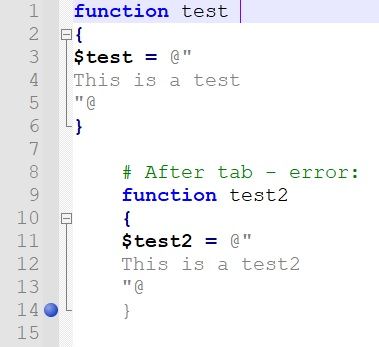
      Example:
      error.jpg

      What can you do if you want to use the TAB to indent the code?
      Thanks for yur help.

      mpheathM 1 Reply Last reply Reply Quote 0
      • Alan KilbornA Offline
        Alan Kilborn
        last edited by

        Well you would go to the Settings menu and choose Preferences… and then see:
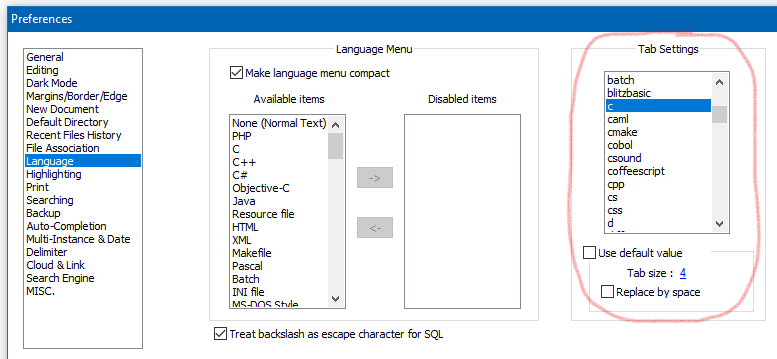
        1b6845c3-186b-47c2-9938-cbc062ee0b81-image.png

        And you would change the setting for the language of interest (maybe what you show is Perl?).

        1 Reply Last reply Reply Quote 0
        • mpheathM Offline
          mpheath @Venus642
          last edited by

          @venus642

          Looks to be the Powershell language.

          Quote from Microsofts Powershell about_Quoting_Rules documentation on Here-strings.

          In either format, the closing quotation mark must be the first character in the line.

          So it appears that "@ needs to be at the start of the line to be valid syntax.

          Powershell Here-strings are not designed for indenting. So you may need to break the implied rule of indenting by:
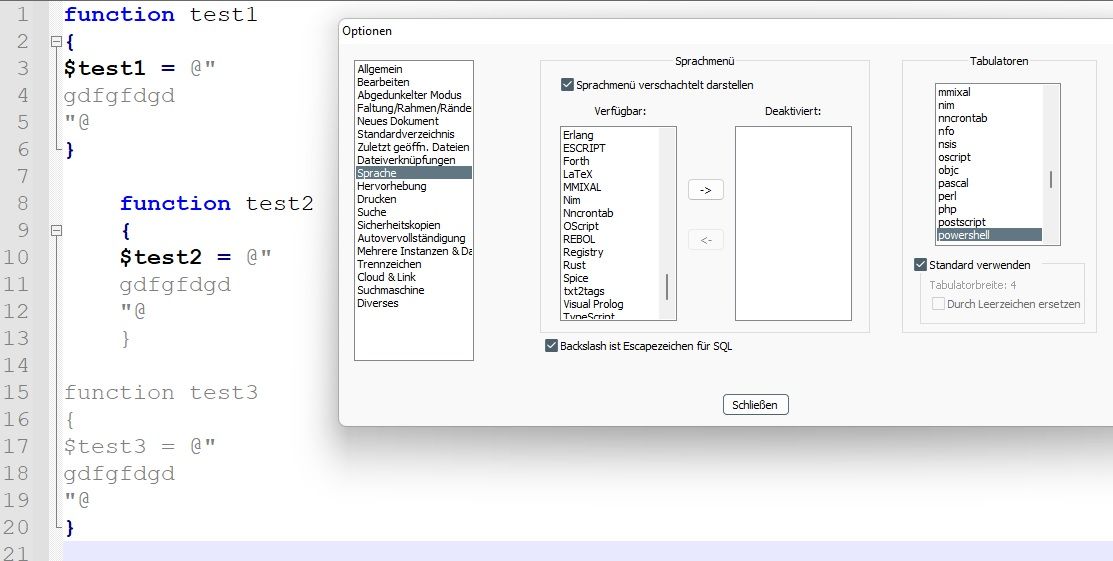
          function test1
          {
          $test = @"
          This is a test
          "@
          }
          
          	function test2
          	{
          	$test = @"
          This is a test
          "@
          	}
          

          Looks ugly though it is valid syntax.

          Venus642V 1 Reply Last reply Reply Quote 2
          • Venus642V Offline
            Venus642 @mpheath
            last edited by

            @mpheath said in After TAB scriptblock error:

            Looks to be the Powershell language.
            Quote from Microsofts Powershell about_Quoting_Rules documentation on Here-strings.

            In either format, the closing quotation mark must be the first character in the line.

            So it appears that "@ needs to be at the start of the line to be valid syntax.
            Powershell Here-strings are not designed for indenting. So you may need to break the implied rule of indenting by:

            error.jpg

            Yes, powershell problem…
            Yes ugly, I would like it to be fully indented…

            Venus642V 1 Reply Last reply Reply Quote 0
            • Venus642V Offline
              Venus642 @Venus642
              last edited by Venus642

              @venus642
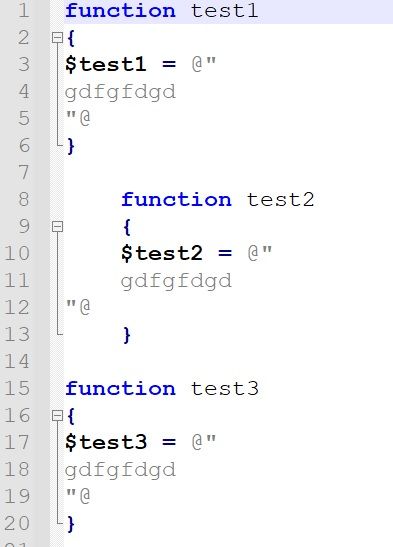
              error1.jpg
              Not so nice …

              Venus642V 2 Replies Last reply Reply Quote 0
              • Venus642V Offline
                Venus642 @Venus642
                last edited by

                @venus642

                It would be nice if Notepad++ could handle that.

                mpheathM 1 Reply Last reply Reply Quote 0
                • mpheathM Offline
                  mpheath @Venus642
                  last edited by

                  @venus642 said in After TAB scriptblock error:

                  @venus642

                  It would be nice if Notepad++ could handle that.

                  It is Powershell syntax. Notepad++ cannot do anything about how Powershell works.

                  The Lexilla component code is:

                  		} else if (sc.state == SCE_POWERSHELL_HERE_STRING) {
                  			// This is a doubles quotes here-string
                  			if (sc.atLineStart && sc.ch == '\"' && sc.chNext == '@') {
                  				sc.Forward(2);
                  				sc.SetState(SCE_POWERSHELL_DEFAULT);
                  			}
                  

                  sc.atLineStart is a condition to close the Here-string, it must be at the start of the line. It complies with the current syntax of Powershell.

                  If you want change to support indentation of Here-strings, then Powershell core development is where the change needs to done.

                  Venus642V 1 Reply Last reply Reply Quote 3
                  • Venus642V Offline
                    Venus642 @mpheath
                    last edited by

                    @mpheath
                    Thanks mpheath for your help and info.

                    1 Reply Last reply Reply Quote 0
                    • Venus642V Offline
                      Venus642 @Venus642
                      last edited by

                      @venus642

                      WARNING !
                      Had to realize that errors can occur when indenting. So it’s best to avoid it.

                      1 Reply Last reply Reply Quote 0

                      Hello! It looks like you're interested in this conversation, but you don't have an account yet.

                      Getting fed up of having to scroll through the same posts each visit? When you register for an account, you'll always come back to exactly where you were before, and choose to be notified of new replies (either via email, or push notification). You'll also be able to save bookmarks and upvote posts to show your appreciation to other community members.

                      With your input, this post could be even better 💗

                      Register Login
                      • First post
                        Last post
                      The Community of users of the Notepad++ text editor.
                      Powered by NodeBB | Contributors