Notepad++ v8.3.1 release
-
Notepad++ v8.3.1 Release is available here:
https://notepad-plus-plus.org/news/v831-boycott-beijing-2022/Note that due to v8.3 big revamp for the large files, there are a lot of plugins found to have stability issue with v8.3.1 release. Here is the info to the plugin authors for fixing the incompatibility and instability problems.
Notepad++ v8.3.1 regression-fixes, bug-fixes and enhancement:
(The critical bug-fixes are inhighlight)Fix XML tag adding or mark deletion crash issue.(Fix #11128)Fix wrong cursor position on opened file & cmdline '-n' param not working regression.(Fix #11131)- Revert “Enable backup on save (simple) feature by default”.
- Restore auto-completion insert selection default behaviour (now with both ENTER & TAB as expected). (Fix #11178)
- Fix Path Completion not working regression. (Fix #11147)
- Fix target directory parameter (/D=) ignored by x64 installer regression. (Fix #11072)
- Add icons on function items of auto-completion to distinguish from word items. (Implement #11087)
- Fix file dialog “Append extension” checkbox not working on empty folder. (Fix #10436)
- Fix link part of Dark Mode Customized tone not persistent issue. (Fix #11095)
- Fix NPPM_RELOADFILE not working with converted 8.3 DOS file name (from long file name) bug. (Fix #11106)
Notepad++ v8.3 new features and bug-fixes:
- Remove 2GB file open restriction for x64 binary.
- Improve large files (200MB) loading speed and editing/browsing performance.
- Fix Find in Files crash issue.
-
D donho locked this topic on
-
-
-
@donho
Thank you for your work!
- Improve large files (200MB) loading speed and editing/browsing performance.
Maybe it’s time to add support exclude by extension? )))
I think it’s relevant! -
Please limit this “Notepad++ v8.3.1 release” topic to kudos and reports critical regressions / bug reports specific to this version. Your feature request is already in the correct place for developers to consider.
-
P PeterJones referenced this topic on
-
-
-
@yaron This happens in the 32-bit version too
-
This post is deleted! -
Thank you for your help!
-
Starting with 8.3 and 8.3.1 when I try to create a new file with different character set the software does not allow me to save directly. I need to click Save As in order save file.
To replicate:
- Open new tab on Notpad++
- Without writing anything click Encoding menu and Character Sets
- Choose any chracter set
- Write or copy paste some text
- You will see that Save button is grey and Save option under File menu is greyed out
- I have to click Save as or Save Copy As option in order to create a new file.
- After creating a new file with these options tab name does not change to the saved file name. For example it stays new 2 where as I saved my file as test.txt
This was working fine on 8.2.1
I am using 32 bit version. Did not test this on 64 bit.
-
@john56099089 said in Notepad++ v8.3.1 release:
Starting with 8.3 and 8.3.1…
Introduced in https://github.com/notepad-plus-plus/notepad-plus-plus/commit/961a133a6008bf2a664360691942ef95bc2710f2.
Switching to another tab and back, “Save” is enabled.
-
@yaron
In that case as you have said save button becomes active however when I save the file, the tab name stays new 1. Whereas it should be the name of the file.
Still I don’t think changing tabs should be a solution. -
Changing tabs is certainly not a solution.
I just wanted to add another point to your detailed report.Thank you for finding it and sharing.
-
@john56099089
It’s fixed in https://github.com/notepad-plus-plus/notepad-plus-plus/commit/2321e648ae467cbecf8388f143ad71a86a05a472 .The new release with the fix will come in a couple of days.
Sorry for the inconvenience. -
Not sure if this is a regression or a modification in how the feature is implemented (if it’s the latter, I’d be interested in the documentation for this feature):
when adding syntax for a user-defined language, the comments are not highlighted.Additionally, although it’s not a new problem: Notepad++ handles Fortran both in free-form and fixed-form. However the “f” file extension is associated to free-form: I believe it should be fixed-form, as explained here: https://fortranwiki.org/fortran/show/File+extensions
-
A question: I’m using Notepad++ 32 bits, and I use heavily the TextFX plugin that is on SourceForge: https://sourceforge.net/projects/npp-plugins/files/TextFX/.
Has this plugin been updated for 64 bits and/or for the 8.3.1 version? Is the old version on SourceForge still working in 8.3.1? (apparently yes, but there might be known bugs) -
@jean-claude-arbaut said in Notepad++ v8.3.1 release:
TextFX
Is ancient. There is no very good 64-bit version and most of the functionality has been incorporated into N++ or other plugins. I gave up using it years ago with no ill effects.
Cheers.
-
I know it’s old, but I really need the ability to sort lines, with all TextFX options: sort unique or not, case sensitive or not, sort at given column using a vertical selection. Is this built in Notepad++ or available in a maintained addin?
-
@jean-claude-arbaut said in Notepad++ v8.3.1 release:
Is this built in Notepad++ or available in a maintained addin?
Many:
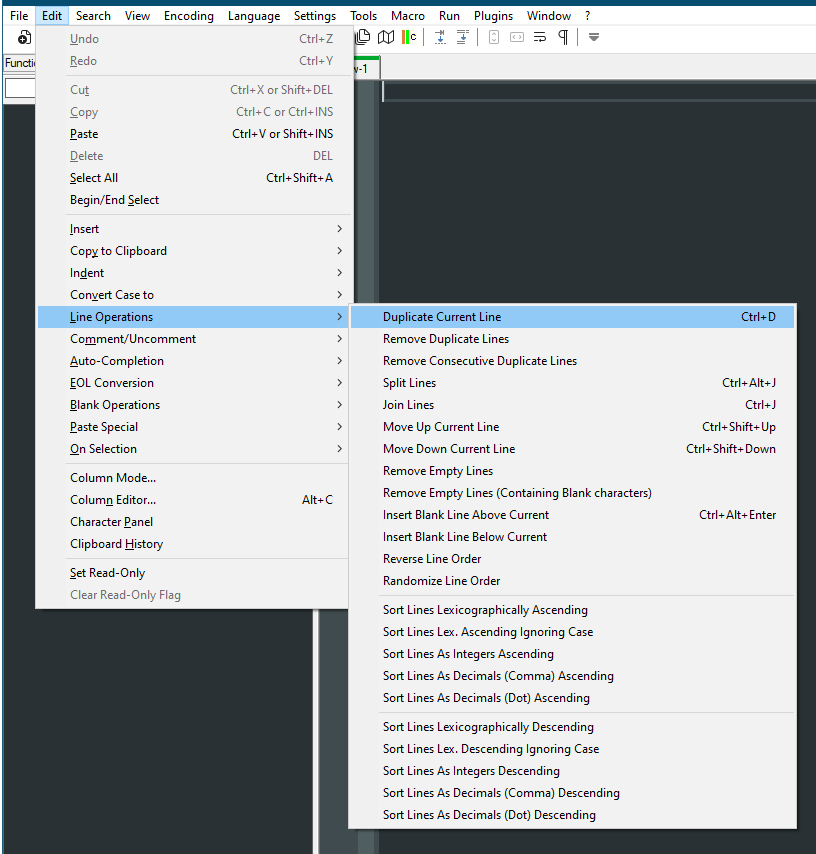
Cheers.
-
I get a .NET Runtime Error 0xc0000005 on clicking in edit area:
<System> <Provider Name="Application Error" /> <EventID Qualifiers="0">1000</EventID> <Version>0</Version> <Level>2</Level> <Task>100</Task> <Opcode>0</Opcode> <Keywords>0x80000000000000</Keywords> <TimeCreated SystemTime="2022-02-20T10:17:44.4538563Z" /> <EventRecordID>536128</EventRecordID> <Correlation /> <Execution ProcessID="0" ThreadID="0" /> <Channel>Application</Channel> <Computer>xxxxxxxx</Computer> <Security /> </System> - <EventData> <Data>notepad++.exe</Data> <Data>8.3.1.0</Data> <Data>6209198e</Data> <Data>notepad++.exe</Data> <Data>8.3.1.0</Data> <Data>6209198e</Data> <Data>c0000005</Data> <Data>000000000003f08f</Data> </EventData> </Event> -
means that one of your .net-based plugins is facing the problem of the recent API changes.
-
Thanks, updating XML Tools did fix it.




Hello! It looks like you're interested in this conversation, but you don't have an account yet.
Getting fed up of having to scroll through the same posts each visit? When you register for an account, you'll always come back to exactly where you were before, and choose to be notified of new replies (either via email, or push notification). You'll also be able to save bookmarks and upvote posts to show your appreciation to other community members.
With your input, this post could be even better 💗
Register Login