turkish characters problem
-
i can only see turkish characters with encoding>character set>turkish>iso 8859-9 or windows-1254. but notepad doesnt save my decision and it gets reset every time i close it. i want one of those default not utf-8.
i have never had this before. what is the problem?
-
In Settings > Preferences > New Document, you might try picking the pulldown with
ISO 8859-9selected: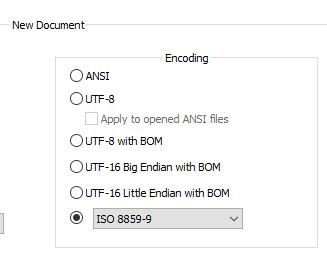
But that’s technically for new files; I don’t know if Notepad++ will also use that for ANSI files.
You might also try toggling Settings > Preferences > MISC > Autodetect character encoding.
-
@peterjones yeah it is for new document not existing ones. i tried to disable and enable that option (autodetect character encoding) but didnt change anything. i dont get it :S
maybe it has smth to do with windows LTSC 2021?
-
@ogün-kovan said in turkish characters problem:
maybe it has smth to do with windows LTSC 2021?
There’s a good chance of that.
If you look at the ? menu, Debug Info, what does it say for your
Current ANSI codepage: xxxx?(There were some recent discussions that you can search for in the forum which show where in windows to change the default codepage)
-
@peterjones 1252 .
can you give me link please :)
-
Those links are focused on changing the codepage to UTF8 (65001)… but should be able to work for changing to 1254 as well.


Hello! It looks like you're interested in this conversation, but you don't have an account yet.
Getting fed up of having to scroll through the same posts each visit? When you register for an account, you'll always come back to exactly where you were before, and choose to be notified of new replies (either via email, or push notification). You'll also be able to save bookmarks and upvote posts to show your appreciation to other community members.
With your input, this post could be even better 💗
Register Login