About XML file
-
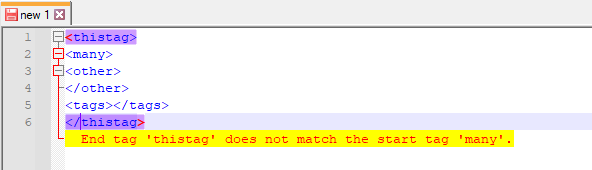
A very large XML file is missing a closing tag somewhere. Can the Notepad++ editor help find this error?
-
Install the plugin XML Tools by going to Plugins menu, select Plugins Admin, click the checkbox for XML Tools, and click Install. Once Notepad++ restarts, you will have a Plugins > XML Tools sub-menu. If you run Plugins > XML Tools > Check XML Syntax Now , it will perform an XML syntax check, which can check missing/unbalanced closing tags:


Hello! It looks like you're interested in this conversation, but you don't have an account yet.
Getting fed up of having to scroll through the same posts each visit? When you register for an account, you'll always come back to exactly where you were before, and choose to be notified of new replies (either via email, or push notification). You'll also be able to save bookmarks and upvote posts to show your appreciation to other community members.
With your input, this post could be even better 💗
Register Login