[New plugin] PlantUML Viewer
-
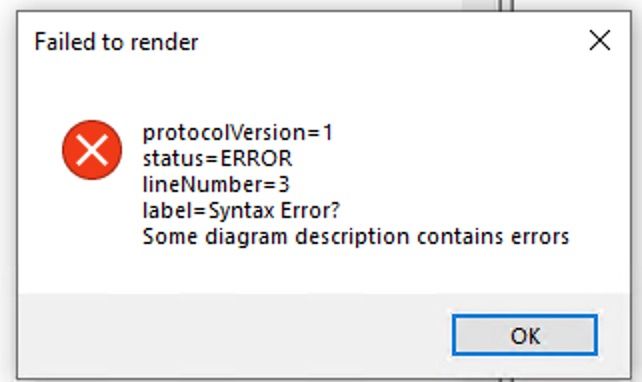
Hi - I tried this on a SysML V2 file and got this:
-
@Andy-Lapping said in [New plugin] PlantUML Viewer:
SysML V2 file
Hi Andy,
obviously the diagram can’t be rendered by PlanUML. Since you are not showing a minimal set of data you want to render, its nearly impossible to say whats the reason for the error.
But a guess from my side: Keep in mind PlantUML is not SysML. Most propably the SysML standard you are talking about is not supported by PlantUML. -
For all of you who are interested in: A new version 1.7.0.11 is released and available.
- PlantUML version updated to 1.2024.3
- Set generation working directory to current file to allow relative includes
- SVG.NET library updated to 3.4.7, dependent ExCSS library updated to 4.2.3 to fix SVG export namespace prefix not set accordingly
You can download it at the 1.7.0.11 release or just wait to the next Notepad++ update to get it with the plugin manager.
-
@Fruchtzwerg94 Great plugin --Thanks! Do you have a suggestion on the best way to set the path to java.exe in a portable copy of npp? That is, the npp-port will be regularly copied to machines that do not access the internet. It would be nice to copy npp-port over along with a jre (maintaining a relative path), and not have to set the jre path in the npp settings after copy.
-
Hi @XOR_0110 ,
happy to hear you like it.
You are lucky, a few weeks ago, I’ve commited a change where I changed the way Java is detected. Previously, the environment variable was checked only. Since a lot of devices are not set up with the corresponding environment variable (JAVA_PATH), I’ve added a registry detection as well.
It is not officially released yet, but have a look at the following build: PlantUmlViewer/9022421474
If Java is installed, it should be detected automatically by leaving the setting empty.
Let me know if this works for you.BR, Philipp
-
@Fruchtzwerg94 I can’t assume java is installed, so I have been copying portable npp with jre in the plugins folder. Then after I have to go into npp plugins settings and tell it jre is in the plugins folder. Would be helpful if there was a way to give the settings a local path starting from the npp portable folder, or from the npp plugins folder.
-
Hi @XOR_0110 ,
relative paths are possible as well. So for me, the following works: …\Java\jre1.8.0_361\bin\java.exe. The path is resolved relative to the notepad++.exe. So if your Java JRE is parallel to the Notepad++ folder, this should do the trick.
BR, Philipp
-
@Fruchtzwerg94 Thanks! That’s exactly what I needed.
-
For all of you who are interested in: A new version 1.8.0.12 is released and available.
- PlantUML version updated to 1.2024.8
- Removed dependency to PlantUml.Net library
- Removed dependency to Fizzler library
- Added generated file information to support built in %filename() and %dirpath() preprocessor functions
- Fixed diagram background not set e.g. if white
You can download it at the 1.8.0.12 release or just wait to the next Notepad++ update to get it with the plugin manager.
-
Hi,
I would like to test your plugin but, unfortunately, I run windows arm-64 and this plugin only runs on x86. Do you think it’s possible to release an ARM version ?
Thank you.



Hello! It looks like you're interested in this conversation, but you don't have an account yet.
Getting fed up of having to scroll through the same posts each visit? When you register for an account, you'll always come back to exactly where you were before, and choose to be notified of new replies (either via email, or push notification). You'll also be able to save bookmarks and upvote posts to show your appreciation to other community members.
With your input, this post could be even better 💗
Register Login