CSVLint.dll problem during setup
-
Hi
I cannot use NotePad++ any more because of this error:
“Loading CreateLexec function failed.
CSVLint.dll is not compatible with the current version of Notepadd++.
Do you wont to remove this plug in …?”no metter if I click Yes or No … Notepad++ don’t start any more.
I tried to cancel e reinstall the app, even a prior release, but … no way.
(Win 10)
-
@fabio-dalla-villa
I can confirm this. It just happened to me, doing the?->Update Notpad++menu selection. I selectedYesto have it remove it and it shutdown and never came back up. Doing it by double clicking the NPP icon on the desktop continues to bring up this same error box. Will post this here and the 8.4.2. release issues.
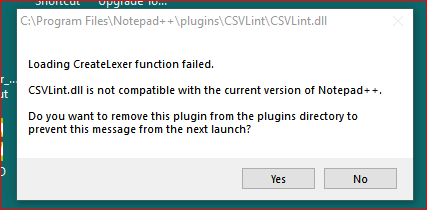
Clicking yes apparently is not removing the plugin to allow the program to continue loading.
-
@fabio-dalla-villa ,
Here’s the fix:
Okay, so I went in and manually had to remove the CSVLint folder from theC:\Program Files\Notepad++\pluginsfolder and then double clicked the desktop icon and it came up.That will fix the problem of not starting after asking it to remove it, but I’ll report it as a bug.
-
@lycan-thrope
Reported the issue here:
CSVLint no start issue -
@lycan-thrope Thank you!


Hello! It looks like you're interested in this conversation, but you don't have an account yet.
Getting fed up of having to scroll through the same posts each visit? When you register for an account, you'll always come back to exactly where you were before, and choose to be notified of new replies (either via email, or push notification). You'll also be able to save bookmarks and upvote posts to show your appreciation to other community members.
With your input, this post could be even better 💗
Register Login