Function Completion: cycle through choices

-
Hello, @peterjones, @ekopalypse and All,
Unlike Eko, I basically tried a lot of possible shortcuts, including the
AltandAltGrkeys. Unfortunately , I could not find any :-(( So, your assumption about the lack of shortcut, for that feature, seems correct !BTW, as you did not mention the language used, I immediately supposed that it could be the
Perllanguage. Bingo, I was right about it :-))Best Regards,
guy038
-
@Ekopalypse & @guy038 ,
Thanks for the confirmation. I thought as much, but wanted to make sure.
Issue #11950 created
-
@Ekopalypse said in Function Completion: cycle through choices:
SCN_CALLTIPCLICK
It’s possible I’m completely incorrect, but it seems the SCN_CALLTIPCLICK is generated by the clicking of the arrow keys in the call tip. I think we want a keyboard key or key combo to generate that notification, so a bit backwards.
Would this involve trapping keyboard input (like say the
up/downarrow keys and then checking SCI_CALLTIPACTIVE and ifTRUE, then post aSCN_CALLTIPCLICKnotification?I’m trying to think about how to proof-of-concept this in PythonScript and not grokking where to start from the Scintilla docs - again it seems backwards - the clicking generates the notification and we want a keyboard key to generate the notification - not sure Scintilla supports that?
I do think this is a smashing idea though!
Cheers.
-
No, you are right.
I put the cart before the horse in my description.It should be enough to use a Python script that sends the notification.
Give me a moment. -
from Npp import notepad, editor, editor1, SCINTILLANOTIFICATION
import ctypes
from ctypes import wintypes

# def on_calltip_click(args):
    # if args['position'] == 1:
        # print('backward')
    # elif args['position'] == 2:
        # print('forward')


# editor.callbackSync(on_calltip_click, [SCINTILLANOTIFICATION.CALLTIPCLICK])


class NMHDR(ctypes.Structure):
    _fields_ = [('hwndFrom', wintypes.HWND),
                ('idFrom',   ctypes.c_size_t),
                ('code',     wintypes.UINT)]
    def __init__(self, hwnd, id, code):
        self.hwndFrom = hwnd
        self.idFrom = id
        self.code = code


Sci_Position = ctypes.c_size_t
class SCNOTIFICATION(ctypes.Structure):
    _fields_ = [('nmhdr', NMHDR),
                ('position', Sci_Position),
                ('ch', wintypes.INT),
                ('modifiers', wintypes.INT),
                ('modificationType', wintypes.INT),
                ('text', wintypes.LPCSTR),
                ('length', Sci_Position),
                ('linesAdded', Sci_Position),
                ('message', wintypes.INT),
                ('wParam', wintypes.WPARAM),
                ('lParam', wintypes.LPARAM),
                ('line', Sci_Position),
                ('foldLevelNow', wintypes.INT),
                ('foldLevelPrev', wintypes.INT),
                ('margin', wintypes.INT),
                ('listType', wintypes.INT),
                ('x', wintypes.INT),
                ('y', wintypes.INT),
                ('token', wintypes.INT),
                ('annotationLinesAdded', Sci_Position),
                ('updated', wintypes.INT),
                ('listCompletionMethod', wintypes.INT)]

SendMessage = ctypes.windll.user32.SendMessageW
SendMessage.argtype = [wintypes.HWND, wintypes.UINT, wintypes.WPARAM, wintypes.LPARAM]
SendMessage.restype = wintypes.LPARAM


nmhdr = NMHDR(editor1.hwnd, 0, SCINTILLANOTIFICATION.CALLTIPCLICK)
notification = SCNOTIFICATION()
notification.nmhdr = nmhdr
notification.position = 2

WM_NOTIFY = 0x4e
SendMessage(notepad.hwnd, WM_NOTIFY, 0, ctypes.addressof(notification))
I have not checked if the fields in the supplied nmhdr structure are really set correctly.
-
@Ekopalypse said in Function Completion: cycle through choices:
SendMessage(notepad.hwnd, WM_NOTIFY, 0, ctypes.addressof(notification))
Trying this out, I get an error:
Traceback (most recent call last):
  File "C:\usr\bin\npp64\plugins\Config\PythonScript\scripts\callTipClick.py", line 67, in <module>
    SendMessage(notepad.hwnd, WM_NOTIFY, 0, ctypes.addressof(notification))
ctypes.ArgumentError: argument 4: <class 'OverflowError'>: int too long to convert
Cheers.
-
Fixed (probably should have noted I’m on 64-bit):
SendMessage(notepad.hwnd, WM_NOTIFY, 0, ctypes.c_longlong(ctypes.addressof(notification)))Cheers.
-
@Michael-Vincent said in Function Completion: cycle through choices:
@Michael-Vincent
@Ekopalypse
Fixed (probably should have noted I’m on 64-bit):
@PeterJonesWorks nicely now:
callTipClick.py:from Npp import notepad, editor, editor1, editor2, SCINTILLANOTIFICATION import ctypes from ctypes import wintypes class NMHDR(ctypes.Structure): _fields_ = [('hwndFrom', wintypes.HWND), ('idFrom', ctypes.c_size_t), ('code', wintypes.UINT)] def __init__(self, hwnd, id, code): self.hwndFrom = hwnd self.idFrom = id self.code = code Sci_Position = ctypes.c_size_t class SCNOTIFICATION(ctypes.Structure): _fields_ = [('nmhdr', NMHDR), ('position', Sci_Position), ('ch', wintypes.INT), ('modifiers', wintypes.INT), ('modificationType', wintypes.INT), ('text', wintypes.LPCSTR), ('length', Sci_Position), ('linesAdded', Sci_Position), ('message', wintypes.INT), ('wParam', wintypes.WPARAM), ('lParam', wintypes.LPARAM), ('line', Sci_Position), ('foldLevelNow', wintypes.INT), ('foldLevelPrev', wintypes.INT), ('margin', wintypes.INT), ('listType', wintypes.INT), ('x', wintypes.INT), ('y', wintypes.INT), ('token', wintypes.INT), ('annotationLinesAdded', Sci_Position), ('updated', wintypes.INT), ('listCompletionMethod', wintypes.INT)] if editor.callTipActive(): SendMessage = ctypes.windll.user32.SendMessageW SendMessage.argtype = [wintypes.HWND, wintypes.UINT, wintypes.WPARAM, wintypes.LPARAM] SendMessage.restype = wintypes.LPARAM hwnd = notepad.getCurrentView() if hwnd == 0: hwnd = editor1.hwnd else: hwnd = editor2.hwnd nmhdr = NMHDR(hwnd, 0, SCINTILLANOTIFICATION.CALLTIPCLICK) notification = SCNOTIFICATION() notification.nmhdr = nmhdr notification.position = 2 WM_NOTIFY = 0x4e SendMessage(notepad.hwnd, WM_NOTIFY, 0, ctypes.c_longlong(ctypes.addressof(notification)))NOTE: This relies in your PythonScript startup having some logic to get the editor1 and 2
HWNDand create those variables I use in the script.Then I just added this to my PythonScript menu and added a shortcut to it. Works like a charm:
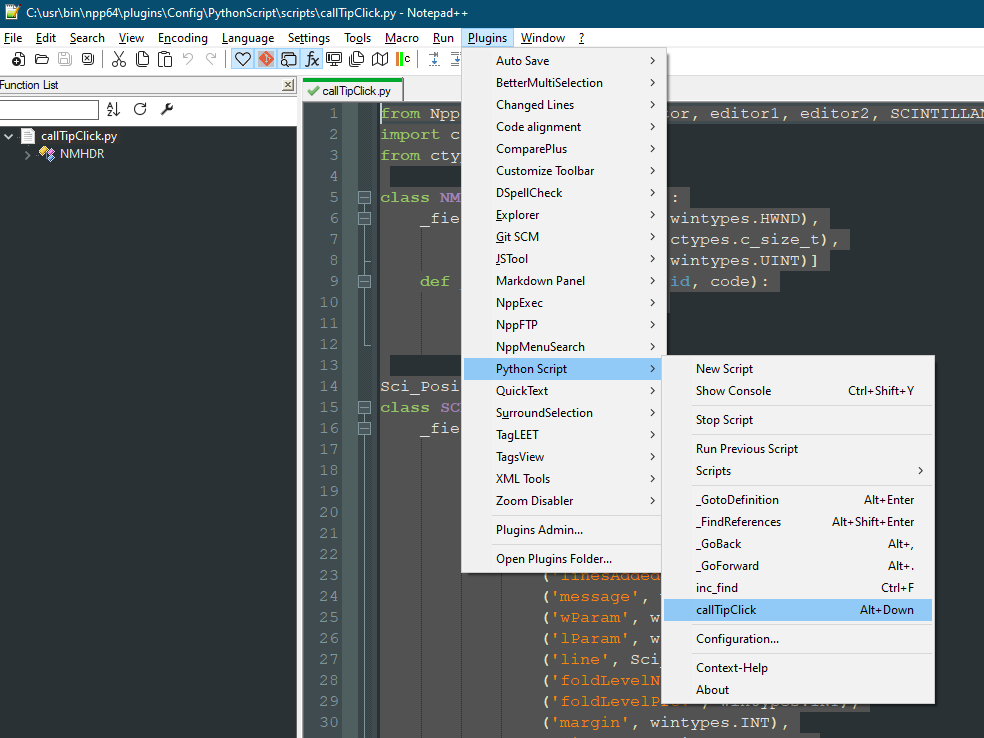
Cheers.
-
I am also working with x64 bit.
The problem could be that you already have a SendMessage function declaration somewhere in your used Python script codes, which is defined slightly different.>>> from ctypes import wintypes >>> wintypes.LPARAM <class 'ctypes.c_longlong'>wintypes.LPARAM is already a c_longlong, so this cast would not be necessary, since the whole point of
SendMessage.argtype = [wintypes.HWND, wintypes.UINT, wintypes.WPARAM, wintypes.LPARAM]
SendMessage.restype = wintypes.LPARAM
is to give Python the information how to interpret certain variables.
-
@Ekopalypse said in Function Completion: cycle through choices:
The problem could be that you already have a SendMessage function declaration somewhere in your used Python script codes, which is defined slightly different.
Indeed, you are correct, and I’ve fixed it so your original code:
SendMessage(notepad.hwnd, WM_NOTIFY, 0, ctypes.addressof(notification))WORKS!
Cheers.
-
@Michael-Vincent said in Function Completion: cycle through choices:
SendMessage.argtype = [wintypes.HWND, wintypes.UINT, wintypes.WPARAM, wintypes.LPARAM]Note this line should be:
SendMessage.argtypes = [wintypes.HWND, wintypes.UINT, wintypes.WPARAM, wintypes.LPARAM]Note: argtypes
Cheers.
-
@PeterJones said in Function Completion: cycle through choices:
@Ekopalypse & @guy038 ,
Thanks for the confirmation. I thought as much, but wanted to make sure.
Issue #11950 createdPR #12017 created.
Cheers.
-
@Michael-Vincent said in Function Completion: cycle through choices:
PR #12017 created.
Cheers.@PeterJones
@Ekopalypse
@guy038DONE! - via commit 8519003
Cheers.
-
@Michael-Vincent - cool, a nice one, thx.




Hello! It looks like you're interested in this conversation, but you don't have an account yet.
Getting fed up of having to scroll through the same posts each visit? When you register for an account, you'll always come back to exactly where you were before, and choose to be notified of new replies (either via email, or push notification). You'll also be able to save bookmarks and upvote posts to show your appreciation to other community members.
With your input, this post could be even better 💗
Register Login