Remove unicode characters within range
-
I have a large text document that includes accented characters like æøåáäĺćçčéđńőöřůýţžš. I am trying to remove all unicode characters between 0 and 96 with the intention of leaving behind these characters only so I can make sure that when I process text like these that I know what special characters I need to be able to handle.
This regular expression I would expect to work but the accented letters are still removed. I presume it’s using unicode hex code rather than number?
[\u0001-\u0096,-]I don’t see a n++ character class that would work either. Any sugestions?
-
As the manual says,
\u####notation is for Extended Search Notation, not regular expression match by character code notation. Extended search does not have range notation. Make sure you use it in the right situation.In regular expression, you use
\x{####}for four-nibble unicode characters.
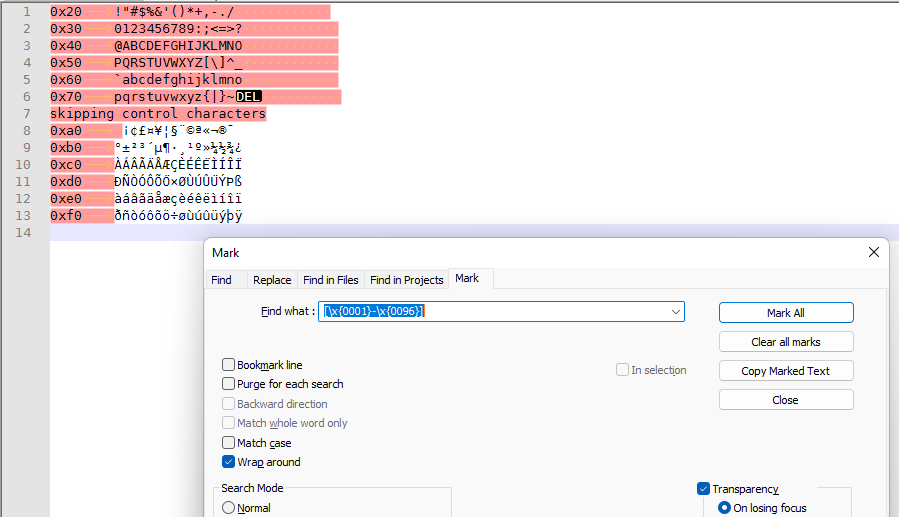
[\x{0001}-\x{0096}]will match from'START OF HEADING' (U+0001)to'START OF GUARDED AREA' (U+0096)… an odd range to pick for your stated goals, but whatever makes you happy on that.And, BTW, the
,-is useless, since comma and hyphen are already in that Unicode range.With regular expression mode and regular expression syntax, it matches the right characters.
-
@PeterJones Thank you so much for not only the answer but explaining the difference notation. I may need to adjust my range but it felt like a good place to start to see what I get back from these documents.


Hello! It looks like you're interested in this conversation, but you don't have an account yet.
Getting fed up of having to scroll through the same posts each visit? When you register for an account, you'll always come back to exactly where you were before, and choose to be notified of new replies (either via email, or push notification). You'll also be able to save bookmarks and upvote posts to show your appreciation to other community members.
With your input, this post could be even better 💗
Register Login