need a way to mark where the page breaks are
-
HERE @Paul-Harouff asked:
Sometimes I use Notepad++ to edit long plain text files (not code) and I need a way to mark where the page breaks are. How hard would it be to add the capability to highlight line numbers (e.g., put a dot next to 64, 128, 192, etc.)? Or is there a plugin that already adds this capability?
Here’s one way to do it, with a Mark All operation from the Mark tab on the Find family of windows:
Find:
(?-s)(.*\R){63}\K.*\R
Wrap around: ticked
Purge for each search: ticked
Search mode: Regular expressionThis would highlight every 64th line in red.
It isn’t dynamic, though, so you’d have to rerun it after changing data.
-
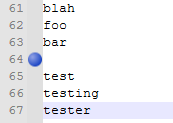
If the 64th line of a group happens to fall on a blank line with no content, the Mark operation would not show that – no text to color red.
To solve this case, perhaps using “bookmarks” will help. Add this condition to the original Mark All operation:
Bookmark line: ticked
This would show like this on an affected line:

Hello! It looks like you're interested in this conversation, but you don't have an account yet.
Getting fed up of having to scroll through the same posts each visit? When you register for an account, you'll always come back to exactly where you were before, and choose to be notified of new replies (either via email, or push notification). You'll also be able to save bookmarks and upvote posts to show your appreciation to other community members.
With your input, this post could be even better 💗
Register Login