Highlighted line endings
-
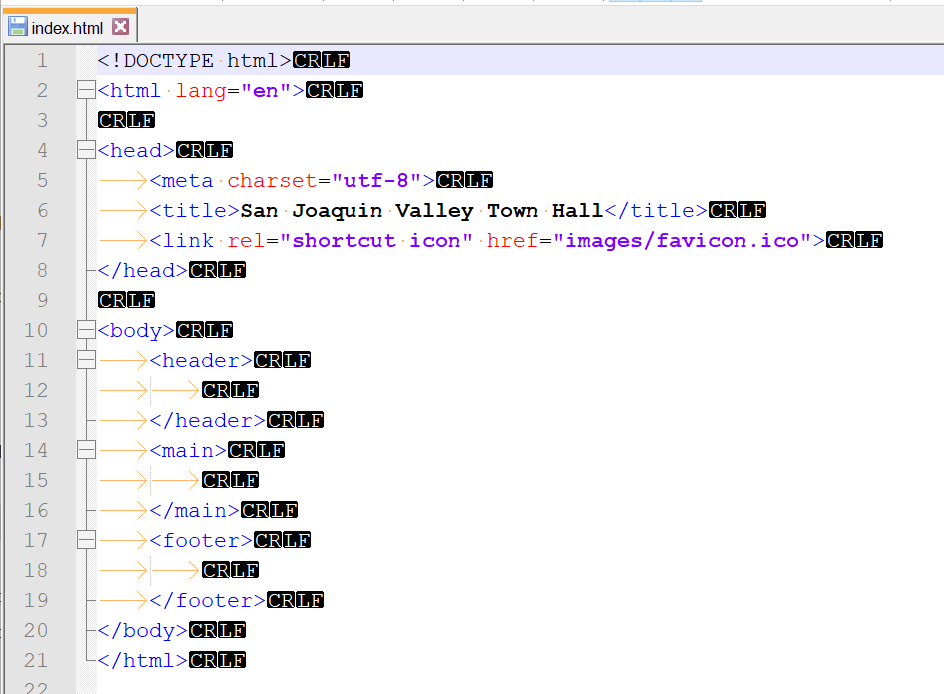
Notepad ++ has started to display highlighted line endings without any settings changes from me. I find this quite annoying and would like to turn it off. Any suggestions?
-
AFK right now, but I believe you want the View menu > Show Symbol > Show EOL Characters (or something close to that). Untick the menu item.
It is curious that it started showing without you doing anything. New N++ software (did you recently upgrade) has the ability to show CRLF in a much less in-your-face way than the default way shown in your screenshot; perhaps that change in the software triggered something on your system to start showing this.
-
@Alan-Kilborn said in Highlighted line endings:
It is curious that it started showing without you doing anything.
Probably @Rick-Udlock unknowingly toggled the ¶ button, given it’s showing whitespace as well
-
Problem solved. In the View->Show Symbol menu the Show All Characters item was checked. Clearing it fixed it. I have been using Notepad ++ for several years, and I had never changed anything in that menu choice until today. Thanks for the help.



Hello! It looks like you're interested in this conversation, but you don't have an account yet.
Getting fed up of having to scroll through the same posts each visit? When you register for an account, you'll always come back to exactly where you were before, and choose to be notified of new replies (either via email, or push notification). You'll also be able to save bookmarks and upvote posts to show your appreciation to other community members.
With your input, this post could be even better 💗
Register Login