How to delete ANSI characters such as Ââ in multiple UTF-8 files?
-
hello, I have a lots of ANSI characters such as
Â|âin multiple UTF-8 files. How to delete them?I try with regex to make a find and replace in
Find in Files, but I did not succeed, because the files are in UTF-8.In UTF-8,
Âandâlooks like this. And I cannot copy and make replacement with these simbols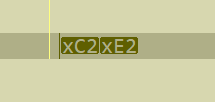
-
I find this Python code HERE, but is a little bit tricky. I must have just ANSI text pages, not UTF-8
import re text = "\t\u001b[0;35mgoogle.com\u001b[0m \u001b[0;36m216.58.218.206\u001b[0m" print("Original Text: ",text) reaesc = re.compile(r'\x1b[^m]*m') new_text = reaesc.sub('', text) print("New Text: ",new_text) -
Another solution I find on internet, it to use uni2ascii
this is the command:
uni2ascii -B input.txt >output.txtAfter convert the file into ANSI, you can make a replacement with powershell:
$a = Get-Content -Path "c:\Folder3\test.txt" $a.Replace("Â"," ").Replace("â"," ") | Out-File -FilePath "c:\Folder3\new.txt" -Encoding utf8 -
@Neculai-I-Fantanaru
Another solution I find on internet, it to use uni2ascii
Off-topic. Please refrain from posting off-topic information here.

Hello! It looks like you're interested in this conversation, but you don't have an account yet.
Getting fed up of having to scroll through the same posts each visit? When you register for an account, you'll always come back to exactly where you were before, and choose to be notified of new replies (either via email, or push notification). You'll also be able to save bookmarks and upvote posts to show your appreciation to other community members.
With your input, this post could be even better 💗
Register Login