Inserting date/time
-
Hi
I just made my user in this community. I want to ask how to insert date/time.
I have been using Notepad++ for the last 18 months and I’m not a programmer.
I use it for taking notes and do other writings.3 days ago I had to reinstall Windows 10 on my laptop here, because WinUpdate corrupted some essential files that could not be repaired.
After the Windows reinstall I had to install Notepad++ again of course.Now I have the 64-bit Notepad++ v.8.4.7. from Nov. 1’st.
It seems that the plugin TextFX is not included as an option to install, as it was in all the earlier versions I used before Windows malfunctioned.
I have always been using the date-time TextFX-functionality to insert date-time stamps in my files.How can I do this again when TextFX is not an option ??
Thanks.
/F -
Edit - Insert - Date Time (short)
or
Edit - Insert - Date Time (long)
or
Edit - Insert - Date Time (customized).The last menu item leads me to a question: Where can this be customized?
-
I should really read the whole manual sometime:
https://npp-user-manual.org/docs/editing/
“Date Time (custom) ⇒ can insert a date with a customized format, as defined in the Settings > Preferences > Multi-Instance & Date dialog” -
Thanks for pointing that out to me. Obviously I didn’t know NPP had moved the functionality inside the normal user-interface from v. 8.1.4.
Would be nice though if a keyboard shortcut could be made, as could easily be made with the TextFX plugin.
/F
-
@Finn-L said in Inserting date/time:
Would be nice though if a keyboard shortcut could be made
So make one:
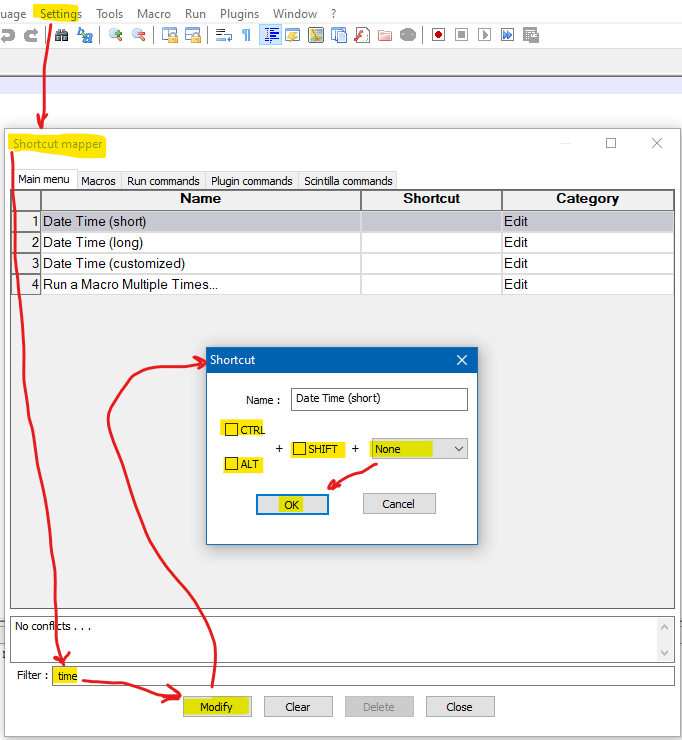
Obviously(?) you would select something other than
Nonein the box that is highlighted as saying None. -
Thanks for this one also.
/F -
@Finn-L This was Alan, not me :-)
-
@datatraveller1
Yes, I know the big diagram came from Alan… but I replied to your 2’nd reply as the “@datatraveller1” in my first line here indicates :-)I come to Alan now. I had to look where to find what Alan was referring to in my Danish version of NPP.
So I will reply to him now. Thanks again traveller!/F
-
Thanks for teaching me how to be more adept using NPP :-)
I have now found in my Danish version, what you show here.
Thanks for your help.
What you two guys (that is @datatraveller1 also) showed me today I’m very happy for./F
-
Hi guys, just wanted to thank you all for this post!
I love shortcuts and just today learned of a way to do it in NP++ thanks to @Alan-Kilborn :)




Hello! It looks like you're interested in this conversation, but you don't have an account yet.
Getting fed up of having to scroll through the same posts each visit? When you register for an account, you'll always come back to exactly where you were before, and choose to be notified of new replies (either via email, or push notification). You'll also be able to save bookmarks and upvote posts to show your appreciation to other community members.
With your input, this post could be even better 💗
Register Login