How to add new Scintilla Messages to NotepadPlusPlusPluginPack.Net
-
Hello,
I would like to add two new Scintilla Messages- SCI_REPLACETARGET
- SCI_REPLACETARGETMINIMAL
to the dotNet Plugin Infrastructure from Kasper B. Graversen which can be found at https://github.com/kbilsted/NotepadPlusPlusPluginPack.Net .
Can this topic be discussed int this forum or should it be discussed at github?
Regards
Guido -
The author of that pack hasn’t been in the forum since 2016 (at least, not under the @kbilsted username here), so discussing it here won’t change what’s available in that github download.
When one is developing a plugin for Notepad++, one should always check the scintilla and notepad++ messages from the Notepad++ repo, and make sure that any you need to use are brought into your source code, whether you are starting from a “plugins pack” or from an older plugin or writing it completely from scratch.
-
@PeterJones thanks! I am happy to add the new SCI Messages into my plugin by myself. It looks like each Scintilla message is associated to an integer
/// Add text to the document at current position.
        SCI_ADDTEXT = 2001,
        /// Add array of cells to document.
        SCI_ADDSTYLEDTEXT = 2002,
        /// Insert string at a position.
        SCI_INSERTTEXT = 2003,
        /// Change the text that is being inserted in response to SC_MOD_INSERTCHECK
        SCI_CHANGEINSERTION = 2672,
Where can I find these values for the two messages
SCI_REPLACETARGET
SCI_REPLACETARGETMINIMAL
I want to add?
-
Good place to start might be:
https://github.com/notepad-plus-plus/notepad-plus-plus/blob/master/scintilla/include/Scintilla.iface
-
Note that the Scintilla.iface file that @Alan-Kilborn linked to doesn’t include the
SCI_prefix, whereas Scintilla.h in the same directory of the repo does include the prefix. So you can either search the.ifaceforReplaceTargetor search the.hforSCI_REPLACETARGET.Since I had also recommended that you verify that the Notepad++ messages haven’t changed since that plugins-pack was last published, you will also want to look at Notepad_plus_msgs.h to make sure it’s up to date.
Please note that all these files are already linked in the Online User Manual’s “Plugin Communications” page.
-
So you can either search the .iface for ReplaceTarget or search the .h for SCI_REPLACETARGET
I guessed that OP was going to figure that out.
Side note: if one is going to search the Notepad++ project for Scintilla commands, and wants to see matches on the N++ AND the Scintilla side, one can’t simply do the intuitive search and look for SCI_REPLACETARGET, e.g., one really needs to start by doing a case-insensitive search for the part after SCI_; so in this case the search would be for
replacetarget. The tagSCI_REPLACETARGETonly appears once in the Scintilla code, in Scintilla.h.Alternatively, once one knows the numeric value of a command, one can search on that, and that will direct one on what they need to search on next:
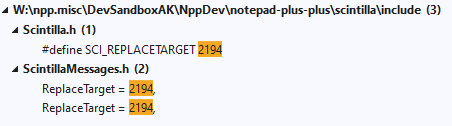
From that it also appears that if this search sequence is conducted, it also gets one where they need to go:
SCI_REPLACETARGET -> 2194 -> ReplaceTarget
-
@Alan-Kilborn @PeterJones, thanks! These were the info I needed. First tests are working fine. Need to do more tests.



Hello! It looks like you're interested in this conversation, but you don't have an account yet.
Getting fed up of having to scroll through the same posts each visit? When you register for an account, you'll always come back to exactly where you were before, and choose to be notified of new replies (either via email, or push notification). You'll also be able to save bookmarks and upvote posts to show your appreciation to other community members.
With your input, this post could be even better 💗
Register Login