notepad++ 8.5 url for install/update plugins
-
I have several VMs behind firewall that seems to be blocking ability to install or update plugins using plugin admin. The plugin admin will come up, but if I attempt to install a plugin, it looks like it works, however when notepad++ loads again, the plugin I requested is not there.
Can someone tell me the URL used to grab in the plugin files? I will see if I can get company to open firewall to that location.
Otherwise, I will have to manually install and update.
Thanks
-
@Paul-Leo said in notepad++ 8.5 url for install/update plugins:
the URL used to grab in the plugin files
If you use Plugins Admin you can see the home site for a plugin, e.g.:
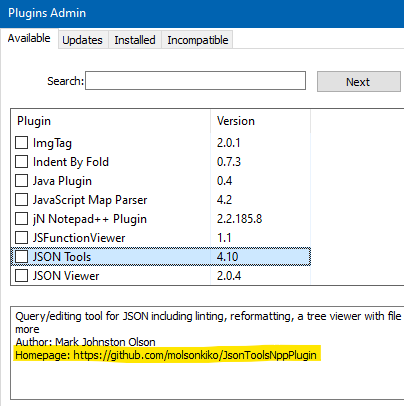
If you look at a few different plugins, I’m sure you’ll notice that there isn’t a nice and tidy single source for the plugins.
-
Actually, maybe this view illustrates the point better:
https://github.com/notepad-plus-plus/nppPluginList/blob/master/doc/plugin_list_x64.md
-
Thanks Alan, I did notice that the homepage seemed to be different for almost every plugin. I was not aware that the plugin manager would be installing from each separate url/homepage. It does make sense though. I probably will just download on a machine that can access the plugins that I want to use, and then copy to firewalled servers, and manually install, or I could just ask for access to the specific plugins that I will use/need
-
Probably some projects more tightly control their plugins.
In Notepad++ land, it is a free for all.
All Plugins Admin does is pull things together a bit.Often people start getting belligerent with Notepad++ developers about some plugin functionality or bug they don’t like. In a loosely coupled plugin arrangement, you can imagine that doesn’t get the complainer very far.
-
@Alan-Kilborn
Makes total sense, thanks again


Hello! It looks like you're interested in this conversation, but you don't have an account yet.
Getting fed up of having to scroll through the same posts each visit? When you register for an account, you'll always come back to exactly where you were before, and choose to be notified of new replies (either via email, or push notification). You'll also be able to save bookmarks and upvote posts to show your appreciation to other community members.
With your input, this post could be even better 💗
Register Login