Community
    • Login

    How could Notepad automatically make an enumeration / listing format?

    Scheduled Pinned Locked Moved General Discussion
    11 Posts 3 Posters 4.2k Views 2 Watching
    Loading More Posts
    • Oldest to Newest
    • Newest to Oldest
    • Most Votes
    Reply
    • Reply as topic
    Log in to reply
    This topic has been deleted. Only users with topic management privileges can see it.
    • Alan KilbornA Offline
      Alan Kilborn @Cletos
      last edited by

      @Cletos

      It isn’t all that practical for Notepad++ to do it. Suggest a word processor for the task.

      Notepad++ does have a numbering function, though, to easily turn:

      one
      two
      three
      four
      

      into:

      1 one
      2 two
      3 three
      4 four
      

      See the Column Editor; default keycombo to invoke is Alt+c.

      1 Reply Last reply Reply Quote 3
      • CletosC Offline
        Cletos
        last edited by

        @Alan-Kilborn said in How could Notepad automatically make an enumeration / listing format?:

        It isn’t all that practical for Notepad++ to do it. Suggest a word processor for the task.

        Yes, thank you, but actually I wanted to use such in Notepad.

        Where can I find the column editor, ALT+C does not work here.

        Alan KilbornA 1 Reply Last reply Reply Quote 0
        • CletosC Offline
          Cletos
          last edited by

          Is there a txt program or a program that can store enumerations / listings in a txt file?

          1 Reply Last reply Reply Quote 0
          • Alan KilbornA Offline
            Alan Kilborn @Cletos
            last edited by

            @Cletos said in How could Notepad automatically make an enumeration / listing format?:

            Where can I find the column editor, ALT+C does not work here.
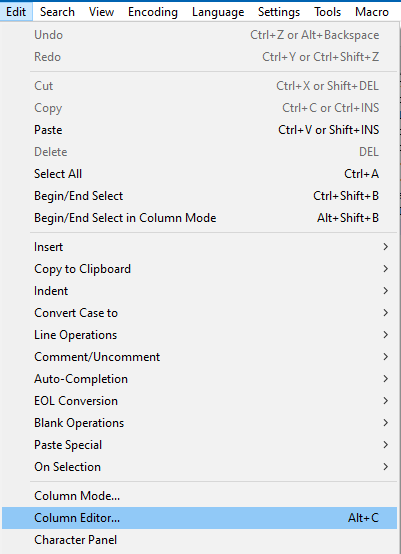
            3505174c-be06-4b2d-be1e-d8afa72a7d4b-image.png

            1 Reply Last reply Reply Quote 1
            • CletosC Offline
              Cletos
              last edited by

              Thank you very much!

              CletosC 1 Reply Last reply Reply Quote 0
              • CletosC Offline
                Cletos @Cletos
                last edited by Cletos

                So obviously that enumeration / list does not automatically add a further item / number when you press ENTER in the last paragraph (other than a word pressor did). Instead the cursor just goes to the next blank line.

                Is that correct? Or is there a method to continue the list when pressing ENTER?

                And when you add an item inbetween existing items, e.g. a new line between 7 and 8 the numeration is not adapted?

                Alan KilbornA 1 Reply Last reply Reply Quote 0
                • Alan KilbornA Offline
                  Alan Kilborn @Cletos
                  last edited by Alan Kilborn

                  @Cletos

                  Again, you are looking for word-processing features in a text editor.

                  Surely a “script” could be written to do what you want, but it would probably be fragile and tricky to get totally correct.

                  EDIT: Ha, a younger and more stupid me took up the scripting challenge on this a few years ago, see HERE.

                  1 Reply Last reply Reply Quote 4
                  • CletosC Offline
                    Cletos
                    last edited by

                    That’s great, many thanks!

                    How do I get it into Notepad as a plug in?

                    PeterJonesP 1 Reply Last reply Reply Quote 0
                    • PeterJonesP Offline
                      PeterJones @Cletos
                      last edited by PeterJones

                      @Cletos said in How could Notepad automatically make an enumeration / listing format?:

                      How do I get it into Notepad as a plug in?

                      It’s not a plugin itself. It is a script for the PythonScript Plugin. See this FAQ

                      1 Reply Last reply Reply Quote 2
                      • CletosC Offline
                        Cletos
                        last edited by

                        Ah, OK, many thanks!

                        1 Reply Last reply Reply Quote 0

                        Hello! It looks like you're interested in this conversation, but you don't have an account yet.

                        Getting fed up of having to scroll through the same posts each visit? When you register for an account, you'll always come back to exactly where you were before, and choose to be notified of new replies (either via email, or push notification). You'll also be able to save bookmarks and upvote posts to show your appreciation to other community members.

                        With your input, this post could be even better 💗

                        Register Login
                        • First post
                          Last post
                        The Community of users of the Notepad++ text editor.
                        Powered by NodeBB | Contributors
