Code Collapsing Weirdness
-
If I have the following code:
<div class=“form_fld”>
<div class=“sub_fld”>
<p class=“txt”>some text 1</p>
</div><!–sub_fld–>
<div class=“sub_fld”>
<p class=“txt”>some text 2</p>
</div><!–sub_fld–>
<div class=“sub_fld”>
<p class=“txt”>some text 3</p>
</div><!–sub_fld–>
</div><!–form_fld–>
I should be able to collapse each of the “sub_fld” class divs to hide only their content.But as soon as I try to collapse one sub_fld, it collapses the parent element. That’s not how code collapse is supposed to work.
And how do I automatically indent four spaces for a tab. Currently you can’t hardly identify the indented lines.
-
@Jason-Burnett said in Code Collapsing Weirdness:
But as soon as I try to collapse one sub_fld, it collapses the parent element. That’s not how code collapse is supposed to work.
And how do I automatically indent four spaces for a tab. Currently you can’t hardly identify the indented lines.Unless I misunderstand, it works for me:
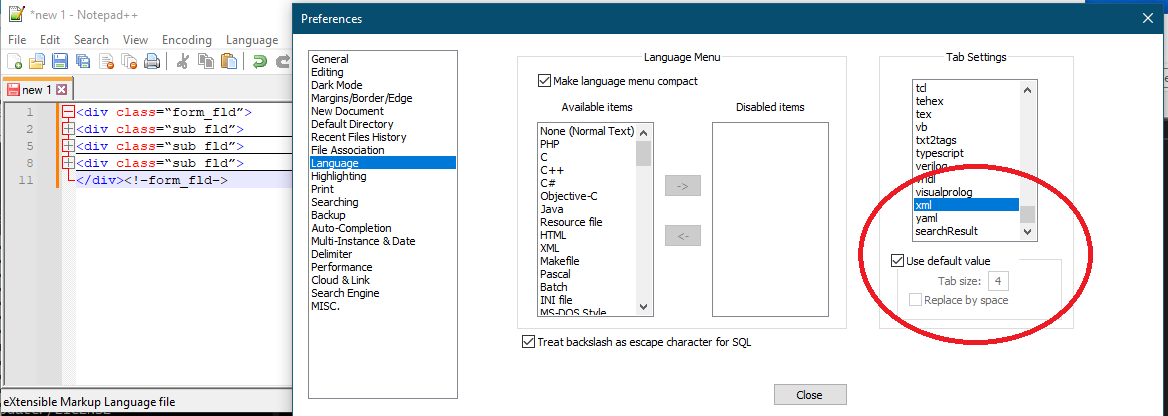
Cheers.
-
I try to collapse one sub_fld, it collapses the parent element
I don’t know…works for me correctly, with N++ 8.5:
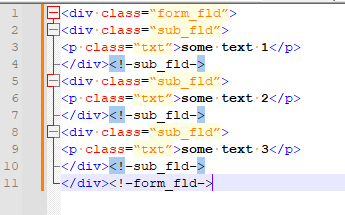
I guess if it doesn’t work for you, you’ll have to demo something about exactly what it is doing for you.



Hello! It looks like you're interested in this conversation, but you don't have an account yet.
Getting fed up of having to scroll through the same posts each visit? When you register for an account, you'll always come back to exactly where you were before, and choose to be notified of new replies (either via email, or push notification). You'll also be able to save bookmarks and upvote posts to show your appreciation to other community members.
With your input, this post could be even better 💗
Register Login