Change the color of the previous line
-
Hello,
I am making a User Defined Language and I was wondering how could I configurate it so everytime that it appears a certain word in a subcategory and it is not empty, the categories above should change the color.
Here is an example
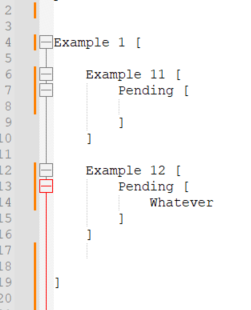
In this case the word would be ‘Pending’, so the lines 12 and 4 should be in red.
Thanks in advanced! :) -
the User Defined Language syntax highlighter is not that powerful. To make complicated logic, you (or someone) would have to write a lexer plugin that implements the specific logic for your specific language.
Or, maybe, you could use EnhanceAnyLexer plugin, which allows changing the foreground color of text based on a regex, to add highlighting on a per-language-basis, whether that language is a UDL or a builtin lexer.
If I have understood your requirements, I believe the regex below will make it so that your Example 12 lines 12-16 will be red because the
Pendingsection has at least one alphanumeric between the brackets, whereas the Example 11 lines 6-10 will not, because there is only whitespace betweenPending’s brackets.[your_udl_name_here] 0x00CC00 = (?s)\w[\w\s]+\x5B\s+Pending\h*\x5B[^\x5D]*\w.*?\x5D\s*\x5D -
@PeterJones Okey, I will try to implement what you said.
Thank you very much.


Hello! It looks like you're interested in this conversation, but you don't have an account yet.
Getting fed up of having to scroll through the same posts each visit? When you register for an account, you'll always come back to exactly where you were before, and choose to be notified of new replies (either via email, or push notification). You'll also be able to save bookmarks and upvote posts to show your appreciation to other community members.
With your input, this post could be even better 💗
Register Login