Notepad++ v8.5.3 Release
-
Notepad++ v8.5.3 Release is available here:
https://notepad-plus-plus.org/news/v853-released/Notepad++ v8.5.3 bug-fixes and new features:
- Fix session file data loss issue. (Fix #13514)
- Fix Explorer context menu “Edit with Notepad++” needs restarting os to appear issue under Win 8/10. (Fix #13)
- Fix Explorer context menu “Edit with Notepad++” not installed for multiple users issue. (Fix #13476)
- Fix Explorer context menu “Edit with Notepad++” double entries in some applications (Winzip). (Fix #13499)
- Make Explorer context menu “Edit with Notepad++” translatable. (Fix #17)
- Add the UTF8 character ability for Run & Macro menu. (Fix #12670, #13221, #13488)
- Add hide/show ability of Control Characters (C0 & C1) and Unicode EOL. (Fix #8111)
- Fix Change history margin in black color issue. (Fix #12764, #13593)
- Improve “Remove consecutive duplicate lines” command performance. (Fix #5538, #12548)
- Project Workspace “Save a Copy As” confusion issue. (Fix #13135)
- Make “Remove consecutive duplicate lines” support more line break. (Fix #13474)
- Fix UDL deletion issue. (Fix #8101)
- Fix RTL not working on FindInFiles progress window. (Fix #13458)
- Fix search results output alignment for large file searches. (Fix #13481)
- Several GUI Enhancements. (Fix #13615, #13601, #12812, #13579, #13577, #13575, #13597, #13524, #13540, #13544, #13315)
Note that your Macro and Run commands saved in Notepad++ v.8.5.2 (or older) may not be compatible with the current version of Notepad++. Please test those commands and, if needed, re-edit them.
Alternatively, you can downgrade to Notepad++ v8.5.2 and restore your previous data. Notepad++ will backup your old “shortcuts.xml” and save it as “shortcuts.xml.v8.5.2.backup”.
Renaming “shortcuts.xml.v8.5.2.backup" -> “shortcuts.xml”, your commands should be restored and work properly.Auto-update will be triggered in one week if no critical issue found.
-
D donho unlocked this topic on
-
After updating to 8.5.3 64-bit, “Edit with Notepad++” context menu is missing from Directory Opus.
The normal Windows Explorer is fine, no issue. It’s only missing from Directory Opus.
::EDIT:: I’ve also reported to Directory Opus, because I’m not sure which program causes the issue. Thanks
Windows 10 Home 64-bit 21H2
Directory Opus 12.31 x64
Notepad++ 8.5.3 64-bit -
Same as above. Starting from v8.5.0, “Edit with Notepad++” context menu is missing from Directory Opus.
W10 22H2
-
G Grath777 referenced this topic on
-
FYI:
Auto-updater has been triggered for v8.5.3. -
@donho I think there’s something not-quite-right with the auto update, referenced here
-
@donho ,
I looked into the ? > Update Notepad++ issue. I was in v8.4.8, and asked it to Update Notepad++, and Notepad++/gup.exe gave the
Xml Exception: It’s not a valid GUP xml.that @datatraveller1 mentioned in the other topic.I then checked my v8.4.8 gup.xml, and didn’t see any problems there… so I went to https://notepad-plus-plus.org/update/getDownloadUrl.php – and the website asked me for a captcha (“please help train our AI with the excuse that we want you to prove that you are a human”). Once I finished the captcha in my web browser, it showed me the normal XML contents of the getDownloadUrl.php page. After I’d seen that in my browser, I tried ? > Update Notepad++ again, and this time it gave me the normal
Update Availabledialog box that I expected.It appears that your webhost is now demanding a captcha that gup.exe is not recognizing, since it’s not a human.
update: per this post, that same captcha system is breaking the Community Forum’s RSS Feed feature.
update: added screenshot of error message -
@PeterJones said in Notepad++ v8.5.3 Release:
It appears that your webhost is now demanding a captcha that gup.exe is not recognizing, since it’s not a human.
I’ve never applied captcha into notepad-plus-plus.org.
Is it possible that it’s applied by the host of Notepad++ website?You said “community.notepad-plus-plus.org have apparently added captcha”
How did you reproduce it? -
@donho said in Notepad++ v8.5.3 Release:
@PeterJones said in Notepad++ v8.5.3 Release:
It appears that your webhost is now demanding a captcha that gup.exe is not recognizing, since it’s not a human.
I’ve never applied captcha into notepad-plus-plus.org.
Is it possible that it’s applied by the host of Notepad++ website?That is possible, yes.
You said “community.notepad-plus-plus.org have apparently added captcha”
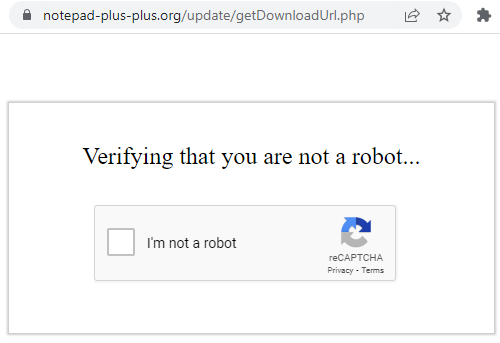
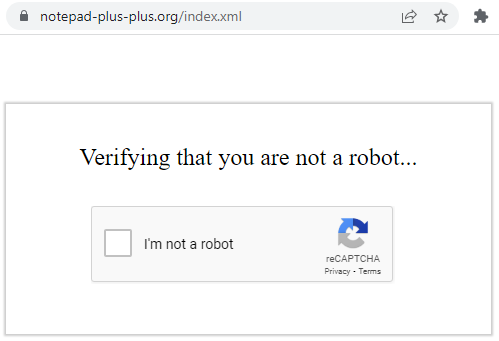
Sorry, I misread @timendum’s post here – it wasn’t the forum RSS… it was the RSS feed for notepad-plus-plus.org itself (https://notepad-plus-plus.org/index.xml). Once I have filled out the captcha on a specific computer, I cannot get it to show the problem again, so I cannot reproduce for the RSS feed… but if you haven’t done the captcha yet on a given computer, then going to either of these pages should ask for the captcha: https://notepad-plus-plus.org/index.xml or https://notepad-plus-plus.org/update/getDownloadUrl.php
So it looks like your host may have applied a captcha to any of the pages that were being automatically downloaded frequently in the main notepad-plus-plus.org site (but not the community forum site)
-
@PeterJones I haven’t done the captcha, and those two URLs currently look like this on my machine:
-
CAPTCHA issue has been solved now:
https://github.com/notepad-plus-plus/notepad-plus-plus/issues/13685#issuecomment-1557426831Thank you for your heads up!
-
 A Alan Kilborn referenced this topic on
-
Hello, @don-ho and All,
@don-ho, I noticed some weird results about the recording of the line-breaks during a macro recording process, with N++
v8.5.3Refer to the link, below, to get a general idea of the problem :
Of course, if you think that it’s a real issue, I will report on
GitHub!Best Regards,
guy038
-
@guy038 said in Notepad++ v8.5.3 Release:
I noticed some weird results about the recording of the line-breaks during a macro recording process, with N++ v8.5.3
And, @donho, would it be terribly difficult to allow real CR and LF characters to be put into the xml as

and
again?Because I’ve been a consistent proponent (on this forum) against “line-ending corruption” in any text files, it goes against my grain to now see this type of “corruption” possible in one of the core N++ configuration files. :-(
-
Hello @donho seems to be a bug with Multi-instance. Prior to 8.5.3 whenever I select multiple files (by highlighting) and right click Edit with Notepad++, all of the files are opened on a single instance. Now with 8.5.3, all files are opened separately (new instance).
Thanks!
-
@donho Tried to install lower version and issue persist. Looks like the problem could be from OS version. I am using Windows 11 Version 22H2 OS Build 22621.1702
-
@Jerald-Belleza
May I know from which version you have updated to v8.5.3? -
I can see the “inconsistency” of carriage return in saved shortcuts.xml.
However, after replaying the recorded macro, I see no unexpected behaviour. So it’s not a bug to me, or am I missing somethings?If I am, please provide me here a small (as small as possible) scenario to reproduce the bug. Thank you in advance.
-
Hello, @don-ho,
I agree with you, that whatever the EOL of the current file, the macro is always fully functional !
It’s the case when :
-
You use my
Test_CRLFmacro with aWindows (CRLF)EOL file -
You use my
Test_LFmacro with aUnix (LF)EOL file -
You use my
Test_CRmacro with aMac (CR)EOL file
However, I would have expected :
- For a current
Windows (CRLF)file, the following recording of the line-breaks, in theshortcuts.xmlfile, with aCRandLFlines ( instead ofCRthenCRLF) :
<Action type="1" message="2170" wParam="0" lParam="0" sParam=" " /> <Action type="1" message="2170" wParam="0" lParam="0" sParam=" " />- And for a current
Unix (LF)file, the following recording of the line-breaks, in theshortcuts.xmlfile, with two consecutiveLFlines ( instead of twoCRLFlines ) :
            <Action type="1" message="2170" wParam="0" lParam="0" sParam="
" />
            <Action type="1" message="2170" wParam="0" lParam="0" sParam="
" />
BR
guy038
P.S. :
- For a
Mac (CR)file, it’ seems OK, as we do have two consecutiveCRlines, if current line-endiing isMac (CR)!
P.P.S. :
- This means that it would be necessary to take in account the current line-ending of the current file, while recording these line-breaks / a macro !
-
-
@donho said in Notepad++ v8.5.3 Release:
So it’s not a bug to me
Is the exact situation they showed technically a bug? No, because “it works”: it plays back what was recorded.
But since we’re requiring users to hand-edit their macros to get rid of entities, it should at least be done in a readable way, and a way that the user can easily understand. And it doesn’t meant that it isn’t pointing to a bug in the implementation.
For example, a user is hand editing their macro, and they know from Scintilla.iface that 2170 is “ReplaceSel” which maps to SCI_REPLACESEL, and they know from the Scintilla documentation that SCI_REPLACESEL allows any string, not just a string containing a single character. So then while hand-editing, they put in “A new line.
[CR][LF]A second line.[CR][LF]” and save their macro file, and restart.

They now run this macro, and the macro inserts a single[LF], not the[CR][LF]that they intended.
If there’s a
[CR][LF]in the string that the macro is supposed to insert in the source for the macro, it needs to be inserted into the document as a[CR][LF]. This is a bug, IMO, because the user hand-edited a macro to put in[CR][LF], and the string that they inserted in that command is not the string that gets inserted into their document. -
@PeterJones said in Notepad++ v8.5.3 Release:
For example, a user is hand editing their macro, and they know from Scintilla.iface that 2170 is “ReplaceSel” which maps to SCI_REPLACESEL, and they know from the Scintilla documentation that SCI_REPLACESEL allows any string, not just a string containing a single character.
I would expect NP++ to include the relevant documentation instead of expecting the (possibly novice) user to start hunting for it. Especially given that the user’s version NP++ may be older than the documentation available online.
Including a snapshot of the relevant documentation with the distribution should be doable.
-
Everything you said has ABSOLUTELY NOTHING to do with the relevant points being made in this thread, and probably just obfuscates the main thrust of those points. :-(





Hello! It looks like you're interested in this conversation, but you don't have an account yet.
Getting fed up of having to scroll through the same posts each visit? When you register for an account, you'll always come back to exactly where you were before, and choose to be notified of new replies (either via email, or push notification). You'll also be able to save bookmarks and upvote posts to show your appreciation to other community members.
With your input, this post could be even better 💗
Register Login