Delete lines beginning with X to ending with Y
-
Hi,
I have log files with some lines I want to remove either with a Regex or a Macro.
I need to delete lines, beginning with “ATTENTION:”, to the line “Backlog (Last messages accounting for this alert)”.Any suggestions are appreciated!
Thanks,
BobRaw data:
{index=vpn-auth_12, message=May 13 2023 09:28:31:
ATTENTION: The email came from an external source.

Event Definition
Title	VPN-Report-test
Description
Type	aggregation-v1

Event
Timestamp	2023-05-14T09:30:36.057-04:00
Message	VPN-Report-test: count(facility_num)=977.0
Source	arch-syslog01
Key
Priority	2
Alert	true
Timestamp Processing	2023-05-14T09:30:36.057-04:00
Timerange Start	2023-05-13T09:30:36.057-04:00
Timerange End	2023-05-14T09:30:36.057-04:00
Source Streams	6303d45e9c80f55bfa35b2df
Fields

Backlog (Last messages accounting for this alert)
{index=vpn-auth_12, message=May 13 2023 09:31:52:
Final result:
{index=vpn-auth_12, message=May 13 2023 09:28:31:
{index=vpn-auth_12, message=May 13 2023 09:31:52:
-–
moderator added code markdown around text; please don’t forget to use the
</>button to mark example text as “code” so that characters don’t get changed by the forum -
Use
^to anchor to the beginning of the line, and use . matches newline or the regex(?s)equivalent to make.*?go across multiple lines. Also, because parentheses are meaningful to regex, you will need to escape them as\(and\)For example, FIND =
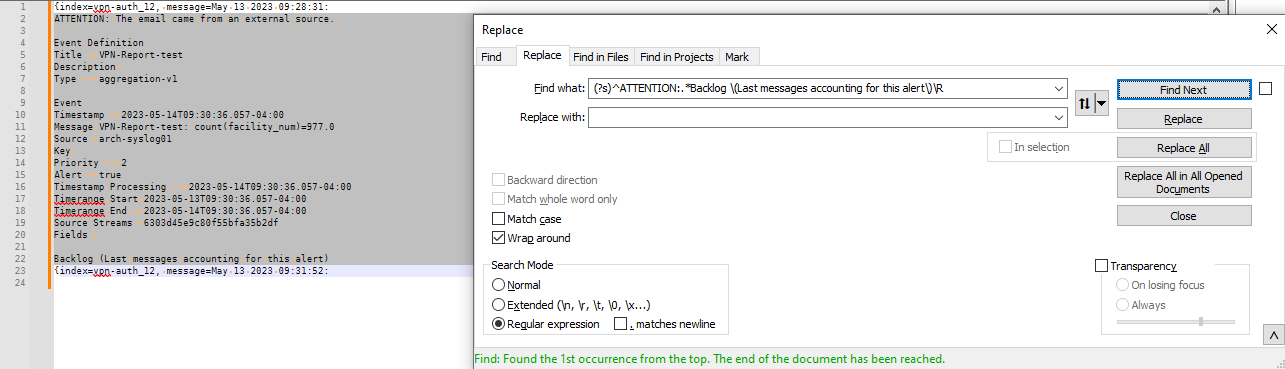
(?s)^ATTENTION:.*Backlog \(Last messages accounting for this alert\)\Rand REPLACE WITH nothing, in regular expression mode, gave the Final Result you asked for.Here’s a screenshot with the match and dialog shown:
-—
Useful References
-
Hello @robert-oram, @peterjones and All,
So, from your INPUT text :
{index=vpn-auth_12, message=May 13 2023 09:28:31:
ATTENTION: The email came from an external source.

Event Definition
Title	VPN-Report-test
Description
Type	aggregation-v1

Event
Timestamp	2023-05-14T09:30:36.057-04:00
Message	VPN-Report-test: count(facility_num)=977.0
Source	arch-syslog01
Key
Priority	2
Alert	true
Timestamp Processing	2023-05-14T09:30:36.057-04:00
Timerange Start	2023-05-13T09:30:36.057-04:00
Timerange End	2023-05-14T09:30:36.057-04:00
Source Streams	6303d45e9c80f55bfa35b2df
Fields

Backlog (Last messages accounting for this alert)
{index=vpn-auth_12, message=May 13 2023 09:31:52:
Two solutions are possible :
- The @peterjones’s idea, which deletes anything between the line begining with the
ATTENTION:string and ending at the complete end of the line beginning with theBacklogstring
Thus :
-
SEARCH
(?xs-i) ^ ATTENTION: .*? ^ Backlog \x20 .+? \R -
REPLACE
Leave EMPTY
Secondly, use the following regex S/R which deletes any line which does not begin with the
{index=string :-
SEARCH
(?x-si) ^ (?! {index= ) .+ \R | ^ \R -
REPLACE
Leave EMPTY
Whatever the option chosen, you’ve left with this OUTPUT text :
{index=vpn-auth_12, message=May 13 2023 09:28:31:
{index=vpn-auth_12, message=May 13 2023 09:31:52:
Best Regards,
guy038
- The @peterjones’s idea, which deletes anything between the line begining with the
-
Thank you so much for your prompt help! They both work perfectly!
Bob



Hello! It looks like you're interested in this conversation, but you don't have an account yet.
Getting fed up of having to scroll through the same posts each visit? When you register for an account, you'll always come back to exactly where you were before, and choose to be notified of new replies (either via email, or push notification). You'll also be able to save bookmarks and upvote posts to show your appreciation to other community members.
With your input, this post could be even better 💗
Register Login