VScode CTRL+P equivalent
-
In VScode I can press CTRL+P and quickly search and open a new file. I can even type just part of filename and it will be found. Press Enter and file is loaded.
Is there same function or plugin for Notepad++? I would like something easy and fast, without necessary extra steps or clicks.
-
@Maxitrol-Mat said:
In VScode I can press CTRL+P and quickly search and open a new file. I can even type just part of filename and it will be found.
Is there some configuration to the described VSCode’s search? Or is this just a blanket find-anything-anywhere on the computer, including mapped network drives?
The problem with such a thing, as I hint at above, is how long it would take such a search to run (it could be way more annoying to wait than have to deal with “necessary extra steps or clicks”).
Is there same function or plugin for Notepad++?
To my knowledge, no, there is not.
I have a script for my own use that is run via a
Sctoolbar button. When I press it, it prompts me for a string. When I supply the string and press OK, it searches my “scripts” folder tree (very finite size, known location, specifically...\plugins\Config\PythonScript\scripts) for filenames that contain the string I supplied, then presents me with a list of matching files, from which I can select one or more to open/execute. This just an example of how it could work with a “configuration” to limit scope, and thus keep the functionality not glacially slow. -
I have created a command center like function for my python scripts.
See here for details. If you want to use something similar, you need at least PS 3.0.16 and the linked WinDialog module. -
Two people have now replied talking about “scripts”, but it is worth pointing out that the OP wasn’t asking about script files, but rather generically any file.
-
@Alan-Kilborn Here is a Screenshot Of Ctrl+P in Visual Studio Code:
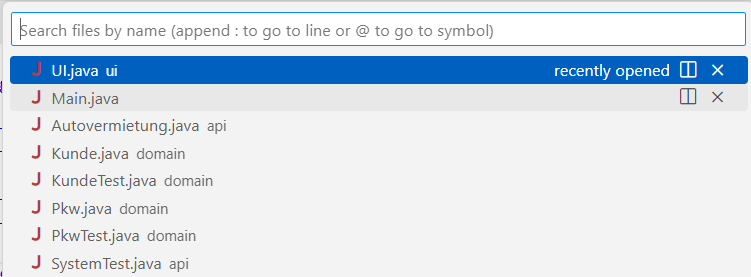
I have installed VS Studio Code recently but haven’t done much with it. Ctrl+P looks like a searchable recent files list.
-
@datatraveller1 said in VScode CTRL+P equivalent:
Ctrl+P looks like a searchable recent files list.
In VSCode, pressing Ctrl+p brings up what you show (recently opened list) but if you start typing it will show that “recently opened” list at the top of the drop-down window and then further down it will show “file results”:
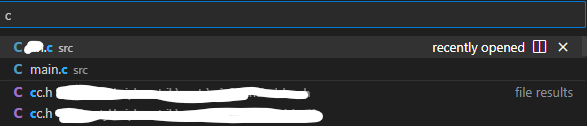
For the “file results” it is probably constrained to the active “Explorer” folder you have set (with Ctrl+Shift+e), keeping the search speedy.
Notepad++ could do something similar using Folder As Workspace parameters, I suppose, but probably FAW isn’t in very common usage among N++ users (IMO, because I’m not a big user of it), like the “Explorer” thing in VSCode probably is for that editor’s users.
-
The nppNavigateTo plugin has similar features.

Note that in the example photo above,
Top Directoryrefers to the top directory (excluding files in subdirectories) of the file in the currently open tab.And if you want to be able to quickly open one of the last 9 files opened, the Alt-F-digit key sequence is very fast and I use it all the time.
-
The alternate Explorer plugin has that functionality for the current directory and subdirs.
See the screenshot for “Quick Open” in the README.
Cheers.
-
@Michael-Vincent Nice plugin. I installed it, and it works fine. Just a minor issue: by default, Ctrl-P is assigned to two commands: “Print” and “Quick Open”.
The quick fix is to open Notepad++'s shortcut mapper, and assign a different key to one of these commands (either “Print” in the
“Main menu” tab, or “Quick Open” in the “Plugin commands”).






Hello! It looks like you're interested in this conversation, but you don't have an account yet.
Getting fed up of having to scroll through the same posts each visit? When you register for an account, you'll always come back to exactly where you were before, and choose to be notified of new replies (either via email, or push notification). You'll also be able to save bookmarks and upvote posts to show your appreciation to other community members.
With your input, this post could be even better 💗
Register Login