Cursor offset, hard to work with Notpad++
-
Hi,
since some weeks I run into a problem:There is an offset between the cursor and the position, where the action takes place.
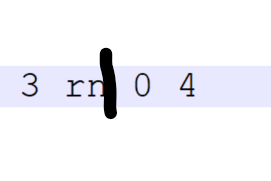
Here the cursor is where the black line is, but hitting <DEL> the charcter ‘r’ is deleted and ‘n’ survives…
Its hard to edit text files which this editor, sorry.
Newest version running on Win 10 Pro.
With best regards
Gerhard
-
@GerhardKreuzer ,
You’ll need to provide more information, Gerhard. Especially you should provide your configuration information by going to?->Debug Info...and copying it to your clipboard to be pasted into a message here.My first impression of your graphic explanation will seem wierd, but I see numbers with spaces and then the rn close together, suggesting to me, that it may be some kind of code page character I’m unfamiliar with. This is a guess, since I can’t see any debug info that shows your codepage, configuration, plugins, etc., so take that with a grain of salt and bring that information and possibly a ‘real’ screenshot of the behavior so someone more qualified than me can intelligently assist you.
-
@Lycan-Thrope said in Cursor offset, hard to work with Notpad++:
My first impression of your graphic explanation will seem wierd,
Graphic and explanation together seem weird. Pressing
DELshould not even delete thencharacter if indeed the manually drawn black line is the caret. It should be deleting the presumed space between thenand the0characters. TheBackspaceshould “delete” thencharacter.You say “newest version” but please as @Lycan-Thrope suggests, provide the menu ?=>Debug Info… output.
Cheers.
-
@GerhardKreuzer said in Cursor offset, hard to work with Notpad++:
Its hard to edit text files which this editor, sorry.
Then you are doing something wrong.
Here is a video screen capture of me moving the caret (the vertical typing bar) after the n, after the r, and after the space, and hitting the DELETE key each time (and undo each). All three delete the character to the right of the caret, as they are supposed to.

As a reminder, DELETE deletes the key to the right of the caret; BACKSPACE deletes the character to the left of the caret.
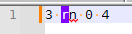
Idea: there is Settings > Preferences > Editing configuration in the section Caret Settings. It defaults to
Width: 1, but I am wondering if you haveWidth: Block Afterselected instead. If you do that, the caret before therwill look like this:


Hello! It looks like you're interested in this conversation, but you don't have an account yet.
Getting fed up of having to scroll through the same posts each visit? When you register for an account, you'll always come back to exactly where you were before, and choose to be notified of new replies (either via email, or push notification). You'll also be able to save bookmarks and upvote posts to show your appreciation to other community members.
With your input, this post could be even better 💗
Register Login