Find duplicate variable declaration Regex
-
I’m looking to build a regex that will find duplicate string/variables. An example of the input as follows:
     <SymbolVar name="DATABASE_NAME" value="DB1"/>
     <SymbolVar name="DATABASE_NAME" value="DB2"/>
     <SymbolVar name="PORT" value="12345"/>
     <SymbolVar name="SERVER_NAME" value="Server1"/>
     <SymbolVar name="SERVER_NAME" value="Server2"/>
The returned find should match “DATABASE_NAME” and “SERVER_NAME” present both twice.
My first attempt as follows, doesn’t quite cut it
(?m)<SymbolVar name="(\S+).\R(?s).?\K\1
-
@Stuart-Dyer
(?s-i)<SymbolVar\s+name\s*=\s*"([^"]+)".+<SymbolVar\s+name\s*=\s*\K"\1"should do it.It will highlight every duplicate instance (that is, it won’t highlight the first occurrence of any name, only the first.
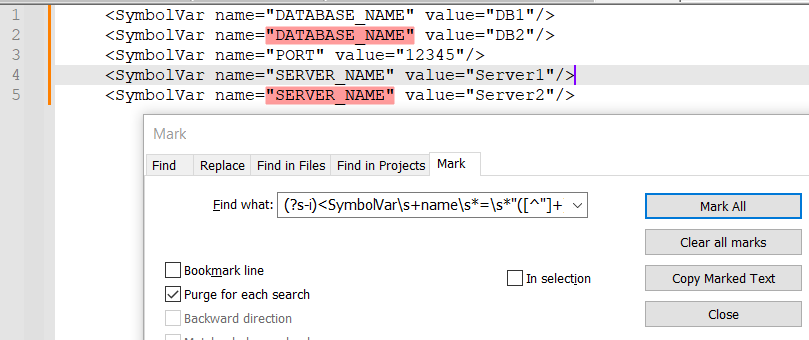
I should note that I use a bunch of
\s+where you could probably just use a simple space and a bunch of\s*that can likely be omitted. That’s mostly just because I like to play it safe with my regexes and not assume that insignificant whitespace will always be the same. -
@Stuart-Dyer ,
@Mark-Olson has come with a solution, but I find your description of the issue to be vague and improperly defined, and if @Mark-Olson 's answer is not what you wanted, then I suggest you give a better description of your desired before and after results, before someone can adequately come up with an answer. -
Hello, @stuart-dyer, @mark-olson, @lycan-thrope and All,
Oh… @stuart-dyer, I think I’ve found an very easy way to visualize all the duplicated values of any attribute, of your
HTMLtext , in one go !
So, let’s start with this INPUT text :
<SymbolVar name="DATABASE_NAME" value="DB1"/> <SymbolVar name="DATABASE_NAME" value="DB2"/> <SymbolVar name="ABCD" value="123"/> <SymbolVar name="PORT" value="34"/> <SymbolVar name="SERVER_NAME" value="Server1"/> <SymbolVar name="EFGH" value="123"/> <SymbolVar name="IJKL" value="456"/> <SymbolVar name="SERVER_NAME" value="Server2"/> <SymbolVar name="SERVER_NAME" value="Server3"/> <SymbolVar name="MNOP" value="456"/> <SymbolVar name="DATABASE_NAME" value="DB3"/>- Duplicate your entire text, right AFTER a separation line of, at least,
3sharp characters. If you text already contains some#characters , just use an other separator !
So, from our simple example, we get this text :
<SymbolVar name="DATABASE_NAME" value="DB1"/> <SymbolVar name="DATABASE_NAME" value="DB2"/> <SymbolVar name="ABCD" value="123"/> <SymbolVar name="PORT" value="34"/> <SymbolVar name="SERVER_NAME" value="Server1"/> <SymbolVar name="EFGH" value="123"/> <SymbolVar name="IJKL" value="456"/> <SymbolVar name="SERVER_NAME" value="Server2"/> <SymbolVar name="SERVER_NAME" value="Server3"/> <SymbolVar name="MNOP" value="456"/> <SymbolVar name="DATABASE_NAME" value="DB2"/> ################ <SymbolVar name="DATABASE_NAME" value="DB1"/> <SymbolVar name="DATABASE_NAME" value="DB2"/> <SymbolVar name="ABCD" value="123"/> <SymbolVar name="PORT" value="34"/> <SymbolVar name="SERVER_NAME" value="Server1"/> <SymbolVar name="EFGH" value="123"/> <SymbolVar name="IJKL" value="456"/> <SymbolVar name="SERVER_NAME" value="Server2"/> <SymbolVar name="SERVER_NAME" value="Server3"/> <SymbolVar name="MNOP" value="456"/> <SymbolVar name="DATABASE_NAME" value="DB2"/>-
Open the Mark dialog (
Ctrl + M) -
Untick all box options
-
Check the
Purge for each searchoption -
Possibly, check the
Bookmark lineandWrap aroundoptions -
Type in, in the
Find whatzone, this simple regex to mark all the duplicated values of anyattribute:- MARK
(?s)="\K(.+?)(?=".*###)(?=".+?\1.+?\1)
- MARK
-
Click on
Mark Allbutton
Et voilà !
Note : You can easily adapt this regex to visualize the duplicate values of a specific attribute ! For instance :
-
The regex
(?s)name="\K(.+?)(?=".*###)(?=".+?\1.+?\1)would mark all the duplicate values of thenameattribute, only -
The regex
(?s)value="\K(.+?)(?=".*###)(?=".+?\1.+?\1)would mark all the duplicate values of thevalueattribute, only
When you finish working of your
HTMLfile, simply delete the last part, with the separator line of#chars !
How this regex works ?
-
As our search is a multi-lignes one, we use the
(?s)modifier to represents text as an unique line -
As we want to aim the values of the attributes, we first search for the string
=" -
Then, due to the
\Ksyntax, the current search is cancelled and the regex engine searches for any text till the nearest"character excluded, but ONLY IF two conditions are respected :-
The line of
#charactes must be always located AFTER the current search, due to the(?=".*###)look-head -
At least, two other occurrences, of the searched value
\1, must be present, AFTER the current location, due to the(?=".+?\1.+?\1)look-ahead. Indeed, as we now duplicated our current file, all unique values of attributes, in this modified file, appear two times ONLY and so will not be marked !
-
Best Regards,
guy038
- Duplicate your entire text, right AFTER a separation line of, at least,
-




Hello! It looks like you're interested in this conversation, but you don't have an account yet.
Getting fed up of having to scroll through the same posts each visit? When you register for an account, you'll always come back to exactly where you were before, and choose to be notified of new replies (either via email, or push notification). You'll also be able to save bookmarks and upvote posts to show your appreciation to other community members.
With your input, this post could be even better 💗
Register Login