Diable Ctrl+D duplicate line shortcut
-
I’ve gone through Settings, Shortcut Mapper… and have not been able to find the option to change/disable the duplicate line option that is triggered by Ctrl+D.
How do I disable the Ctrl+D duplicate line keyboard shortcut?
-
You apparently didn’t go all the way through Settings > Shortcut Mapper, because it’s there:
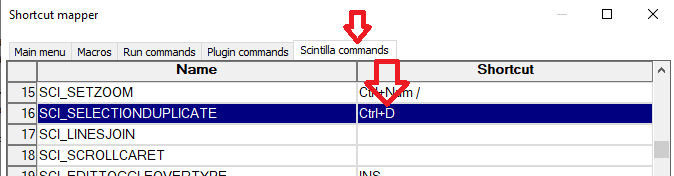
-
@PeterJones I did not notice the tabs
@PeterJones said in Remove Parameters from Functions List?:
<nameExpr expr="(?:\x26\s*)?[A-Za-z_
That worked, thank you very much. I’ve had some very minimal experience with these files in the past though a while ago and not enough to claim to be familiar.


Hello! It looks like you're interested in this conversation, but you don't have an account yet.
Getting fed up of having to scroll through the same posts each visit? When you register for an account, you'll always come back to exactly where you were before, and choose to be notified of new replies (either via email, or push notification). You'll also be able to save bookmarks and upvote posts to show your appreciation to other community members.
With your input, this post could be even better 💗
Register Login