How to save file with new Encoding ??
-
Hello,
I have problem with encoding. If I make a new file with utf8 encoding, change encoding to windows-1250 and save the file, after reopen this file encoding is utf8 again.
-
You probably have Settings > Preferences > New Document > Encoding > [UTF-8] Apply to opened ANSI files checkmarked.
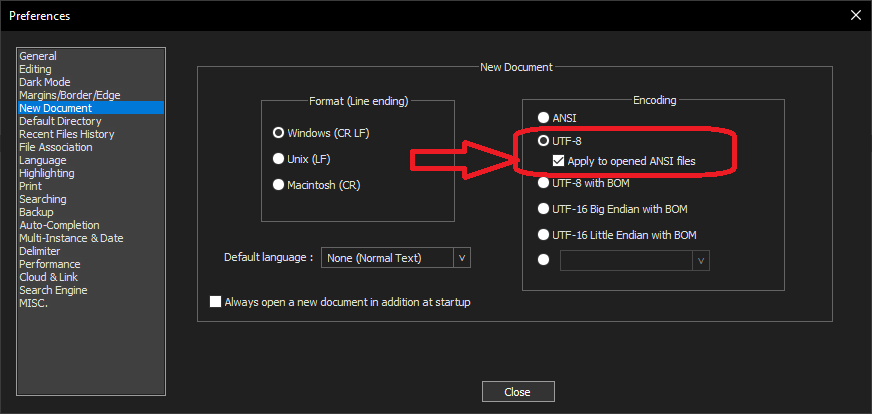
This says “if I open a file that appears to be an ANSI-encoding file, instead open it as UTF-8”. If that’s not what you want, then uncheck that option.
Also, Settings > Preferences > MISC > Autodetect character encoding is not always right, so be warned that even when you do have a file in ANSI, it might guess the wrong ANSI encoding, because no heuristic is perfect. (Unfortunately, in the early days of DOS, they didn’t think that storing encoding information as metadata in the FAT would be worthwhile, though it would have saved decades of problems; and the FAT32 and NTFS never rectified that; so all that modern text editors have to go on is imperfect heuristics, rather than having metadata that saves the actual encoding with the rest of the file name and size and date information. We might even be able to throw the blame all the way back to CP/M rather than DOS; I don’t know how far back that particular backward-compatibility goes. That’s why some file types, like XML/HTML, allow embedding the encoding inside the file; and why some editors will honor the modeline commands inside your source files; using the EditorConfig plugin, Notepad++ honors some, but doesn’t yet honor the encoding from a modeline)


Hello! It looks like you're interested in this conversation, but you don't have an account yet.
Getting fed up of having to scroll through the same posts each visit? When you register for an account, you'll always come back to exactly where you were before, and choose to be notified of new replies (either via email, or push notification). You'll also be able to save bookmarks and upvote posts to show your appreciation to other community members.
With your input, this post could be even better 💗
Register Login