Community
    • Login

    Notepad++, windows 11 and pythonscript

    Scheduled Pinned Locked Moved Help wanted · · · – – – · · ·
    9 Posts 4 Posters 1.2k Views 1 Watching
    Loading More Posts
    • Oldest to Newest
    • Newest to Oldest
    • Most Votes
    Reply
    • Reply as topic
    Log in to reply
    This topic has been deleted. Only users with topic management privileges can see it.
    • ThosRTannerT Offline
      ThosRTanner
      last edited by

      I’ve recently had to replace my windows 10 computer with a windows 11 one. After reinstalling notepad++, pythonscript and python2.7 and the windows api python extension, I’m having problems with this script:

      https://github.com/ThosRTanner/python-notepad-scripts/blob/master/statusbar_for_linter.py

      The read_statusbar_section function is always returning an empty string as the SendMessage function always returns 0.

      I’m at a loss to work out what is happening here, and if anyone has any suggestions I’d be grateful.

      (PS I may have posted this twice. the forum is being a bit strange today)

      Mark OlsonM 1 Reply Last reply Reply Quote 0
      • Mark OlsonM Offline
        Mark Olson @ThosRTanner
        last edited by

        @ThosRTanner
        Have you posted an issue in the repo?

        ThosRTannerT 1 Reply Last reply Reply Quote 0
        • ThosRTannerT Offline
          ThosRTanner @Mark Olson
          last edited by

          @Mark-Olson Which repo?

          EkopalypseE 1 Reply Last reply Reply Quote 0
          • EkopalypseE Offline
            Ekopalypse @ThosRTanner
            last edited by

            @ThosRTanner

            The problem with the code is that it is not clear how SendMessage needs to be called.
            Make sure you define a prototype, such as

            import ctypes
            from ctypes.wintypes import (
            	HWND, UINT, WPARAM, LPARAM
            )
            LRESULT = ctypes.c_ssize_t
            SendMessage = user32.SendMessageW
            SendMessage.restype = LRESULT
            SendMessage.argtypes = [HWND, UINT, WPARAM, LPARAM]
            

            and then use that always.
            Python now knows how to handle the parameters and will throw exceptions if they are not specified properly.
            HWND is a pointer, while the rest are integer types.

            Alan KilbornA 1 Reply Last reply Reply Quote 2
            • Alan KilbornA Offline
              Alan Kilborn @Ekopalypse
              last edited by Alan Kilborn

              @Ekopalypse said in Notepad++, windows 11 and pythonscript:

              LRESULT = ctypes.c_ssize_t

              This is interesting. Previously I believe you recommended:

              LRESULT = LPARAM

              and indeed that is what I have in my scripts that use this.
              Is ctypes.c_ssize_t a better thing to use?

              EkopalypseE 1 Reply Last reply Reply Quote 1
              • EkopalypseE Offline
                Ekopalypse @Alan Kilborn
                last edited by

                @Alan-Kilborn said in Notepad++, windows 11 and pythonscript:

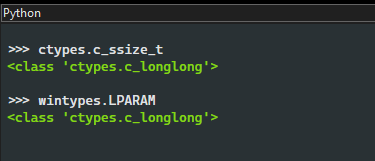
                Is ctypes.c_ssize_t a better thing to use?

                No, they are exactly the same.
                8859cab6-5665-4747-a190-2b0011a8de0b-image.png

                I have finally started to migrate my scripts with a single winapi module
                and I kept the c_ssize_t variant because it is more descriptive for me.
                There is no doubt that it is a signed size_t, while LPARAM cannot tell.
                If wintypes had contained LRESULT, I would have taken it.

                1 Reply Last reply Reply Quote 3
                • ThosRTannerT Offline
                  ThosRTanner
                  last edited by

                  it’s now objecting because what create_string_buffer returns isn’t an integer.

                  EkopalypseE 1 Reply Last reply Reply Quote 0
                  • EkopalypseE Offline
                    Ekopalypse @ThosRTanner
                    last edited by

                    @ThosRTanner

                    use ctypes.addressof to get the int representation of the pointer

                    ThosRTannerT 1 Reply Last reply Reply Quote 3
                    • ThosRTannerT Offline
                      ThosRTanner @Ekopalypse
                      last edited by

                      @Ekopalypse working great now. thank you!

                      1 Reply Last reply Reply Quote 2

                      Hello! It looks like you're interested in this conversation, but you don't have an account yet.

                      Getting fed up of having to scroll through the same posts each visit? When you register for an account, you'll always come back to exactly where you were before, and choose to be notified of new replies (either via email, or push notification). You'll also be able to save bookmarks and upvote posts to show your appreciation to other community members.

                      With your input, this post could be even better 💗

                      Register Login
                      • First post
                        Last post
                      The Community of users of the Notepad++ text editor.
                      Powered by NodeBB | Contributors


