how to highlight the text between [] ?
-
Hello, I use notepat++ a lot to do translations and I usually need to put notes in square brackets and I was wondering if there is a way to automatically highlight the text between the square brackets in a different color?
That would be extremely useful for me and my editors. -
@Eduardo-Perez
What do you mean byhighlight in a different color? If you meanapply formatting to the text in a way that persists after the document is closed, that is not something that Notepad++ can do (unless you’re working with HTML, which seems unlikely from your question). See FAQ (Notepad++ is a text editor, not a word processor) for an explanation of why this is so.If you want to highlight the text in a way that is purely visual and does not persist when the document is closed, you could just use the
Markform (Ctrl+M with default keybindings, selectPurge after each search, enter the regex(?s)\\[.+?\\], and hitMark all. This will visually mark all the text in square braces, as shown below.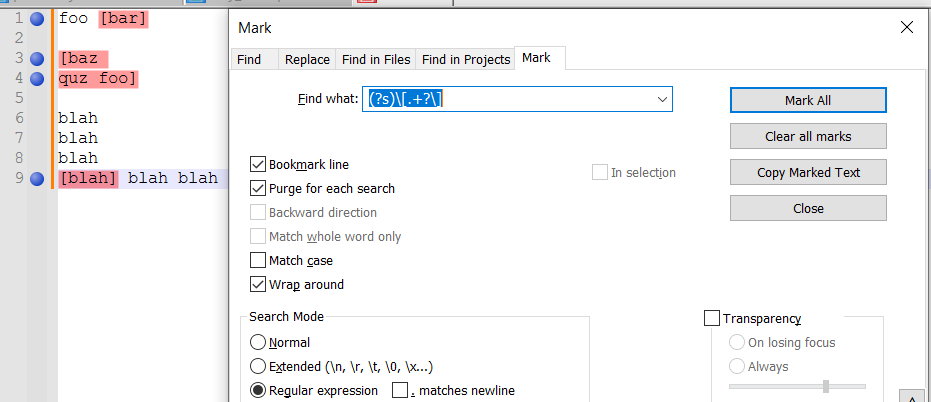
-
It sounds to me like you might benefit from syntax highlighting. I don’t know what kind of file you are editing – whether it’s a YAML or JSON or INI or XML or something that Notepad++ already syntax-highlights; or whether it’s a plain text file.
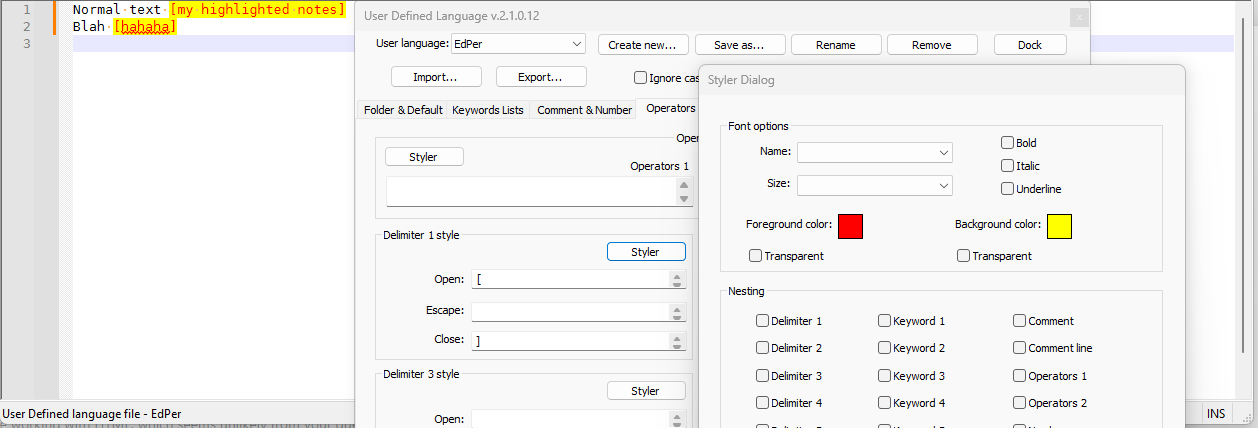
If it’s a plain text file – and especially if it has a consistent file extension, or just a few, that all files of that type will end with – then you can define a User Defined Language (“UDL”) that can syntax highlight (that is, automatically add color while you’re editing the file … though, as Mark pointed out, the color is not saved in the file, and someone viewing the file in another application or in a copy of Notepad++ that doesn’t have your UDL won’t see the colors). But you could use Language > User Defined Language > Define Your Language to create a new UDL, define the file extension that will automatically be colored, then go to the Operators & Delimiters tab; in Delimiter 1 style, you can put
[in the Open: and]in Close, then click Styler to define the foreground and background colors for your highlight.In my example screenshot below, I called the language
EdPer, and set bracketed text as red foreground on yellow background; you should, of course, pick a more meaningful language name and more aesthetically pleasing colors.
If you are using an already-existing file type (which I doubt, but maybe), then I’d suggest using whatever syntax that language defines for comments, rather than [bracketed text]. But if you still want to use bracketed text as your comments even in a pre-defined language, then I would suggest installing the plugin EnhanceAnyLexer (using the Plugins > Plugins Admin interface). Then you would open your file, and use Plugins > EnhanceAnyLexer > Enhance current language, and in the section of the config file that opened when you did that, you would do
0xcccc00 = \\[.+\\]to highlight stuff between brackets as cyan (EnhanceAnyLexer will only affect foreground colors, not background colors)

-
Mark-Olson Thanks for the answer, but I need it to last between sessions
PeterJones Thank you very much, this is just what I needed, I will use a modified language for my workgroup



Hello! It looks like you're interested in this conversation, but you don't have an account yet.
Getting fed up of having to scroll through the same posts each visit? When you register for an account, you'll always come back to exactly where you were before, and choose to be notified of new replies (either via email, or push notification). You'll also be able to save bookmarks and upvote posts to show your appreciation to other community members.
With your input, this post could be even better 💗
Register Login