is there a way to make delimeter check UP UNTIL closing char??

-
I’m trying to make a lang for a file that stores specific string format for a videogame. Strings have tokens inside them that tell the game what color to use when drawing characters.
Get the ~g~briefcase~w~ and return it back to casino
^green ^whiteThe string is white by default, then the word “briefcase” will be drawn green, and after it color switches back to white.
So far, I came up with following delimiter rule:

But this setup has an issue with first
~of~w~being colored green, because I assume npp considers closing char of delimiter as it’s part. That also breaks whole setup, since npp can’t find~w~at all and switch text back to white.

So the question I want to ask, is it possible to set a rule for delimiter’s closing char that would only scan up until that char?
-
@firedihm Change the closing delimiter to just
((EOL))and add “Delimiter 3” to the nesting of Delimiter 7. -
@supasillyass thanks for the suggestion, but looks like nesting is also not the best solution
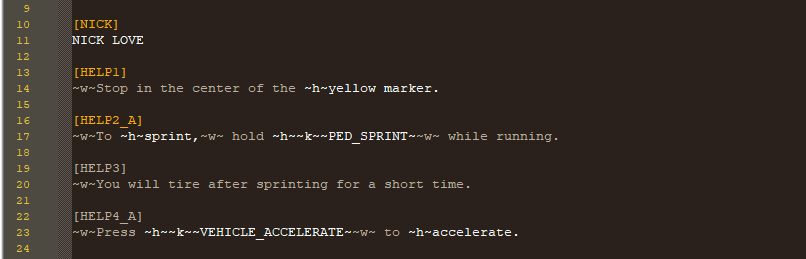
Header
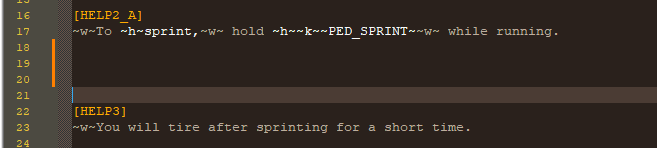
[ ]highlighting breaks. That’s probably because[HELP2_A]has level 5 nesting, so it would need to encounter 5 ((EOL))s to properly exit.Simply inserting newlines helps resolve this, but it makes file look stupid
Hello! It looks like you're interested in this conversation, but you don't have an account yet.
Getting fed up of having to scroll through the same posts each visit? When you register for an account, you'll always come back to exactly where you were before, and choose to be notified of new replies (either via email, or push notification). You'll also be able to save bookmarks and upvote posts to show your appreciation to other community members.
With your input, this post could be even better 💗
Register Login