Difference in display between Win11 Notepad and Notepad++
-
Just for clarity, I’ve searched and found some new topics with similar keywords, but none of them looked legit. Others come from before 2018 so Win11 wasn’t even a thing back then.
This is a file I have:
md_01
{
	playerModel	md_01
	weapon		WP_BOT_LASER
	reactions	3
	aim			1
	move		3
	aggression	3
	evasion		3
	intelligence	5
	playerTeam	TEAM_ENEMY
	enemyTeam	TEAM_PLAYER
	class		CLASS_REMOTE
	yawSpeed	120
	runSpeed	500
	walkSpeed	150
	height		32
	width		8
	hFOV		160
	vfov		45
	snd			remote
	moveType	"flyswim"
}
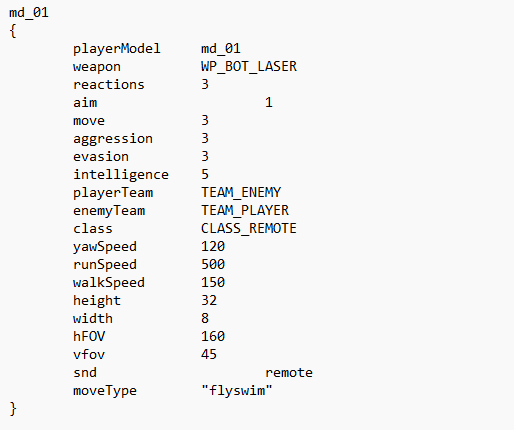
This is how it looks in Notepad on Windows 11:
This is how it looks in Notepad++, newest version, Windows 11 too - here everything looks perfect, and this is where file was created:
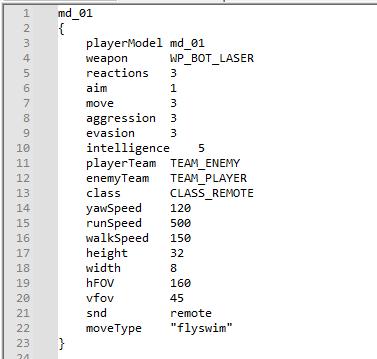
Where does this difference come from? As you can see, tabs on the line “aim” and “snd” are messed. How can I fix it? This happens to many other similar files. I want normal Windows Notepad to have tabs look normal. (my colleague uses just the normal Notepad, I use Notepad++).
-
Microsoft’s Notepad treats tabs differently than Notepad++ does. That’s why it looks different. The number of tab characters in the file is the same.
In Notepad++, Settings > Preferences > Language contains the settings which influence how tabs are rendered. If your file is a .txt or other un-recognized file type (which it appears to be, since your screenshot shows no lexing), then use the
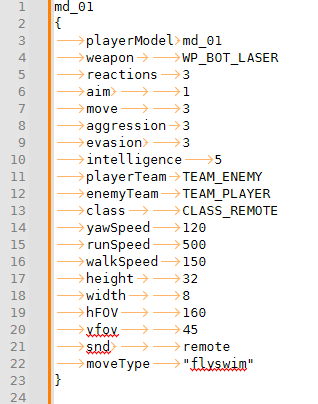
[Default]entry for tab size. I am assuming Microsoft’s Notepad is just doing the old-fashioned 8-spaces-per-tab, whereas Notepad++ defaults to a Tab Size of 4. If you want Notepad++ to waste more screen space, then change that Tab Size to 8.And if you want to see how many tab characters are there in Notepad++, use View > Show Symbol > Show Space and Tab =>
-
@PeterJones Oh, so it’s actually a super simple issue. Thank you!

Hello! It looks like you're interested in this conversation, but you don't have an account yet.
Getting fed up of having to scroll through the same posts each visit? When you register for an account, you'll always come back to exactly where you were before, and choose to be notified of new replies (either via email, or push notification). You'll also be able to save bookmarks and upvote posts to show your appreciation to other community members.
With your input, this post could be even better 💗
Register Login