How could one use a spell checker for a portable Notepad++?
-
How could one use a (portable) spell checker for a portable Notepad++? Without having to install anything?
-
@Cletos ,
DSpellCheck keeps all its files (including the Hunspell dictionaries) in the portable hierarchy if you are using a portable Notepad++.
(In fact, I don’t know of any plugins that violate Notepad++'s portable hierarchy when in portable mode, though it’s not impossible for them to hardcode some directory sometime.)
-
OK, thank you.
Then, how can I turn on the spell checker, I cannot get it to work. No red underlines, etc.
https://i.imgur.com/c8sAAuX.png
https://i.imgur.com/R8Fy0k4.png
I want Notepad to correct an entire file / text, without interventions.
-
@Cletos ,

You haven’t yet downloaded a dictionary. Hit the “download” button that was shown in your first screenshot.
Once you have one, it will look more like
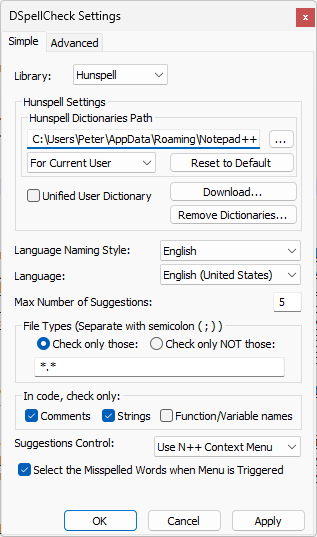
… notice how there is actually a Language: listed now. -
Ah, yes, thank you very much, now it works. Strange, some time ago it still worked. Maybe it has something to do with a new installation of Win. Also I have a protable Notepad++.
I want Notepad to correct an entire file / text, without interventions, so I clicked this, but nothing happened.

How could I make it?
-
@Cletos ,
I want Notepad to correct an entire file / text, without interventions, so I clicked this, but nothing happened.
How could I make it?I don’t think DSpellCheck currently has that feature. The menu action you are showing just works on the current misspelled word.
You would have to put in a feature request for that plugin over here to get that feature added. Since it has a couple other “All” actions, you might be able to convince the plugin developer to add “Replace All Misspelled Words with Topmost Suggestion”.
-
Okey, thank you very much!


Hello! It looks like you're interested in this conversation, but you don't have an account yet.
Getting fed up of having to scroll through the same posts each visit? When you register for an account, you'll always come back to exactly where you were before, and choose to be notified of new replies (either via email, or push notification). You'll also be able to save bookmarks and upvote posts to show your appreciation to other community members.
With your input, this post could be even better 💗
Register Login