Adjusting column spacing and line tracking
-
Hello Notepad++ Community,
I’m a newcomer to the forum with no programming skills. Currently, I’m trying to get acquainted with using Notepad++. For the CAD software I use, I need to adjust some settings, and it was recommended to use Notepad++ for this because it’s supposed to be easier in the background.!
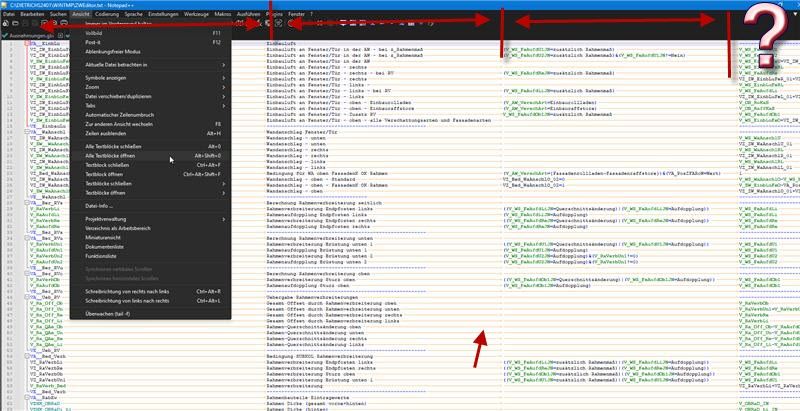
The file I want to edit is a text file. When I first opened it, the contents were disorganized. I received an XML file that allowed me to make language settings, which made everything more structured. Now, as shown in the attached image (was sent to me), I want to adjust the distance between the vertical columns because some of them overlap. Also, I would like to see the line arrows in orange for better tracking. Can someone explain where and how I can make these adjustments?
Thanks
Torge -
@Torge-Weiß said in Adjusting column spacing and line tracking:
I would like to see the line arrows in orange for better tracking.
Those are View > Show Symbol > Show Space and Tab
I want to adjust the distance between the vertical columns because some of them overlap.
For that, you need a plugin like Elastic Tabstops or Columns++ – I recommend Columns++, as it’s actively supported/developed by someone who regularly reads and posts in this Community forum, and gives you a bunch of additional features, include a powerful search feature that is quite helpful for columnar data (and even non-columnar data).
-
Hello Peter,
thank you so much. It worked out exactly as I wanted.


Hello! It looks like you're interested in this conversation, but you don't have an account yet.
Getting fed up of having to scroll through the same posts each visit? When you register for an account, you'll always come back to exactly where you were before, and choose to be notified of new replies (either via email, or push notification). You'll also be able to save bookmarks and upvote posts to show your appreciation to other community members.
With your input, this post could be even better 💗
Register Login