Will Np++ support cursorcolumn like Vim?
-
Hi,
Will NP++ support cursorcolumn function just like Vim does. Would be nice for editing yaml files to see if the tabs are correct everywhere. If you could have a vertical column to show that.
-
I recommend two things to help with this:
-
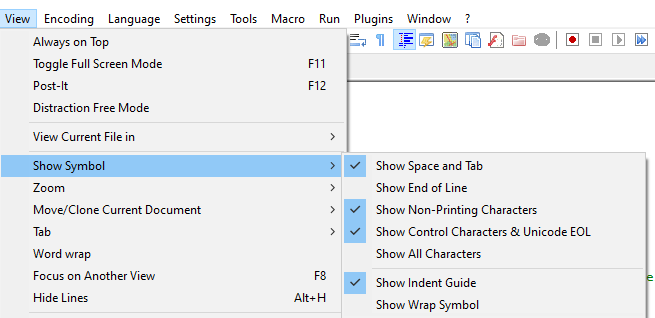
View > Show Symbols > Show Space and Tab – this will use special glyphs for the space and tab symbols, to make indentation obvious
-
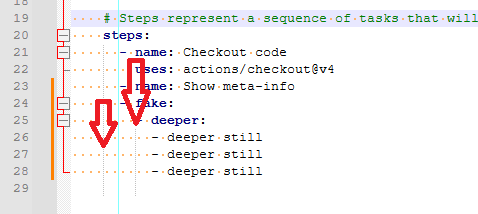
Install the ColumnTools plugin and enable Plugins > ColumnTools > Column Highlight
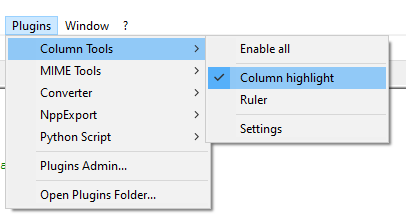
This puts the “edge column marker” at the current column (the cyan vertical line in the screenshot below)
The results of these two together:
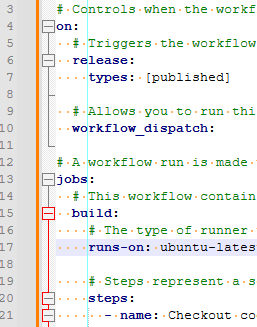
You can assign keyboard shortcut to either, to be able to easily toggle them on and off.
-----
update: three things, actually. View > Show Symbol > Show Indent Guide
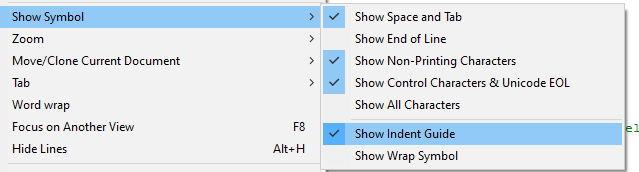
This puts a separate vertical line at every tabstop level; Settings > Preferences > Language > yaml > Tab Size: ____ determines how far apart the Indent Guide lines are.
And Settings > Style Configurator > Language:
Global Styles> Style:Indent guideline styleand … > Style:Edge colourwill allow you to change the colors for the Indent Guide and the Edge Column Marker, if you don’t like the default gray and cyan for those two. -


Hello! It looks like you're interested in this conversation, but you don't have an account yet.
Getting fed up of having to scroll through the same posts each visit? When you register for an account, you'll always come back to exactly where you were before, and choose to be notified of new replies (either via email, or push notification). You'll also be able to save bookmarks and upvote posts to show your appreciation to other community members.
With your input, this post could be even better 💗
Register Login