Syntax highlight % and %% lines differently
-
Hi
I am creating a UDL using the GUI. I need to distinguish between lines starting with a single %, which marks a comment line, and those that start with %% which are quite different.
How do I do that please?
Thanks -
@jnbearon
Off the top of my head, the best way to do this is probably to use EnhanceAnyLexer.^%(?!%).*$matches any line that begins with a single%
^%%.*$matches any line that begins with%% -
In this case, you could use UDL’s own functionality by ensuring that you define two delimiters, with the
%%defined first and both ending with the((EOL))marker.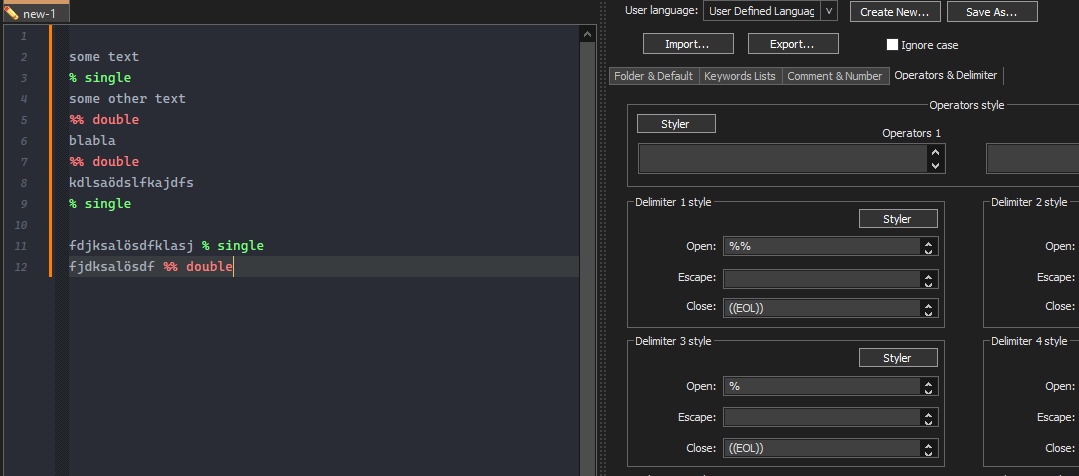
-
@Ekopalypse
Thanks Ekopalypse, that method does work if both are defined in “Operators and Delimiters”. What does not seem to work is to have % set as the comment marker in “Comment and Number” and %% set in the “Operators and Delimiters”. If there are consecutive lines starting with %% then they get coloured in alternating colours - seems to be something to do with how the ((EOF)) is interpreted.I have a problem in that I am already short of Delimiter defs as the language definition form only allows 8 to be set. That then prompts 2 further questions:
- Can I define more than 8 delimiters - by editing the XML file?
- Can I assign more than 1 delimiter to a particular colour? (I would be quite happy to bundle a few of the less often used ones into a single colour, but have the more popular ones having their own specified coloured line.
Thanks
-
@jnbearon said in Syntax highlight % and %% lines differently:
@Ekopalypse
I have a problem in that I am already short of Delimiter defs as the language definition form only allows 8 to be set. That then prompts 2 further questions:- Can I define more than 8 delimiters - by editing the XML file?
No. The number of colors is compiled into the program, and cannot be changed by a config file.
- Can I assign more than 1 delimiter to a particular colour? (I would be quite happy to bundle a few of the less often used ones into a single colour, but have the more popular ones having their own specified coloured line.
Yes. You can see an example of this in the “Markdown (preinstalled)” UDL that ships with Notepad++:
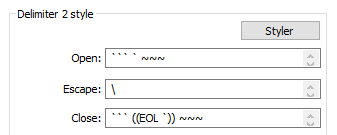
Just put the space-separated list of open and the space-separated list of close in the same order



Hello! It looks like you're interested in this conversation, but you don't have an account yet.
Getting fed up of having to scroll through the same posts each visit? When you register for an account, you'll always come back to exactly where you were before, and choose to be notified of new replies (either via email, or push notification). You'll also be able to save bookmarks and upvote posts to show your appreciation to other community members.
With your input, this post could be even better 💗
Register Login