Unicode characters as delimiters in UDL
-
Hi,
Is there a way to use special (Unicode) characters as delimiters in a UDL? I know Notepad++ doesn’t natively support this, but I’m wondering if it’s possible with plugins.
I’ve installed and fiddled around with EnhanceAnyLexer, as suggested by the Notepad++ User Manual, but as far as I can see (which isn’t very far, to be sure) it seems to allow only the coloring of Unicode strings themselves.
What I’m trying to do is to use double curly quotes, as in this post:
https://community.notepad-plus-plus.org/topic/23774/simple-udl-highlighting-apostrophes-quotation-marks
Except in my case I’d like to use them as delimiters – so that the custom style applies not only to the curly quote characters themselves, but all the text encased between matching curly quotes.Thanks!
-
@Marion ,
EnhanceAnyLexerConfig.ini
[normal text]
0x00FF00 = “.*?”|‘.*?’
; but only if the matches are not already styled by one of the IDs in excluded_styles.
; check in the respective styler xml if the following IDs are valid
excluded_styles = 1,2,3,4,5,6,7,8,9,10,11,12,13,14,15,16,20,21,22,23
blah.txt
“hello”
normal
‘there’
normal
highlighting:
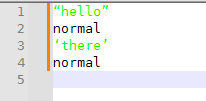
If you want it to work for multiline strings, change the config line to
0x00FF00 = (?s)(“.*?”|‘.*?’) -
@PeterJones This is perfect – thank you so much for your help!


Hello! It looks like you're interested in this conversation, but you don't have an account yet.
Getting fed up of having to scroll through the same posts each visit? When you register for an account, you'll always come back to exactly where you were before, and choose to be notified of new replies (either via email, or push notification). You'll also be able to save bookmarks and upvote posts to show your appreciation to other community members.
With your input, this post could be even better 💗
Register Login