Pinning or locking specific tabs?
-
Is it in base notepad++, or any plugins? I frequently open dozens of files, sometimes hundreds (editing game mod files) so it would be convenient for me to have a few tabs locked (so they don’t get deleted when I delete all tabs with close-all button)
-
@Duality-CA said in Pinning or locking specific tabs?:
Is it in base notepad++, or any plugins
No.
It is a feature that has been requested a few times on the official issues list, but developers have not taken it up. For one example, see HERE.
It can be approximated by a script that would group “pinned” tabs to the left of all other tabs. Then a close of all non-“pinned” tabs could be done by right-clicking the rightmost “pinned” tab and choosing Close Multiple Tabs > Close All to the Right.
I will attempt to write such a script and post it here…
-
@Duality-CA. within Notepad++ there are a couple of ways to have what amounts to pinned tab lists.
See this in the manual - https://npp-user-manual.org/docs/session/
I think you would be interested in using either session.xml files, which are much like the plain-text pinned.txt I use, or Project Panels, which is a more GUI oriented way of doing it.
The advantage of the session approach is that you can have any number of session.xml files that contains the list of files related to a specific game or project.
Neither of those does exactly what you want which would be making it so you can declare tabs as “pinned” and that the various Close Multiple Tab options don’t close pinned tabs. Both of them though allow you to define lists of files and to open the list of files in one shot.
-
@Alan-Kilborn said in Pinning or locking specific tabs?:
I will attempt to write such a script and post it here
My plan for the script was (and is) to dedicate one of the “tab color” choices (ref. View menu > Tab > Apply Color …) to signify a “pinned tab”. So here’s an example of what it might look like, with two pinned tabs:
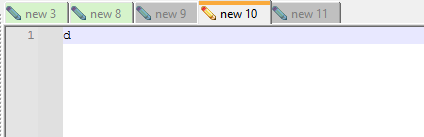
So in the screenshot, tabs
new 3andnew 8are “pinned” and I’ve used the green tab coloring to signify this.Unfortunately, as of N++ 8.6.6, there is no easy way for a plugin (e.g. a scripting plugin) to “get” what the current tab color is on a tab. There’s a way to “set” the tab color (using the menu-id method), but, because pinning-via-script isn’t going to be a 100% rock-solid thing (there will be things a user can do that could mess it up), I’d feel better if the script could “see” the current tab coloring and possibly take some (corrective) action based upon that.
So…long story…but I’m going to take a break from this script while I make and possibly implement a feature request to allow plugins to set/get tab colors. The feature request may be found HERE.
-
@Alan-Kilborn said in Pinning or locking specific tabs?:
possibly implement a feature request to allow plugins to set/get tab colors
The implementation is finished and should be in Notepad++ 8.6.8.
After that version is released, I’ll finish up and publish the script to pin tabs.



Hello! It looks like you're interested in this conversation, but you don't have an account yet.
Getting fed up of having to scroll through the same posts each visit? When you register for an account, you'll always come back to exactly where you were before, and choose to be notified of new replies (either via email, or push notification). You'll also be able to save bookmarks and upvote posts to show your appreciation to other community members.
With your input, this post could be even better 💗
Register Login