How to assign arbitrary color to standart C++ or user defined functions ?
-
Hi,
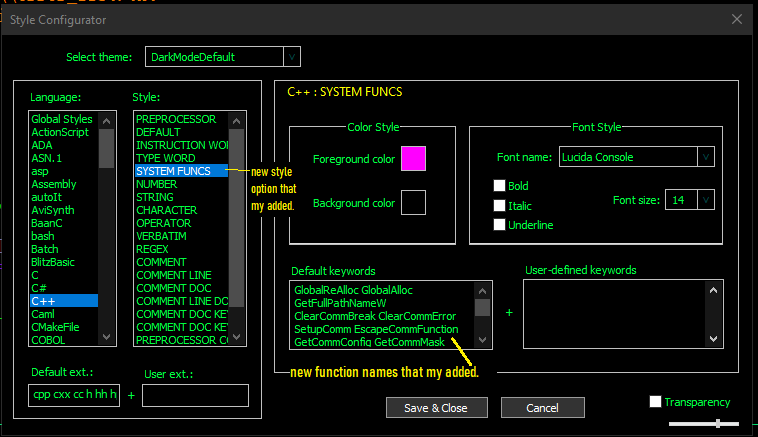
i want append extra color option to Style Configurator for standart C++ , winapi or user defined functions that Style name is “SYSTEM FUNCS” (i using darkmode) . i added to stylers.xml, stylers.model.xml and DarkModeDefault.xml files this line :
<WordsStyle name=“SYSTEM FUNCS” styleID=“25” fgColor=“FF00FF” bgColor=“000000” fontName=“Lucida Console” fontStyle=“0” fontSize=“14” keywordClass=“type3”></WordsStyle>i also added to langs.xml, langs.model.xml files this line :
<Keywords name=“type3”>GlobalReAlloc GlobalAlloc ( … etc few function names )</Keywords>
Now i can see “SYSTEM FUNCS” option and function names in C++ Language Styles under Style Configurator , but during editing C++ files colors of functions as new keywords dont change according my setting .
What can i do for this ? .
-
@unal-mk ,
You cannot just arbitrarily add a new list of keywords in the XML and have it automatically propagate through Notepad++ into the lexer. They both have to be coded and compiled to make use of a given list.
I haven’t had time to experiment (maybe later today or tomorrow), but I think the lexer might have one more keyword list that Notepad++ isn’t coded to use. If so, I will put in a PR to enable it in a future NPP release. If not, I will let you know.
Update: this discussion has a script that works with the Python script plugin that should give you the extra list
-
@unal-mk ,
After my experimentation, I found something even better: v8.6.5 wouldn’t allow the following, but the newly released v8.6.6 will (so new, it’s not even in auto-update yet, so you will have to download it from the links in the announcement):
- Download and Install v8.6.6
- Edit
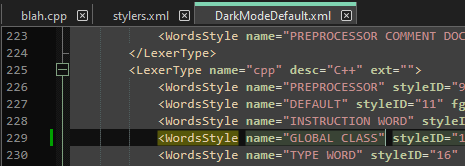
%AppData%\Notepad++\stylers.xml(or, in your case,%AppData%\Notepad++\theme\DarkModeDefault.xml) - Search for
name="cpp" - Add one of the following, depending on your active theme:
- For light mode (
stylers.xml):
<WordsStyle name="GLOBAL CLASS" styleID="19" fgColor="FF8080" bgColor="FFFFFF" fontName="" fontStyle="0" fontSize="" keywordClass="instre2" >instre2 useri2</WordsStyle>
somewhere in the “cpp” block:
- For
themes\DarkModeDefault.xmluse:
<WordsStyle name="GLOBAL CLASS" styleID="19" fgColor="FF8080" bgColor="3F3F3F" fontName="" fontStyle="0" fontSize="" keywordClass="instre2">instre2 useri2</WordsStyle> - For any other theme, it will be similar, but you will probably need to edit the colors to match your theme, either now or after step 8
- For light mode (
- File > Save
- File > Exit
- Run Notepad++ again
- You will get something like:
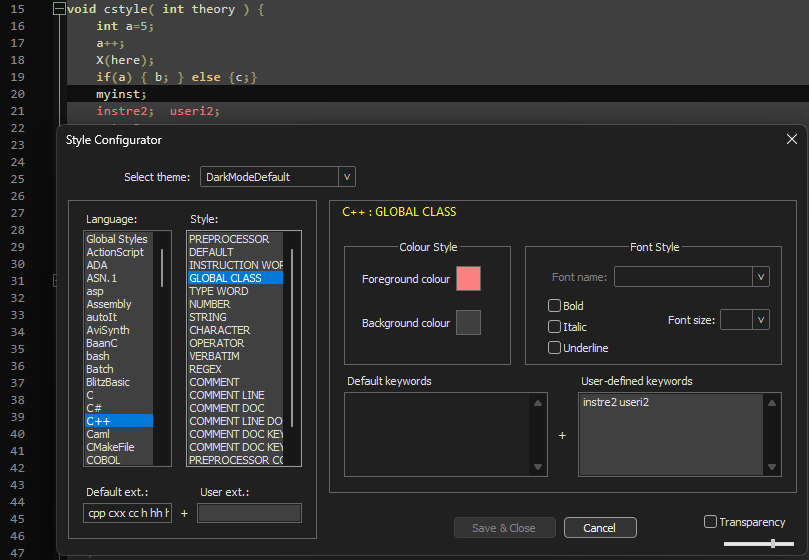
If you don’t like my suggestion for DarkModeDefault, you can then change the style to match your whims (and obviously the list of user-defined keywords)
-
@PeterJones said in How to assign arbitrary color to standart C++ or user defined functions ?:
but the newly released v8.6.6 will (so new, it’s not even in auto-update yet
So new, but has already even been superseded by 8.6.7. :-)
-
@PeterJones Thank you very much, it works on 8.6.7 portable :) .



Hello! It looks like you're interested in this conversation, but you don't have an account yet.
Getting fed up of having to scroll through the same posts each visit? When you register for an account, you'll always come back to exactly where you were before, and choose to be notified of new replies (either via email, or push notification). You'll also be able to save bookmarks and upvote posts to show your appreciation to other community members.
With your input, this post could be even better 💗
Register Login