File extension List
-
Every language in
%AppData%\Notepad++\langs.xml🛈 (or your installation’s equivalent config file location) will show up in the Open and Save As dialog file-type lists.To get rid of entries in that list, you
would have tocould remove the<Language ... </Language>section for each of the entries that you don’t want from thelangs.xml(following the sequence for editing Notepad++ config files) then restart Notepad++. However, the major caveat for that is that if you remove a given language fromlangs.xml, Notepad++ will not be able to correctly syntax-highlight that language.As an alternative suggestion: the order of the file types is determined by the order in
langs.xml– so if you have just 2-5 languages you normally use, then you could move it so those were the first 2-5 languages (after<Language name="normal" ext="txt"/>) – after restarting, then those more-frequent languages would be your first few choices in the pulldown, so they are easier to choose when opening or saving a file, without losing access to the syntax highlighting on languages you use less often.update: see below, there is another option
-
After my above post, I had another idea that I experimented with: there is actually another way: you can use Settings > Preferences > Language dialog. If you move languages from the Available items to the Disabled items, as in the screenshot below:
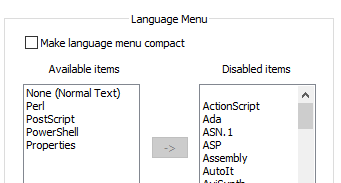
… then after restarting, the only languages that show up in the Open and Save As file-type drop-downs are the ones in the Available items list:

So that’s a simpler way of removing them from the list
-
I don’t know if you’d call these techniques “hacks” (probably), but my first thought about them is that it might be nice to pull this info into the user manual so that it is not “lost” for the future. But maybe since they are hacks, they don’t belong there.
-
The “delete from
langs.xml” is definitely a hack. The reorder is borderline hacky. But it would make sense to document that the Language list affects the open/save-as pulldowns. -
@PeterJones Thanks Peter thats great, really appreciate your help with this, do you know if there a way to add a language / file extension tyoe to the list? I use it for editing Bentley MX input files so *.inp
-
You cannot arbitrarily add languages to the
langs.xmland expect it to fully work, becauselangs.xmlwas made to control the built-in languages, not add arbitrary language or control UDL.However, my experiments show that when I add an unknown language to
langs.xml, like<Language name="normal" ext="txt"/> <Language name="BentleyMX" ext="inp" /> ...(and restart after changing/saving
langs.xml, so Notepad++ re-readslangs.xml)Then when I do an Open (or Save As), it will show up as a second Normal Text in the pulldown:

… so it’s not perfect (because it calls itNormal textagain, instead ofBentleyMX), but it does add a new mask to the pulldown, which might be enough for youIf you also have a User Defined Language (UDL) defined – for example, I created one called
BentleyMXthat has Ext.: defined asinp– then when you open theblah.inpfile, it will automatically apply the UDL styling (which you would have to set up) to it.

(Per Alan’s note, I would call adding a unknown language to
langs.xmla “hack”. But it does seem to “work” per your use-case, insofar as Open and Save As dialogs are concerned.)For the right way to do it: Notepad++ , in theory, could have a way to add the UDL types with their extensions to that list, and I requested that years ago but it hasn’t been implemented yet. If having a native implementation, where Notepad++ automatically includes those in the list as you create more UDL, you could go over there and “upvote” (click on the thumbs-up) and/or comment, agreeing that you’d like it implemented.
-
@Mark-Davies-0 said in File extension List:
do you know if there a way to add a language / file extension tyoe to the list?
Are you talking about user-defined languages? Follow that link for relevant documentation.
-
@PeterJones Hi Peter, thats great thanks so much for your help!
-
@PeterJones said in File extension List:
I requested that years ago but it hasn’t been implemented yet.
Prompted by this, and the thought, “I should be able to figure out how to take the list of UDL extensions, which should be available in a data structure already, and add them to the other list of filters for the SaveAs/Open dialogs”, I tried it out, even though I don’t have much experience in the codebase: I was able to figure it out, and put in a PR for it – that PR has been merged, so that means the SaveAs/Open dialog filters will show all UDL extensions in the file-type filter, starting in the next release. 🎉
-
@PeterJones ,
Bravo @PeterJones. Hope to get to that point, someday.
:-)





Hello! It looks like you're interested in this conversation, but you don't have an account yet.
Getting fed up of having to scroll through the same posts each visit? When you register for an account, you'll always come back to exactly where you were before, and choose to be notified of new replies (either via email, or push notification). You'll also be able to save bookmarks and upvote posts to show your appreciation to other community members.
With your input, this post could be even better 💗
Register Login