Clearing Marked Lines
-
In previous versions of Notepad ++ we were able to search for a keyword, mark all lines and clear the marks - in turn leaving us with only all the unmarked lines.
The newer version is not seeming to clear the lines. Any insight on how to make this possible?
-
@Drake-McCleary
You’re comments are very vague, but try this:
When you are clearing the bookmarks (i.e., pressing the button to clear), make sure the Bookmark Lines checkbox is checkmarked.
-
@Drake-McCleary ,
Your use of “clear” is ambiguous. That might mean “clear the marks” as in remove the highlights or circles (like Alan interpreted). Or it might mean “delete the lines that had marked text” (which is how I’m interpreting it).
In order to be able to do things with the lines of marked text, when you use the Mark dialog, you need to remember to checkmark
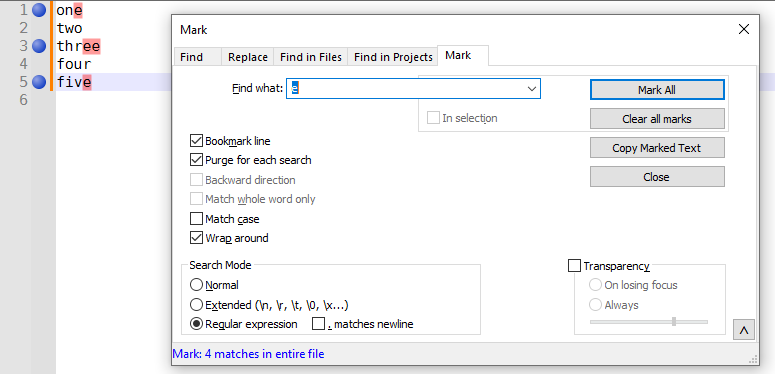
☑ Bookmark lineas well.Then you can do the search to add the marks (highlights) and bookmarks (circles). Then use the Search > Bookmark > … commands (*) to delete the bookmarked or unbookmarked lines. (*: or right-click on the bookmark margin to access the same menu of commands)
If I have a file with the words
onetofiveon separate lines, and want to delete only the lines that contain theecharacter, I could:- Mark and Bookmark those lines
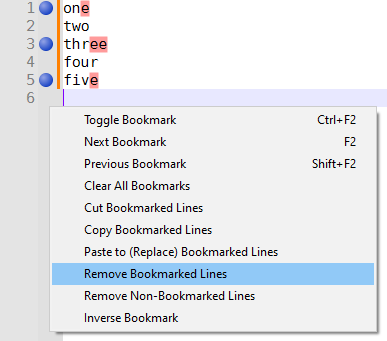
- Use the Bookmark menu to Remove the Bookmarked Lines
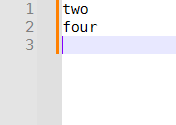
- End up with only the non-matching lines:
Using the Remove Non-Bookmarked Lines would do the opposite, deleting
twoandfourand leaving the other three words.Hopefully one of us interpreted you correctly.
- Mark and Bookmark those lines
-
This is exactly what I was looking for - Sorry for the vague description!
Thanks for the help.



Hello! It looks like you're interested in this conversation, but you don't have an account yet.
Getting fed up of having to scroll through the same posts each visit? When you register for an account, you'll always come back to exactly where you were before, and choose to be notified of new replies (either via email, or push notification). You'll also be able to save bookmarks and upvote posts to show your appreciation to other community members.
With your input, this post could be even better 💗
Register Login