How to expand workspace folder for currently open tab?
-
I have a very highly nested project folder of someone else’s source code for an application I am using. I opened the top level folder as workspace in notepad++.
I will often be opening files from that folder in notepad++, say, using the command line, rather than doing it in the UI. i.e. for search result. When I do so, I realized I didn’t know how to tell notepad++ to force expand the containing folder.
How can I do that?
ie it’s in a.b.c.d.e.f.g.h.i.j.k.myfile.java
then i want to expand up to k -
Assuming that you have
aas the Folder as Workspace (FaW) top-level, so thata\b\c\d\e\f\g\h\i\j\k\myfile.javais under it, then hitting the “Locate current file” button in the FaW toolbar will move the highlight in the FaW panel to be in that hierarchy.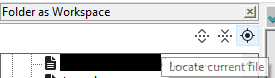
(If the active file isn’t in the FaW hierarchy, then it won’t locate it when you click, and nothing in FaW panel will change.)
-
@PeterJones Thank you. That solves my problem. Is there a way to mark this as solved?
-
@Thomas-Zito said in How to expand workspace folder for currently open tab?:
That solves my problem.
Glad it worked for you
Is there a way to mark this as solved?
This forum doesn’t have such marking. People reading can determine for themselves whether there is anything more worth adding to a discussion topic, whether or not it’s already been “solved” in the original poster’s mind. (Sometimes, when the original poster has been gone for years, topics are re-awakened years later and new and productive discussion occurs. having a “solved” status might discourage such productive add-ons.)


Hello! It looks like you're interested in this conversation, but you don't have an account yet.
Getting fed up of having to scroll through the same posts each visit? When you register for an account, you'll always come back to exactly where you were before, and choose to be notified of new replies (either via email, or push notification). You'll also be able to save bookmarks and upvote posts to show your appreciation to other community members.
With your input, this post could be even better 💗
Register Login