There is no problem until you enter Korean and save the South Korean language.
-
There is no problem until you enter Korean and save the South Korean language.
There is a phenomenon that the text is broken when opened and closed.
I’m asking because I don’t know how to get help.
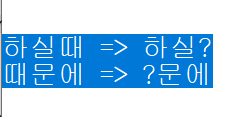
I’m using utf-8.
I am using notepad++ v8.7.
-
You provided a screenshot, but I am doubtful any of of the regulars here have enough experience with Korean to understand what you seem to think is wrong with the above. Maybe a better description will help.
But I will try some wild guesses, to see if I can be of some help to you.
Assuming you are trying to show that a few of the glyphs on the left are showing up as a
?in Notepad++:- if you did a bad encoding conversion, where the destination encoding didn’t have a codepoint for your source character.
- For example, if you took text
☺U+2640SMILE, and tried to use Encoding > Convert to ANSI, it would change from

to
? `U+2640` SMILE

because there is no glyph in ANSI for the ☺ smile character.
- For example, if you took text
- Similarly, if you tried to paste that text into a file that was already an ANSI file, it would do the same conversion to
? `U+2640` SMILE- so maybe you are trying to convert text into or paste text into an encoding that doesn’t have a codepoint for the Korean character that becomes the
?
- so maybe you are trying to convert text into or paste text into an encoding that doesn’t have a codepoint for the Korean character that becomes the
- Or maybe your chosen font for Notepad++ doesn’t include glyphs for those characters (but I think it would be an empty square box, not a question mark).
- Using Settings > Style Configurator > Global Styles > Default Style to pick a different font which you know has that glyph might solve the problem. (Or maybe changing the Settings > Preferences > MISC > ☐ Use DirectWrite and restarting Notepad++.)
- Or maybe it is showing something like
one�two– which would indicates that it was trying to decode some bytes from your file as a unicode character, but it wasn’t a valid unicode character, so it displays the � symbol to indicate a data input problem. This might indicate that your original file has some bad bytes (either because something was corrupted, or because the application that created your text file made a mistake).
- if you did a bad encoding conversion, where the destination encoding didn’t have a codepoint for your source character.


Hello! It looks like you're interested in this conversation, but you don't have an account yet.
Getting fed up of having to scroll through the same posts each visit? When you register for an account, you'll always come back to exactly where you were before, and choose to be notified of new replies (either via email, or push notification). You'll also be able to save bookmarks and upvote posts to show your appreciation to other community members.
With your input, this post could be even better 💗
Register Login