How to multiselect with double click without ignoring whitespace?
-
I’m running Notepad++ v8.7.4 (32 bit) on Windows 10.
If I do C-<double-left-mousebutton>, notepad++ ignores whitespace but not delimiter.
C-<left-mousebutton> is also used to begin a multicaret
You can see my issue here, if i try to create a multiselect using Ctrl key and double left click, it will create the new caret, begin selecting, but ignore whitespace.
Well, I could probably figure this out myself but I don’t want to spend an hour on this. I’m betting someone already has a solution that takes 60 seconds.
-
I’m not 100% sure whether I’ve understood your problem.
I was going to ask for a screenshot of your Preferences > Delimiter page, wondering if maybe you had something added to your list of characters… but then I was reminded of the Delimiter selection settings (Ctrl + Mouse double click), which I forget about under most circumstances.
So with the example text
one two three
four five six
blah(seven eight nine)
if I Ctrl+DoubleClick on
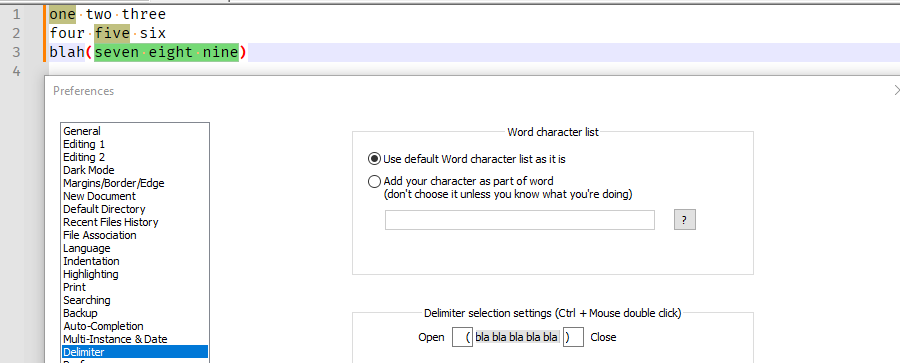
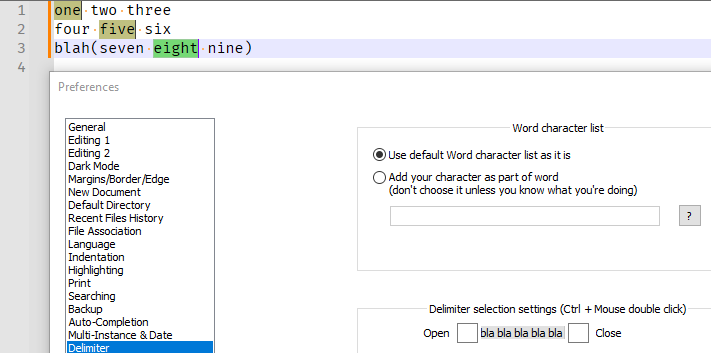
onethenfivetheneight, I getoneandfiveandseven eight nineselected. Based on being reminded of the existing of the special meaning for inside-delimiter Ctrl+DoubleClick, that is now my expectation. But I’m wondering if you were hoping for justoneandfiveandeightin that situation. If so, you would have to “defeat” the Delimiter selection settings, by changing the open and close delimiters to something else (or to nothing).Examples:
Default:
With no selection-delimiters:


Hello! It looks like you're interested in this conversation, but you don't have an account yet.
Getting fed up of having to scroll through the same posts each visit? When you register for an account, you'll always come back to exactly where you were before, and choose to be notified of new replies (either via email, or push notification). You'll also be able to save bookmarks and upvote posts to show your appreciation to other community members.
With your input, this post could be even better 💗
Register Login