Link to Edit with Notepad++ status/fix please
-
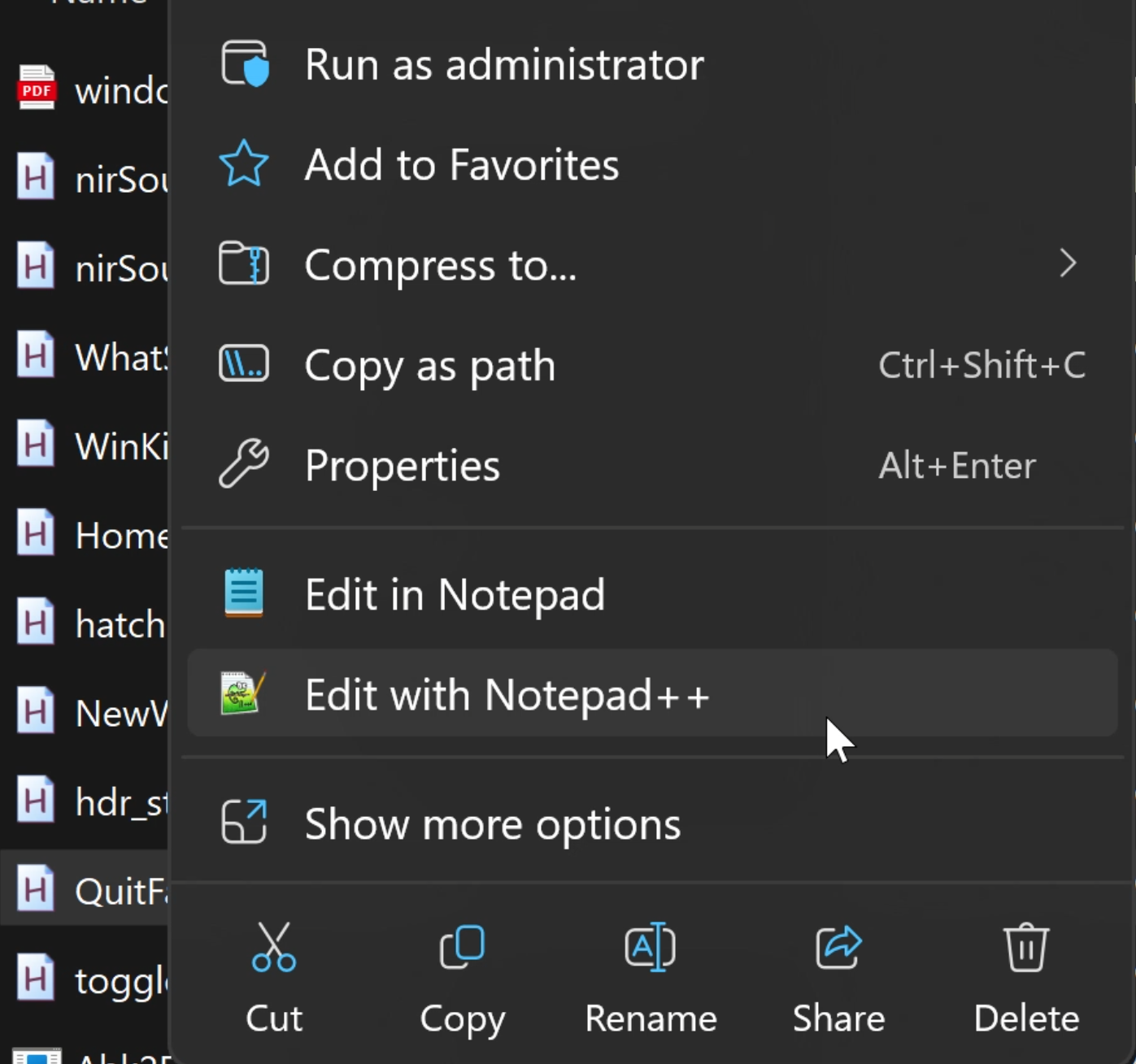
Open with submenu works fine, Edit with Notepad++ (right under Edit in Notepad) does nothing. I’ve seen “known issue” for older versions, not the latest.
If someone has found a workaround for this (other than not using it) I’d appreciate that info or a link to info on this I can track related to the most recent version of Notepad++.
Thank you!!
Screenshot 2024-12-21 075553.png -
You didn’t say which OS, or which precise version of Notepad++ you are using, both of which may be relevant; based on your screenshot, I’m guessing Win11. If it’s an older Notepad++ and Win11, then some older versions had some difficulties with the context menu for a while. (?-menu’s Debug Info would answer both.)
I am also wondering whether it’s the Edit with Notepad++ entry from the Shell Extension, as described in the User Manual, or whether it’s added as a registry entry.
If it’s the Shell Extension, maybe you could try to un-register then re-register the extension, as described further down in the User Manual link above. Or maybe un-register, then re-install Notepad++ (making sure to [install v8.7.1], which is the last confirmed-stable version). You can also
reg query HKLM\SOFTWARE\Classes /s /f NppShell.dll: mine shows the following results:HKEY_LOCAL_MACHINE\SOFTWARE\Classes\CLSID\{B298D29A-A6ED-11DE-BA8C-A68E55D89593}\InProcServer32 (Default) REG_SZ C:\Program Files\Notepad++\contextMenu\NppShell.dll HKEY_LOCAL_MACHINE\SOFTWARE\Classes\PackagedCom\Package\NotepadPlusPlus_1.0.0.0_neutral__7njy0v32s6xk6\Class\{E6950302-61F0-4FEB-97DB-855E30D4A991} DllPath REG_SZ NppShell.dll End of search: 2 match(es) found.If it’s an old-fashioned registry entry (less likely if you’re in Win11), you can run
regedit.exeand search fornotepad++.exe, looking for an entry namedEdit with Notepad++(it may be&Edit with Notepad++orEdit with &Notepad++, which is why I suggested searching for the executable name, which won’t change) – there might be an entry pointing to an old location (maybe theProgram Files (x86)\when your active one is really inProgram Files\) -
You are correct, I left out crucial details. Running Notepad++ v8.7.4 (64 bit) on Windows 11 Pro. I uninstalled that version and installed v8.7.1, same problem.
I got the same results when querying the registry. I tried unregistering and reregistering the dll, no change.
Am I to understand that it works for you?
Searching for Notepad++ I found an odd entry for ANotepad++64 under:
Computer\HKEY_CLASSES_ROOT\*\shell\ANotepad++64
Also (Default) value “Notepad++ Context menu” at:
Computer\HKEY_LOCAL_MACHINE\SOFTWARE\Classes\*\shell\ANotepad++64Is removing the odd A an option? Or is that supposed to be there for that entry.
I found the NppShell.dll as the DllPath at:
Computer\HKEY_CLASSES_ROOT\PackagedCom\Package\NotepadPlusPlus_1.0.0.0_neutral__7njy0v32s6xk6\Class\{E6950302-61F0-4FEB-97DB-855E30D4A991}At one point I found where Notepad and Notepad++ were in that menu and Notepad had an entry that Notepad++ didn’t, but for the life of me I can’t find it again.
Thank you for your time and expertise. If we can find the proper workaround it’ll be very popular.
-–
moderator: added `…` markdown around the registry keys, so that the\*and\{render properly rather than escaping the character; see Formatting Forum Posts to learn how that works -
@Stanseas said in Link to Edit with Notepad++ status/fix please:
Am I to understand that it works for you?
Yes, it works just fine for me.
I was hoping that the registry might show that some entries were pointing at the wrong path (or at least a different path) for notepad++.exe or the DLL, but you didn’t share the actual paths in the registry, just the names of the keys, so I just have to assume you didn’t notice the paths being different from where your actually Notepad++ is located.
The
ANotepad++64is a normal way for it to be named in the registry, though I don’t know why the A prefix was included.I’m not sure what I’d look at next. Maybe someone else will have an idea of how to help you.
-
@PeterJones Yes, the paths were accurate. I have Notepad++ installed on a secondary drive with %APPDATA% path turned off - if you recall that install option. I tried installing on the default drive/path to no avail. I have added the PATH in my Environment settings to the dll’s and app just in case as well.
I wish there was a way to compare registries just for Notepadd++ with you. I’m glad it works for you, hopefully another method will present itself here. Thank you.

Hello! It looks like you're interested in this conversation, but you don't have an account yet.
Getting fed up of having to scroll through the same posts each visit? When you register for an account, you'll always come back to exactly where you were before, and choose to be notified of new replies (either via email, or push notification). You'll also be able to save bookmarks and upvote posts to show your appreciation to other community members.
With your input, this post could be even better 💗
Register Login