Display in NPP

-
@DomOBU Just to add to @PeterJones ’ comments:
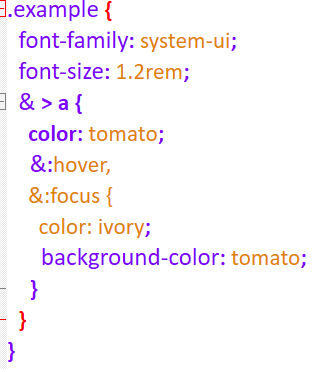
FWIW, the brace-matching issue for this particular example also seems to be linked to the extra space in
&:focus {; if you change it to&:focus{, you get the expected brace matching. Unfortunately, I don’t know enough about CSS programming to know if this is actually feasible syntax. -
Sorry for the misunderstanding (usually in French, … means any text before or after).
I hope this time it’s right
.example { font-family: system-ui; font-size: 1.2rem; & > a { color: tomato; &:hover, &:focus { color: ivory; background-color: tomato; } } } -
@DomOBU yes, that seems to match the content that @PeterJones already posted. Hopefully, our corresponding answers are sufficient.
-
Thank you for your time.
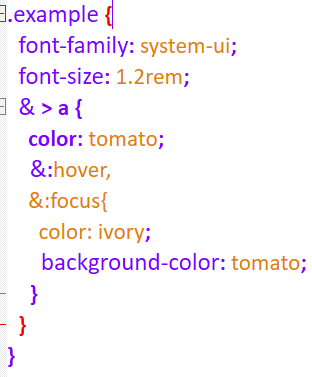
This problem is not fundamental, I will live with it without any problem:
-
@DomOBU I just noticed that, in your latest screenshot, you removed the space that I mentioned, but the brace highlighting is still mismatched. Looking more closely at my setup, I can see that removing (and even re-adding) that space is only a temporary solution to the mismatch issue - it returns as soon as you click on another line. I could have sworn this wasn’t happening before, but evidently not…
Looking more closely at the code structure, it seems that braces cannot be nested within the
& > agroup, at least not in the manner that you’ve done here. Further to my original comment about&:focus {looking like it’s commented out: it looks as though there’s some sort of syntax error on the previous line that’s preventing the nested braces (or, perhaps more accurately, the next&statement) from processing as expected. When you run/use this code, does it actually work as expected? If it does, then this is probably a NP++ bug.FWIW, this vaguely reminds me of a similar issue I encountered in batch scripts, where a closing parenthesis from within an
Echocall was being applied unexpectedly. The difference there was that NP++ was actually matching the parentheses the way I would expect it to - the mismatch wasn’t occurring until the script was actually run. The solution was to escape each)in theEchocall with^. However, if the code here is valid, I don’t think that would help with the NP++ highlighting. -
@DomOBU Did you setup any CSS properties like mentioned at this other topic ?
Just tested this code in PythonScript’s
startup.py:editor.setProperty('lexer.css.less.language', 1) notepad.callback(lambda _: editor.setProperty('lexer.css.less.language', 1), [NOTIFICATION.BUFFERACTIVATED])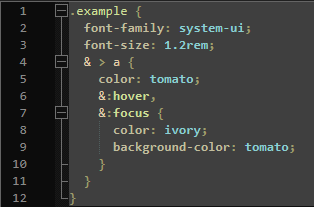
I would not know of side-effects of enabling LESS though it does appear to allow nesting.
-
Thank you very much for your answers.
The source code of the example is from MDN:
“https://developer.mozilla.org/en-US/docs/Web/CSS/Nesting_selector#using_in_nested_css_styles”
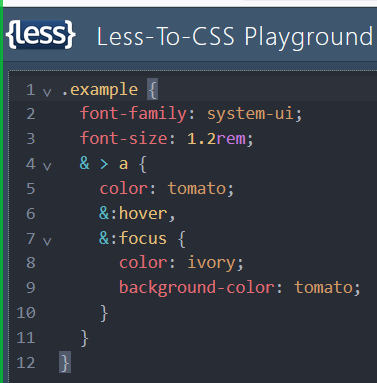
The source code runs correctly with Firefox & Edge.I copied the source code into the web site “https://lesscss.org/” (thanks to @mpheath, I didn’t know about this web site); this is the result:
I copied the source code into the web site “https://phcode.dev/” (my brain is getting old, I hadn’t thought of testing the source code into this web site); this is the result:
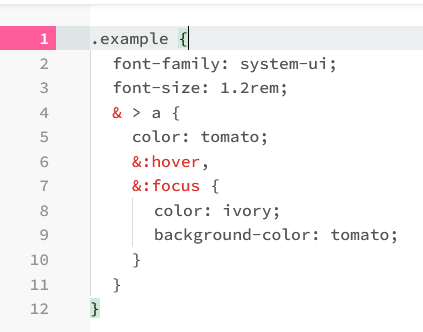
Both results are in line with expectations.
PS: on this forum, it’s a shame that as soon as you question the way NPP works, you’re seen as questioning the quality of NPP. -
@DomOBU said in Display in NPP:
PS: on this forum, it’s a shame that as soon as you question the way NPP works, you’re seen as questioning the quality of NPP.
It’s a shame you think that. I see nothing in this conversation that indicates that people thought you were questioning the quality of NPP.
I thought we were pretty clear: on the CSS & issue, you were completely right, but that nothing can be fixed in Notepad++ until the Lexilla library is fixed (and the Notepad++ developer doesn’t control the Lexilla library); for the brace matching, there does appear to be something weird (probably, again, in Lexilla… though whether it’s part of the same & issue, or whether it’s solely caused by the lexer not handling deep nesting properly is uncertain as of yet); for HTML lone-&, the advice, for your own safety, is to always encode the literal
&character as&in HTML, and if you do, then you won’t notice that Lexilla chooses a strange style for a lonely&. -
@mpheath said in Display in NPP:
Just tested this code in PythonScript’s startup.py:
editor.setProperty(‘lexer.css.less.language’, 1)
notepad.callback(lambda _: editor.setProperty(‘lexer.css.less.language’, 1), [NOTIFICATION.BUFFERACTIVATED])@DomOBU just to clarify this suggestion: if you open the Plugins menu, you will see something like this:
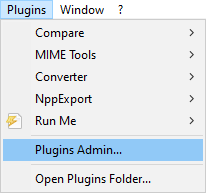
Note that PythonScript is currently not listed there. To install this plugin (or any other for that matter), select Plugins Admin…. This will bring up a window similar to:
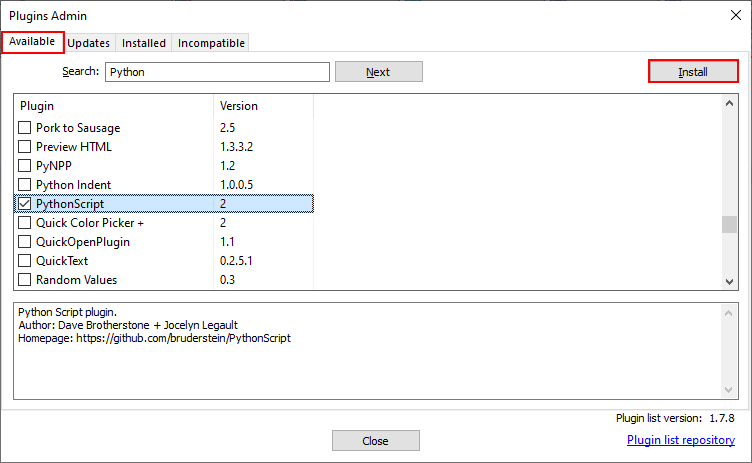
Once you have the desired plugin selected, click Install (top right) and follow the prompts. When finished, PythonScript should appear in the Plugins menu; selecting it should launch something that you can run @mpheath 's code in, which should update your brace matching as desired.
-
The installation of the PythonScript plugin doesn’t work.
I assume that Python needs to be installed on my laptop beforehand. I don’t have that configuration because I don’t use Python.One last question. There are some basic words in CSS: selector, property and value. Why don’t these words appear in the CSS Style Configurator?
-
-
@DomOBU said in Display in NPP:
There are some basic words in CSS: selector, property and value. Why don’t these words appear in the CSS Style Configurator?
This sounds like a question for the developers, but it looks like a few other users have had similar/related issues with CSS syntax highlighting, even when the identifiers are listed. If these threads do not answer your question, feel free to start a new one.
-
@mpheath
Thank you very much, adding these lines to thestartup.pydid indeed solve the problem og not correctly highlighted brackets with modern css selectors!




Hello! It looks like you're interested in this conversation, but you don't have an account yet.
Getting fed up of having to scroll through the same posts each visit? When you register for an account, you'll always come back to exactly where you were before, and choose to be notified of new replies (either via email, or push notification). You'll also be able to save bookmarks and upvote posts to show your appreciation to other community members.
With your input, this post could be even better 💗
Register Login