Notepad++ v8.7.8 released
-
Notepad++ release 8.7.8 is available here:
https://notepad-plus-plus.org/news/v878-we-are-with-ukraine/Notepad++ release 8.7.8 change log:
- Fix regression (v8.7.1 - v8.7.7) of saving backup file without modifications. (Fix #16186)
- Fix syntax highlighting regression while switching among UDL files. (Fix #16154)
- Add ability to hide selected toolbar buttons via a XML configuration.(Fix #15106, #15440, #16000)
- Optimize switching programming language performance for large files. (Fix #16106)
- Improve folding/unfolding performance for large files. (Fix #16064)
- Fix SQL Backslash Preference state regression (from v8.7). (Fix #16249)
- Fix count operation on regex causing Notepad++ to hang. (Fix #16207)
- Fix FunctionList not refreshing with current document lexer changes. (Fix #16221)
- Improve Style Configurator GUI organization. (Fix #15939)
- Adds SAS programming language support. (Fix #16148)
- Make existing DirectWrite rendering modes accessible. (Fix #16126)
- Allow DirectWrite use on non-Core Windows Server. (Fix #15916)
- Use VTS instead of LTS for specific control code abbreviation. (Fix #16107)
- Fix installer silent mode doLocalConf.xml setting handling issue. (Fix #16233)
As usual, auto-update for this version will be triggered in about 1 week, if no critical issue found.
-
Possible error in “hide selected toolbar buttons”
I think this new functionality does not work correctly. If I set <Standard hideAll=“yes”> in the example config file, all buttons of plugins are always displayed, independent of the different setting.
I observed this behaviour with the following configuration and the provided file toolbarButtonsConf_example.xml
Notepad++ v8.7.8 (32-bit)
Build time : Mar 7 2025 - 20:37:43
Path : C:\Users\CurrUser\Documents\temp\npp.8.7.8.portable\notepad++.exe
Command Line :
Admin mode : OFF
Local Conf mode : ON
Cloud Config : OFF
Periodic Backup : ON
Placeholders : OFF
Scintilla Rendering Mode : SC_TECHNOLOGY_DIRECTWRITE (1)
Multi-instance Mode : monoInst
File Status Auto-Detection : cdEnabledNew (for current file/tab only)
Dark Mode : OFF
OS Name : Windows 11 Enterprise (64-bit)
OS Version : 24H2
OS Build : 26100.3476
Current ANSI codepage : 1252
Plugins :
ComparePlugin (2.0.2)
mimeTools (3.1)
NppConverter (4.6)
NppExport (0.4) -
@sevem47 said in Notepad++ v8.7.8 released:
I think this new functionality does not work correctly
hideAll="yes"works for me:
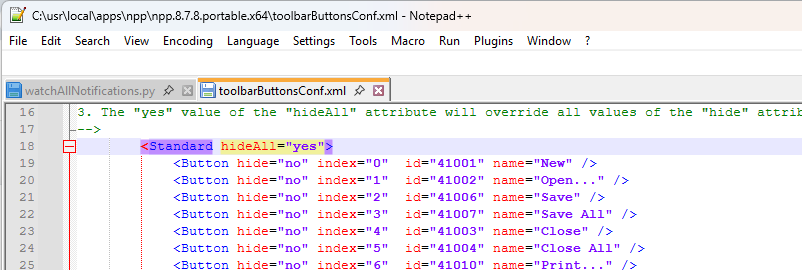
And here’s an example with
hideAll="no", but three of the first group of seven buttons, the three buttons are individually hidden, so only four appear:

Notepad++ v8.7.8   (64-bit)
Build time : Mar  7 2025 - 20:39:25
Path : C:\usr\local\apps\npp\npp.8.7.8.portable.x64\notepad++.exe
Command Line :
Admin mode : OFF
Local Conf mode : ON
Cloud Config : OFF
Periodic Backup : ON
Placeholders : OFF
Scintilla Rendering Mode : SC_TECHNOLOGY_DIRECTWRITEDC (3)
Multi-instance Mode : monoInst
File Status Auto-Detection : cdEnabledNew (for current file/tab only)
Dark Mode : OFF
OS Name : Windows 11 Home (64-bit)
OS Version : 24H2
OS Build : 26100.3476
Current ANSI codepage : 1252
Plugins :
    mimeTools (3.1)
    NppConverter (4.6)
    NppExport (0.4)
    PythonScript (2.1)
it behaves exactly as I’d expect.
Things you should check:
-
The example file is called
toolbarButtonsConf_example.xml, but you have to copy that totoolbarButtonsConf.xmlfor Notepad++ to see it; editing the _example will not make changes to Notepad++'s toolbar buttons -
You have a portable Notepad++, so
toolbarButtonsConf.xmlneeds to be in the same directory asnotepad++.exe(ie,C:\Users\CurrUser\Documents\temp\npp.8.7.8.portable\toolbarButtonsConf.xml) -
Notepad++ only reads
toolbarButtonsConf.xmlwhen it first starts: if you edittoolbarButtonsConf.xmlin Notepad++ itself, then you have to save it, exit Notepad++, and re-run the application.
Useful Reference:
-
-
@PeterJones
The part you describe, works well for me. It is about the buttons of plugins. These are always shown, when <Standard hideAll=“yes”>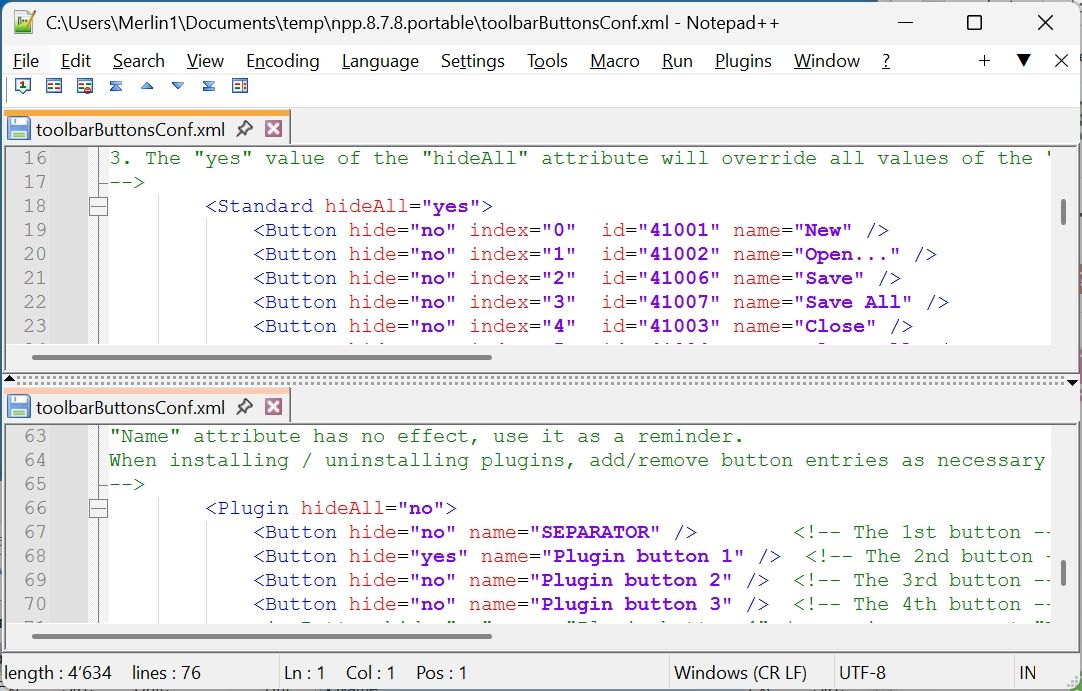
Even if I set <Plugin hideAll=“yes”> all of the buttons of the plugin are still visible.
-
@sevem47 said in Notepad++ v8.7.8 released:
plugins. These are always shown, when <Standard hideAll=“yes”>
Okay, it took me a while to figure out what you meant: if you have ComparePlugin v2.0.2 installed, and have both
<Standard hideAll="yes">and<Plugin hideAll="yes">, then it still shows the plugin buttons. I can confirm that.When I have
<Standard hideAll="no">and<Plugin hideAll="yes">, then I get what I expect, where it shows the standard buttons but not the plugin buttons.And if I have
<Standard hideAll="yes">and<Plugin hideAll="no">, then I get what I expect, where it shows the plugin buttons but not the standard buttons.(And obviously, if I have both at no, I see all the buttons)
@donho, it looks like the new feature has a bug when both
<Standard hideAll="yes">and<Plugin hideAll="yes">
But @sevem47 , I have a question: what are you trying to accomplish by hiding all the buttons of both standard and plugin? If you don’t want any buttons, then just turn off the toolbar with Settings > Preferences > Toolbar > Hide: that way, you don’t have the wasted screen space of an empty button bar.
-
Further, if I have both at “no”, but the first few individual plugin buttons hidden (so with ComparePlugin, hiding the FIRST, COMPARE, and CLEAR COMPARE buttons), it works as expected:
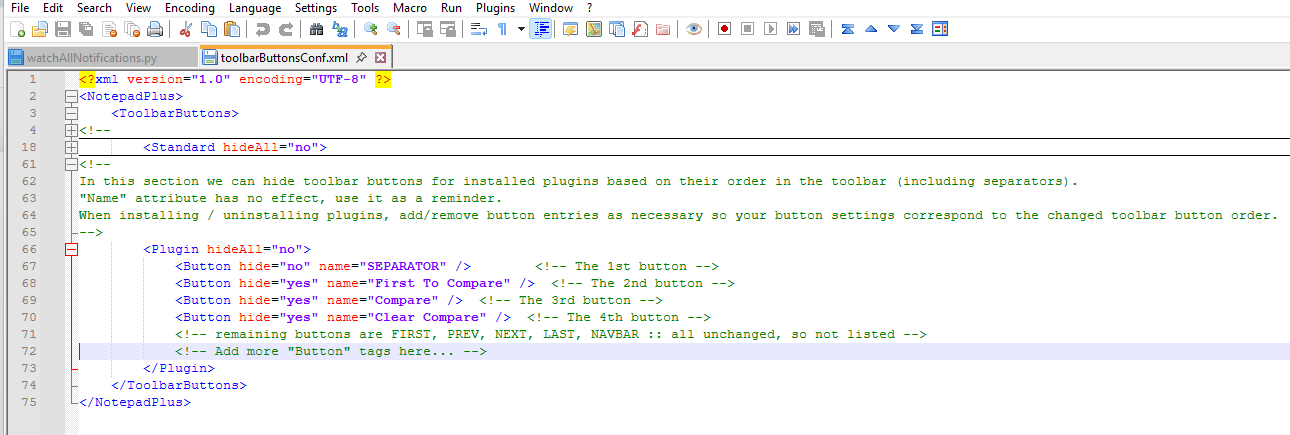
… but if I hide ALL the standard, and just those specific for the plugin, it still shows all the plugin buttons:
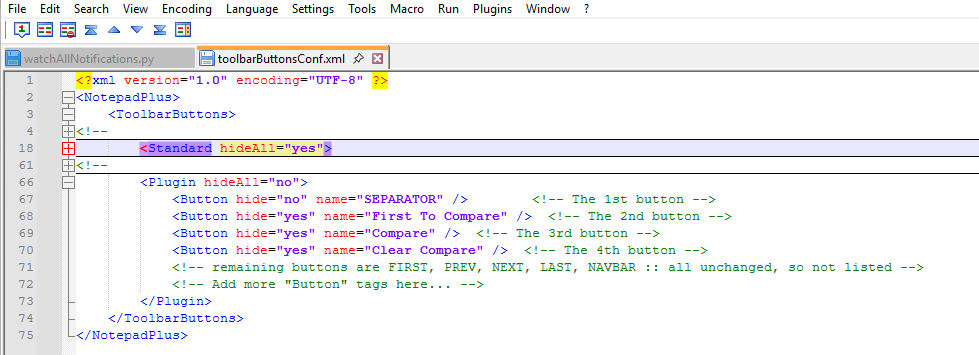
In other words, if standard is set to hide all, it completely ignores the hiding settings for plugin buttons, as far as I can tell.
Would you like an Issue created for this bug in toolbarButtonsConf handling?=> created issue #16280 -
@PeterJones
I don’t want to hide all buttons. Since I have several plugins installed, I wanted to selectively select, which buttons to show. Therefore I first wanted to hide all standard buttons to have a better overview. But with all standard-buttons hidden any change in the plugin-section has no effect to the display. Even when hiding some of the plugin-buttons, they are still visible.When standard ist set to hideAll, nothing can be hidden in the plugin-section.
-
@sevem47 ,
Sorry, as you can see, I figured that out after I asked you the question.
If I set
<Standard hideAll="no">, but then manually set<Button hide="yes"for all the standard buttons, and then set hide=yesfor particular buttons, I can get it to hide all of the standard buttons and select of the plugin buttons. You can use that to implement what you want.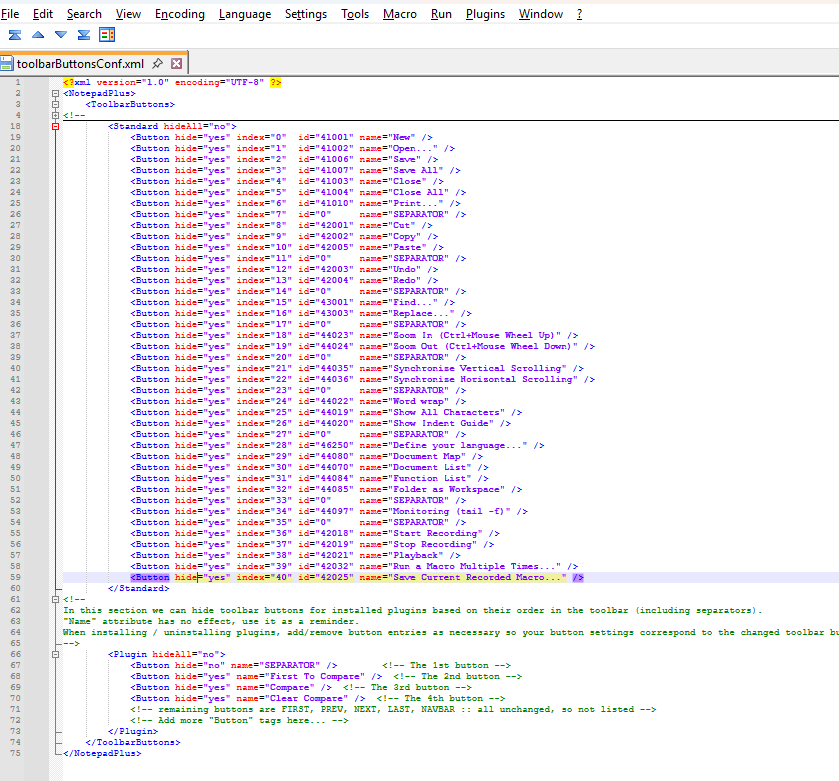
So @donho, the
<Plugin ...>section bug only shows up if<Standard hideAll="yes">; if you manually hide each individual Standard button, the<Plugin ...>section settings work correctly. Hopefully, that will help find the logic bug. -
The unrelated post has been moved to 22917 of Boycott Notepad++.
-
D donho unpinned this topic on


Hello! It looks like you're interested in this conversation, but you don't have an account yet.
Getting fed up of having to scroll through the same posts each visit? When you register for an account, you'll always come back to exactly where you were before, and choose to be notified of new replies (either via email, or push notification). You'll also be able to save bookmarks and upvote posts to show your appreciation to other community members.
With your input, this post could be even better 💗
Register Login