Blue icons
-
Hello Notepad++ Community,
I once had a Notepad++ where the save button and the save all files button were blue. I don’t remember how I got it to work.
Can you please tell me how to make at least these buttons blue?
And I use a translation program.
And I have Windows on two computers (one with 10 and the other with 11, both 64-bit), and I’m connected to my computer as the administrator (to change something in the registry), and you’re welcome to respond with screenshots.
Thank you in advance for your reply. -
@TG-King ,
Can you please tell me how to make at least these buttons blue?
I assume mean the icons like these:
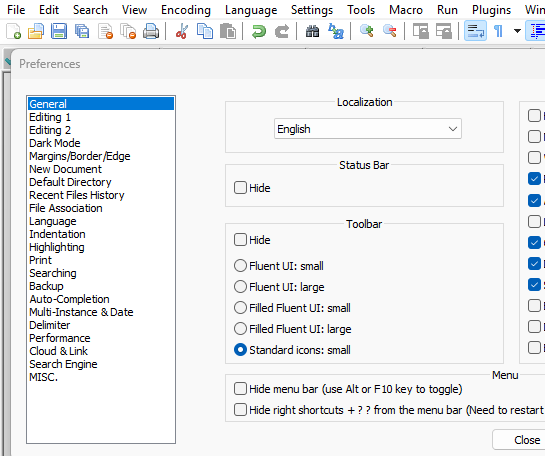
You get that by doing to Settings > Preferences > General and selcting Toolbar =
Standard icons: small -
@PeterJones said in Blue icons:
@TG-King ,
Can you please tell me how to make at least these buttons blue?
I assume mean the icons like these:
You get that by doing to Settings > Preferences > General and selcting Toolbar =
Standard icons: smallHi, no that’s not what I mean, I had it set as the part of the screenshot shows, but the icons were blue, and I think they were round.
-
Did you install a plugin? Look under the Plugins Menu item, then Plugins Admin and look for the Customise Toolbar plugin.
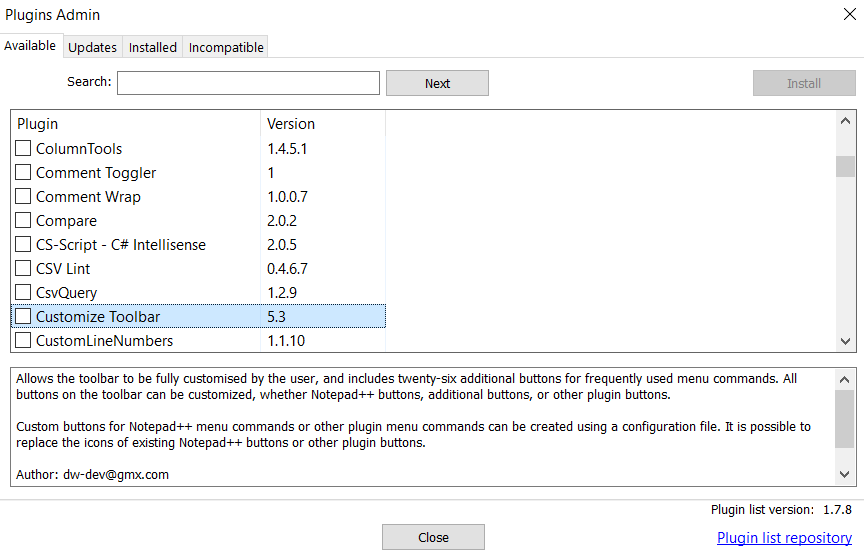
Maybe that’s what allowed you to customise the toolbar.
Terry
-
@TG-King said in Blue icons:
but the icons were blue, and I think they were round.
Sounds like you used a set of custom icons, as per the User Manual > Config Files > Toolbar Icon Customization
That section has a link to a zip file with various icon sets, so maybe you used one of those; or maybe you found icons elsewhere, but we cannot tell you where you found them.


Hello! It looks like you're interested in this conversation, but you don't have an account yet.
Getting fed up of having to scroll through the same posts each visit? When you register for an account, you'll always come back to exactly where you were before, and choose to be notified of new replies (either via email, or push notification). You'll also be able to save bookmarks and upvote posts to show your appreciation to other community members.
With your input, this post could be even better 💗
Register Login